
Asus
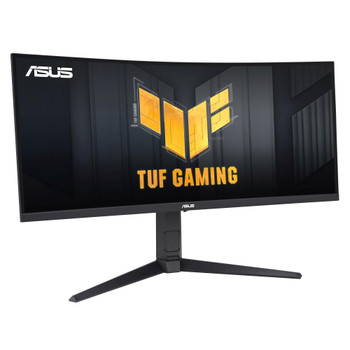
ASUS TUF Gaming VG34VQL3A computer monitor 86.4 cm 34 3440 x 1440 pixels UltraWi VG34VQL3A
(No reviews yet)
Write a Review

- UPC:
- 4711387184592
- MPN:
- VG34VQL3A
- Condition:
- New
- Availability:
- Available with FREE Delivery (usually delivered within 5-7 working days)

Description
TUF Gaming VG34VQL3A is a 34-inch Ultra Wide QHD (3440 x 1440) 1500R curved gaming monitor with an 180 Hz refresh rate and 1 ms GTG response time for extremely immersive gameplay. ASUS Extreme Low Motion Blur and AMD FreeSync- Premium Pro enables buttery-smooth gaming. In addition, it also features DisplayHDR 400 technology, supporting the HDR10 format and covering 125% sRGB color gamut for great contrast and lifelike colors.
GAMING KEY SPEC 0HZ REFRESH RATE AND 1MS (GTG) RESPONSE TIME
TUF Gaming VG34VQL3A delivers stunning visuals from all angles with an 1500R curvature that ensures every point is equidistant to your eyes. With 180Hz refresh rate decimates lag and motion blur to give you the upper hand in first person shooters, racers, real-time strategy, and sports titles. This ultrafast refresh rate lets you play at the highest visual settings and lets you react instantly to what's onscreen - so you'll get that first strike in.
GAMING KEY SPEC
ADAPTIVE-SYNC
AMD FreeSync Premium Pro technology supported through DP and HDMI ports providing variable refresh rates for low latency, stuttering-free and tearing-free while gaming.
COLOR PERFORMANCE
HIGH DYNAMIC RANGE
TUF Gaming VG34VQL3A takes advantage of HDR technology to deliver more vivid colors and higher contrast levels compared to traditional monitors.
EXCLUSIVE GAMING FEATURE
EXTREME LOW MOTION BLUR (ELMB)
ASUS Extreme Low Motion Blur (ELMB) technology provides a 1 ms MPRT response time to eliminate smearing and motion blur. It makes moving objects appear even sharper, so gameplay is more fluid and responsive.
*Ideal for Fast-paced games , works better over 85Hz.
EXCLUSIVE GAMING FEATURE
VARIABLE OVERDRIVE
Integrated ASUS Variable Overdrive technology allows the display to dynamically alter its overdrive setting as frame rates fluctuate, ensuring optimal results for any game. You choose how strong you want the overall effect to be, then let the monitor take it from there.
IN-GAME ENHANCEMENTS
INTUITIVE CONTROLS
DisplayWidget Center software upgraded the user interface so that users can easily change monitor settings via a mouse ? so there-s no need to access the OSD menu.
SHADOW BOOST
ASUS Shadow Boost technology clarifies dark areas of the game without overexposing brighter areas, improving overall viewing while also making it easier to spot enemies hidden in dark areas of the map.
GAMEPLUS
The ASUS-exclusive, integrated GamePlus hotkey offers in-game enhancements that help you get more out of your game. This function is co-developed with input from pro gamers, allowing them to practice and improve their gaming skills.
GAMEVISUAL
ASUS GameVisual Technology has seven pre-set display modes to optimize visuals for different types of content. This unique feature can be easily accessed through a hotkey or the on-screen display settings menu.
FLICKER-FREE TECHNOLOGY
Flicker-Free technology reduces flicker to minimize eyestrain for improved comfort when you're embroiled in long gaming sessions.
LOW BLUE LIGHT
ASUS Low Blue Light technology reduces the amount of potentially harmful blue light emitted by the display. Four different filter settings are available to control the amount of blue light reduction.
ENGINEERING
EXTENSIVE CONNECTIVITY
A multitude of connectivity options, including two HDMI 2.0, plus DisplayPort- 1.4, USB HUB ensures wide compatibility with a variety of input sources.
ERGONOMIC DESIGN
With an ergonomically-designed stand, it provides tilt, swivel and height adjustments so you can easily find your ideal viewing position. The display is also VESA-compatible for wall mounting.
Specs
Display
Display diagonal
Size of the display for this product, measured diagonally, usually in inches.
86.4 cm (34")
Display resolution
The number of distinct pixels in each dimension that can be displayed. It is usually quoted as width - height, with the units in pixels: for example, "1024 - 768" means the width is 1024 pixels and the height is 768 pixels. The higher the number of pixels, the sharper the image.
3440 x 1440 pixels
HD type
Type of supported High Definition (e.g. Full HD, 4K Ultra HD).
UltraWide Quad HD
Native aspect ratio
The aspect ratio is the ratio of the width of an image to its height. The native aspect ratio is the one which the projector/display is particularly designed for. Images shown in native aspect ratio will utilize the entire resolution of the display and achieve maximum brightness. Images shown in other than native aspect ratio will always have less resolution and less brightness than images shown in native aspect ratio.
21:9
Display technology
The technology used in the display e.g. plasma, LED.
LCD
Panel type
VA
Touchscreen
A screen of a laptop, smartphone, etc., that responds to touch so you can control the interface using your fingers.
Display brightness (peak)
400 cd/m-
Display brightness (typical)
Display brightness, measured by its Luminance, presented as a figure in nits. Typical brightness ratings for monitors range from 250 to 350 nits with a target value of between 80 to 120 nits being suitable for most displays in a normal viewing environment.
400 cd/m-
Response time
The response time is the time difference between the moment that a source (for example a video card) sends a signal and that equipment (for example a monitor) receives or display the signal. (Used abbreviations: R/F = Rise and Fall.)
1 ms
Anti-glare screen
Always gives an optimal view, even in direct sunlight.
Screen shape
Curved
Screen curvature rating
00R
Contrast ratio (typical)
The difference in light intensity between the brightest white and the darkest black.
4000:1
Maximum refresh rate
0 Hz
Viewing angle, horizontal
Maximum horizontal angle at which a display can be viewed with acceptable visual performance.
8-
Viewing angle, vertical
Maximum vertical angle at which a display can be viewed with acceptable visual performance.
8-
Display number of colours
.7 million colours
Pixel pitch
This is the parameter of a picture tube, which specifies the shortest distance between two dots of the same colour. The principle is: the smaller the dot pitch, the better sharpness of image.
0.232 x 0.232 mm
Viewable size, horizontal
The viewable size is often somewhat smaller than the actual size of a monitor, because there is a border around the image.
79.7 cm
Viewable size, vertical
33.4 cm
Digital horizontal frequency
267 - 267 kHz
Digital vertical frequency
48 - 180 Hz
High Dynamic Range (HDR) supported
High Dynamic Range (HDR) technology
High Dynamic Range 10 (HDR10)
Performance
NVIDIA G-SYNC
AMD FreeSync
The product includes AMD Freesync Technology for the dynamic synchronization of the graphic card and the monitor in order to avoid screen tearing.
AMD FreeSync type
FreeSync Premium Pro
Flicker-free technology
Low Blue Light technology
Game mode
Multimedia
RMS rated power
RMS (Root mean square) is a measure of the continuous power required by a device, in particular audio amplifiers and loudspeakers.
4 W
Built-in speaker(s)
The device contains speaker(s) to produce sound.
Built-in camera
The product has an integrated camera.
Design
Market positioning
Under which category can the device be positioned in the market, e.g. camera phone.
Gaming
Product colour
The colour e.g. red, blue, green, black, white.
Black
Detachable stand
Ports & interfaces
Built-in USB hub
Whether or not the device features a USB hub to connect more than one other device via USB.
USB hub version
3.2 Gen 2 (3.1 Gen 2)
USB Type-A downstream ports quantity
3
HDMI
HDMI (High-Definition Multimedia Interface) is a compact audio/video interface for transferring uncompressed video data and compressed/uncompressed digital audio data from a HDMI-compliant device ("the source device") to a compatible computer monitor, video projector, digital television, or digital audio device. HDMI is a digital replacement for existing analog video standards.
HDMI ports quantity
The number of sockets (ports) for HDMI connections. HDMI (High-Definition Multimedia Interface) is a compact audio/video interface for transferring uncompressed video data and compressed/uncompressed digital audio data from a HDMI-compliant device ("the source device") to a compatible computer monitor, video projector, digital television, or digital audio device. HDMI is a digital replacement for existing analog video standards.
2
HDMI version
2.0
DisplayPorts quantity
Number of DisplayPorts. A DisplayPort is a digital display interface developed by the Video Electronics Standards Association (VESA). The interface is primarily used to connect a video source to a display device such as a computer monitor, though it can also be used to carry audio, USB, and other forms of data.
2
DisplayPort version
1.4
Headphone out
The socket for connecting headphones to the device.
Ports & interfaces
HDCP
High-bandwidth Digital Content Protection (HDCP) is a form of digital copy protection to prevent copying of digital audio and video content as it travels across connections.
HDCP version
2.2
AC (power) in
Ergonomics
VESA mounting
Panel mounting interface
The product can be used wih VESA mounting interfaces.
0 x 100 mm
Cable lock slot
Holes on the edge of devices through which a cable lock can be passed, so the device can be locked to a desk etc.
Cable lock slot type
Kensington
Height adjustment
The part of the device that can be adjusted to change the height.
Adjustable height (max)
cm
Swivelling
Swivel angle range
-10 - 10-
Tilt adjustment
The tilt, which means the angle at which the device is pointing (up or down), can be changed.
Tilt angle range
-5 - 20-
Power
Energy efficiency class (SDR)
F
Energy efficiency class (HDR)
G
Energy consumption (SDR) per 1000 hours
28 kWh
Energy consumption (HDR) per 1000 hours
42 kWh
Power consumption (typical)
Amount of power consumed by this model, often expressed in watts (W). Typical values that manufacturers give are power consumption when off, standby/suspended mode, typical use, maximum usage.
27 W
Power consumption (off)
0.3 W
Power consumption (PowerSave)
0.5 W
AC input voltage
The voltage of the AC electricity that is inputted into the product.
0 - 240 V
AC input frequency
50/60 Hz
Energy efficiency scale
A to G
Weight & dimensions
Width (with stand)
808 mm
Depth (with stand)
250 mm
Height (with stand)
541 mm
Weight (with stand)
8.1 kg
Width (without stand)
808 mm
Depth (without stand)
1 mm
Height (without stand)
364 mm
Weight (without stand)
5.8 kg
Packaging data
Package width
The distance from one side of the packaging to the other.
915 mm
Package depth
The distance from the front to the back of the packaging.
280 mm
Package height
The distance from the top to the bottom of the packaging.
495 mm
Package weight
Weight of the packaged product.
.3 kg
Package type
The type of product package e.g. box.
Box
Packaging content
Stand included
Cables included
AC, DisplayPort, HDMI, USB Type-A to USB Type-B
Quick start guide
Instructions, either online, as a computer program or in paper form, to allow you to set up and start using the product quickly.
Other features
Country of origin
Country where the device is made. Aka Country of manufacture (COM).
China
Shadow control
Motion blur reduction
Certification
T-V Flicker-free T-V Low Blue Light VESA DisplayHDR 400
AMD FreeSync Premium Pro
Logistics data
Commodity Classification Automated Tracking System (CCATS)
8528521000
View AllClose
GAMING KEY SPEC 0HZ REFRESH RATE AND 1MS (GTG) RESPONSE TIME
TUF Gaming VG34VQL3A delivers stunning visuals from all angles with an 1500R curvature that ensures every point is equidistant to your eyes. With 180Hz refresh rate decimates lag and motion blur to give you the upper hand in first person shooters, racers, real-time strategy, and sports titles. This ultrafast refresh rate lets you play at the highest visual settings and lets you react instantly to what's onscreen - so you'll get that first strike in.
GAMING KEY SPEC
ADAPTIVE-SYNC
AMD FreeSync Premium Pro technology supported through DP and HDMI ports providing variable refresh rates for low latency, stuttering-free and tearing-free while gaming.
COLOR PERFORMANCE
HIGH DYNAMIC RANGE
TUF Gaming VG34VQL3A takes advantage of HDR technology to deliver more vivid colors and higher contrast levels compared to traditional monitors.
EXCLUSIVE GAMING FEATURE
EXTREME LOW MOTION BLUR (ELMB)
ASUS Extreme Low Motion Blur (ELMB) technology provides a 1 ms MPRT response time to eliminate smearing and motion blur. It makes moving objects appear even sharper, so gameplay is more fluid and responsive.
*Ideal for Fast-paced games , works better over 85Hz.
EXCLUSIVE GAMING FEATURE
VARIABLE OVERDRIVE
Integrated ASUS Variable Overdrive technology allows the display to dynamically alter its overdrive setting as frame rates fluctuate, ensuring optimal results for any game. You choose how strong you want the overall effect to be, then let the monitor take it from there.
IN-GAME ENHANCEMENTS
INTUITIVE CONTROLS
DisplayWidget Center software upgraded the user interface so that users can easily change monitor settings via a mouse ? so there-s no need to access the OSD menu.
SHADOW BOOST
ASUS Shadow Boost technology clarifies dark areas of the game without overexposing brighter areas, improving overall viewing while also making it easier to spot enemies hidden in dark areas of the map.
GAMEPLUS
The ASUS-exclusive, integrated GamePlus hotkey offers in-game enhancements that help you get more out of your game. This function is co-developed with input from pro gamers, allowing them to practice and improve their gaming skills.
GAMEVISUAL
ASUS GameVisual Technology has seven pre-set display modes to optimize visuals for different types of content. This unique feature can be easily accessed through a hotkey or the on-screen display settings menu.
FLICKER-FREE TECHNOLOGY
Flicker-Free technology reduces flicker to minimize eyestrain for improved comfort when you're embroiled in long gaming sessions.
LOW BLUE LIGHT
ASUS Low Blue Light technology reduces the amount of potentially harmful blue light emitted by the display. Four different filter settings are available to control the amount of blue light reduction.
ENGINEERING
EXTENSIVE CONNECTIVITY
A multitude of connectivity options, including two HDMI 2.0, plus DisplayPort- 1.4, USB HUB ensures wide compatibility with a variety of input sources.
ERGONOMIC DESIGN
With an ergonomically-designed stand, it provides tilt, swivel and height adjustments so you can easily find your ideal viewing position. The display is also VESA-compatible for wall mounting.
Specs
Display
Display diagonal
Size of the display for this product, measured diagonally, usually in inches.
86.4 cm (34")
Display resolution
The number of distinct pixels in each dimension that can be displayed. It is usually quoted as width - height, with the units in pixels: for example, "1024 - 768" means the width is 1024 pixels and the height is 768 pixels. The higher the number of pixels, the sharper the image.
3440 x 1440 pixels
HD type
Type of supported High Definition (e.g. Full HD, 4K Ultra HD).
UltraWide Quad HD
Native aspect ratio
The aspect ratio is the ratio of the width of an image to its height. The native aspect ratio is the one which the projector/display is particularly designed for. Images shown in native aspect ratio will utilize the entire resolution of the display and achieve maximum brightness. Images shown in other than native aspect ratio will always have less resolution and less brightness than images shown in native aspect ratio.
21:9
Display technology
The technology used in the display e.g. plasma, LED.
LCD
Panel type
VA
Touchscreen
A screen of a laptop, smartphone, etc., that responds to touch so you can control the interface using your fingers.
Display brightness (peak)
400 cd/m-
Display brightness (typical)
Display brightness, measured by its Luminance, presented as a figure in nits. Typical brightness ratings for monitors range from 250 to 350 nits with a target value of between 80 to 120 nits being suitable for most displays in a normal viewing environment.
400 cd/m-
Response time
The response time is the time difference between the moment that a source (for example a video card) sends a signal and that equipment (for example a monitor) receives or display the signal. (Used abbreviations: R/F = Rise and Fall.)
1 ms
Anti-glare screen
Always gives an optimal view, even in direct sunlight.
Screen shape
Curved
Screen curvature rating
00R
Contrast ratio (typical)
The difference in light intensity between the brightest white and the darkest black.
4000:1
Maximum refresh rate
0 Hz
Viewing angle, horizontal
Maximum horizontal angle at which a display can be viewed with acceptable visual performance.
8-
Viewing angle, vertical
Maximum vertical angle at which a display can be viewed with acceptable visual performance.
8-
Display number of colours
.7 million colours
Pixel pitch
This is the parameter of a picture tube, which specifies the shortest distance between two dots of the same colour. The principle is: the smaller the dot pitch, the better sharpness of image.
0.232 x 0.232 mm
Viewable size, horizontal
The viewable size is often somewhat smaller than the actual size of a monitor, because there is a border around the image.
79.7 cm
Viewable size, vertical
33.4 cm
Digital horizontal frequency
267 - 267 kHz
Digital vertical frequency
48 - 180 Hz
High Dynamic Range (HDR) supported
High Dynamic Range (HDR) technology
High Dynamic Range 10 (HDR10)
Performance
NVIDIA G-SYNC
AMD FreeSync
The product includes AMD Freesync Technology for the dynamic synchronization of the graphic card and the monitor in order to avoid screen tearing.
AMD FreeSync type
FreeSync Premium Pro
Flicker-free technology
Low Blue Light technology
Game mode
Multimedia
RMS rated power
RMS (Root mean square) is a measure of the continuous power required by a device, in particular audio amplifiers and loudspeakers.
4 W
Built-in speaker(s)
The device contains speaker(s) to produce sound.
Built-in camera
The product has an integrated camera.
Design
Market positioning
Under which category can the device be positioned in the market, e.g. camera phone.
Gaming
Product colour
The colour e.g. red, blue, green, black, white.
Black
Detachable stand
Ports & interfaces
Built-in USB hub
Whether or not the device features a USB hub to connect more than one other device via USB.
USB hub version
3.2 Gen 2 (3.1 Gen 2)
USB Type-A downstream ports quantity
3
HDMI
HDMI (High-Definition Multimedia Interface) is a compact audio/video interface for transferring uncompressed video data and compressed/uncompressed digital audio data from a HDMI-compliant device ("the source device") to a compatible computer monitor, video projector, digital television, or digital audio device. HDMI is a digital replacement for existing analog video standards.
HDMI ports quantity
The number of sockets (ports) for HDMI connections. HDMI (High-Definition Multimedia Interface) is a compact audio/video interface for transferring uncompressed video data and compressed/uncompressed digital audio data from a HDMI-compliant device ("the source device") to a compatible computer monitor, video projector, digital television, or digital audio device. HDMI is a digital replacement for existing analog video standards.
2
HDMI version
2.0
DisplayPorts quantity
Number of DisplayPorts. A DisplayPort is a digital display interface developed by the Video Electronics Standards Association (VESA). The interface is primarily used to connect a video source to a display device such as a computer monitor, though it can also be used to carry audio, USB, and other forms of data.
2
DisplayPort version
1.4
Headphone out
The socket for connecting headphones to the device.
Ports & interfaces
HDCP
High-bandwidth Digital Content Protection (HDCP) is a form of digital copy protection to prevent copying of digital audio and video content as it travels across connections.
HDCP version
2.2
AC (power) in
Ergonomics
VESA mounting
Panel mounting interface
The product can be used wih VESA mounting interfaces.
0 x 100 mm
Cable lock slot
Holes on the edge of devices through which a cable lock can be passed, so the device can be locked to a desk etc.
Cable lock slot type
Kensington
Height adjustment
The part of the device that can be adjusted to change the height.
Adjustable height (max)
cm
Swivelling
Swivel angle range
-10 - 10-
Tilt adjustment
The tilt, which means the angle at which the device is pointing (up or down), can be changed.
Tilt angle range
-5 - 20-
Power
Energy efficiency class (SDR)
F
Energy efficiency class (HDR)
G
Energy consumption (SDR) per 1000 hours
28 kWh
Energy consumption (HDR) per 1000 hours
42 kWh
Power consumption (typical)
Amount of power consumed by this model, often expressed in watts (W). Typical values that manufacturers give are power consumption when off, standby/suspended mode, typical use, maximum usage.
27 W
Power consumption (off)
0.3 W
Power consumption (PowerSave)
0.5 W
AC input voltage
The voltage of the AC electricity that is inputted into the product.
0 - 240 V
AC input frequency
50/60 Hz
Energy efficiency scale
A to G
Weight & dimensions
Width (with stand)
808 mm
Depth (with stand)
250 mm
Height (with stand)
541 mm
Weight (with stand)
8.1 kg
Width (without stand)
808 mm
Depth (without stand)
1 mm
Height (without stand)
364 mm
Weight (without stand)
5.8 kg
Packaging data
Package width
The distance from one side of the packaging to the other.
915 mm
Package depth
The distance from the front to the back of the packaging.
280 mm
Package height
The distance from the top to the bottom of the packaging.
495 mm
Package weight
Weight of the packaged product.
.3 kg
Package type
The type of product package e.g. box.
Box
Packaging content
Stand included
Cables included
AC, DisplayPort, HDMI, USB Type-A to USB Type-B
Quick start guide
Instructions, either online, as a computer program or in paper form, to allow you to set up and start using the product quickly.
Other features
Country of origin
Country where the device is made. Aka Country of manufacture (COM).
China
Shadow control
Motion blur reduction
Certification
T-V Flicker-free T-V Low Blue Light VESA DisplayHDR 400
AMD FreeSync Premium Pro
Logistics data
Commodity Classification Automated Tracking System (CCATS)
8528521000
Additional Information
Shipping: |
Usually shipped within 3-5 working days |
Delivery: |
Usually delivered within 5-7 working days |
Related Products
Related Products


Asus VG34VQL3A VG34VQL3A Computer Monitor VG34VQL3A
Asus
£400.87
TUF Gaming VG34VQL3A is a 34-inch Ultra Wide QHD (3440 x 1440) 1500R curved gaming monitor with an 180 Hz refresh rate and 1 ms GTG response time for extremely immersive gameplay. ASUS Extreme Low...
Out of stock
Asus Tuf Gaming VG34VQL3A 34" Widescreen Va Led Black Multimedia Curved Monitor VG34VQL3A
Asus
£419.69
Product Group: Monitors Manufacturer: ASUS SKU: 3922 Product Specifications Product Name: ASUS TUF Gaming VG34VQL3A 34" Widescreen VA LED Black Multimedia Curved...
Out of stock

ASUS TUF Gaming VG34VQEL1A 86.4 cm 34 3440 x 1440 pixels LED Black" VG34VQEL1A
Asus
£356.22
TUF Gaming VG34VQEL1A is a 34-inch Ultra Wide QHD (3440 x 1440) 1500R curved gaming monitor with an 100 Hz refresh rate and 1 ms (MPRT) response time for extremely immersive gameplay. It features...

Samsung LS34C652VAU computer monitor 86.4 cm 34 3440 x 1440 pixels" LS34C652VAUXXU
Samsung
£462.49
Ultra Wide immersion Ultra-WQHD in 1000R curvature Immerse yourself in games, movies or design projects. A 34" 1000R curved display surrounds you with a 21:9 aspect ratio. The curve closely matches...

Samsung ViewFinity LS34C652UAUXEN computer monitor 86.4 cm 34 3440 x 1440 pixels LS34C652UAUXXU
Samsung
£420.37
Specs Display Display diagonal Size of the display for this product, measured diagonally, usually in inches. 86.4 cm (34") Display resolution The number of distinct...