
Asus
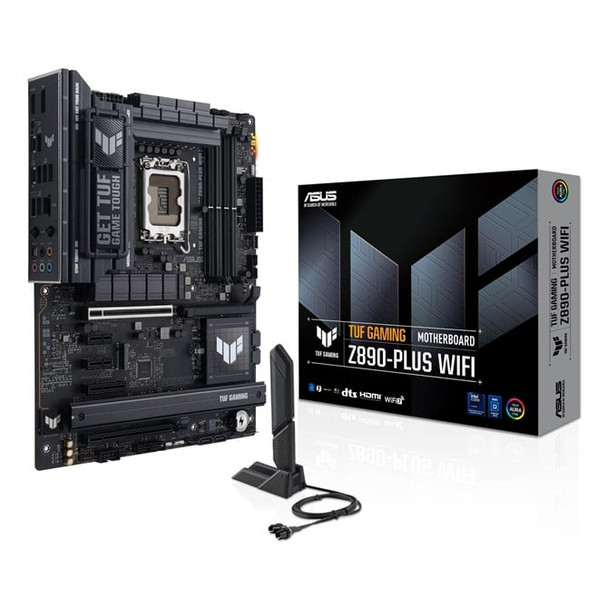
ASUS TUF GAMING Z890-PLUS WIFI Intel Z890 LGA 1851 Socket V1 ATX 90MB1IQ0-M0EAY0
(No reviews yet)
Write a Review
- UPC:
- 4711387763926
- MPN:
- 90MB1IQ0-M0EAY0
- Condition:
- New
- Availability:
- Available with FREE Delivery (usually delivered within 5-7 working days)

Description
ASUS TUF GAMING Z890-PLUS WIFI takes all the essential elements of the latest Intel® Core™ Ultra Processors (Series 2) processors and combines them with game-ready features and proven durability. Engineered with military-grade components, an upgraded power solution and a comprehensive cooling system, this motherboard goes beyond expectations with rock-solid and stable performance for marathon gaming. TUF GAMING motherboards also undergo rigorous endurance testing to ensure that they can handle conditions where others may fail. This platform delivers the power and connectivity that advanced AI PC applications demand.
Intelligent
Complete AI Solution
ASUS AI Solutions – including AI Advisor, AI Cooling II for thermal control and AI Networking II for real-time bandwidth optimization – offer smart assistance, efficient cooling and new levels of ultrafast connectivity.
AI Advisor
An ASUS technical expert that's always available to answer your questions.
* Availability of ASUS AI Advisor may vary by region.
AI Cooling II
Optimized thermals, and reduced noise via dynamic adjustment of fan speeds, based on CPU temperatures.
AI Networking II
Optimized network performance, helping to ensure seamless connectivity and maximized WiFi 7 speeds.
Intelligent
Overclocking
NPU Boost
The integrated NPU in Intel® Core™ Ultra Processors (Series 2) efficiently accelerates AI workflows — and NPU Boost lets you do more with it. This BIOS feature overclocks the NPU with just one click, increasing performance by up to 24%.
* This feature only supports Intel K series processors ?
** The overclocking performance may vary depending on the CPU series and motherboard used. ?
*** Testing was conducted with an Intel Arrow Lake QS Q2HA Ultra 9 285K processor, ROG Maximus Z890 Extreme motherboard, GeForce RTX™ 4090 24GB graphics card, and XPG Lancer DDR5 memory modules (model AX5U6000C4016G).?
Intelligent
Intelligent Control
UEFI BIOS
The UEFI interface delivers easy-to-use configuration options for PC beginners, and advanced features for veterans.
UEFI BIOS
The renowned ASUS UEFI BIOS provides everything you need to configure, tweak and tune your system. It offers intelligently simplified options for PC DIY beginners and comprehensive features for seasoned veterans.
BIOS Q-Dashboard
Simplify your motherboard configuration with BIOS Q-Dashboard. Its intuitive visual representation of hardware connections and corresponding BIOS settings takes the complexity out of setting up your system. Upgrade now, and discover the power of BIOS Q-Dashboard to easily and efficiently enhance your computing setup.
TurboV Core
TurboV Core is engineered for overclocking enthusiasts to elevate system capability with unprecedented simplicity. Accessed via ASUS DriverHub, TurboV Core provides intuitive configuration of CPU and DRAM parameters to unlock your computer's potential. No need to enter the BIOS, you can seamlessly modify settings directly from the Windows interface, and apply them right away without restart interruptions.
ASUS DriverHub
Simplify driver management with automatic detection, one-click installation and update for smooth, efficient system performance.
ASUS GlideX
Enable seamless screen sharing and control across PCs, tablets, and smartphones via USB or WiFi, supporting multiple platforms.
Power Saving
Provides easy-to-use configuration options for PC beginners and advanced features for veterans.
Armoury Crate
Customize Aura Sync RGB and control ASUS devices. Includes product registration and updates.
Performance
Premium Power Design
Stable power is crucial for maximizing the performance of Intel processors. The motherboard is designed to meet the needs of high-core-count CPUs. It features 16(80A) + 1(80A) + 2(80A) + 1(80A) power stages that integrate high-side and low-side MOSFETs and drivers into packages rated for up to 80A each. This configuration ensures optimal power delivery, efficiency, stability and performance for both current and future Intel processors.
Eight Layered PCB design
Enhanced stability and overclocking.
ProCool Power Connectors
Proprietary 8+8 pin connectors improve PSU connection.
TUF Components
TUF chokes and capacitors offer rock-solid durability and stability.
Digi+VRM Control
Real-time voltage control.
Performance
Memory & Storage
DRAM Overclocking Performance
Comprehensive memory tuning options are the cornerstone of TUF GAMING motherboards. With the motherboard, you can extract all the potential out of your DDR5 modules*, whether they're from an extreme-speed kit or an entry-level set that would otherwise be locked.
* Memory overclocking may vary between CPU series. Please refer to the spec table for detailed information.
AEMP III
ASUS Enhanced Memory Profile III (AEMP III) is an advanced firmware feature that empowers users to achieve unparalleled memory performance with cutting-edge CUDIMM memory. Through a two-phase comprehensive tuning process, AEMP III first optimizes the clock driver and then the memory frequency. This results in the best balance between performance and stability, even at cutting-edge speeds of DDR5-8000 or higher.*
*Results may vary according to individual system specifications. Currently, only 2-DIMM configurations are supported. Results are based on a test with an Intel Core Ultra 9 285K processor and 2x16GB SK Hynix DDR5-6400 Clocked Unbuffered DIMM RAM, model HMCG78AHBCA326N.?
DIMM Fit
DIMM Fit is an ASUS-exclusive BIOS feature that precisely analyzes individual memory modules to optimize performance and pinpoint potential issues. This offers peak efficiency, compatibility, and system stability.
Whether you are an overclocker seeking ultimate performance, a competitor pursuing the most responsive gameplay, or a content creator prioritizing rock-solid stability, DIMM Fit provides optimizations tailored to your needs and your hardware configuration.
M.2 PCIe 5.0 Support
This motherboard also features one PCIe 5.0 M.2 slots to enjoy the fastest data transfers of up to 128 Gbps*, and all M.2 slots support NVMe RAID configurations to take advantage of the latest available speeds.
Cooling
Cooler by Design
Cooling
Cooler Compatibility
ASUS AIO coolers offer robust performance, high overclocking potential, bold aesthetics and customizable functionality for new TUF Gaming motherboards, empowering you to build your dream gaming rig.
Connectivity
Empowering Connection
This motherboard offers a versatile range of connectivity with PCIe 5.0, Thunderbolt™ 4 and front USB 20Gbps Type-C® connectors.
PCIe 5.0 for Graphics Card?
PCIe 5.0 offers twice the data transfer speed of PCIe 4.0, making it robust enough to handle new data-heavy tasks. PCIe 5.0 also brings other benefits, such as electrical changes to improve signal integrity, backward-compatible CEM connectors for add-in cards and backward compatibility with previous versions of the PCIe bus.
Thunderbolt™ 4 Support
Each port delivers up to 40Gbps of bi-directional bandwidth for the latest super-speed devices and drives. Both ports can be employed for up to two external 4K displays.
Front USB 20Gbps Type-C®
This motherboard features a USB 20Gbps Type-C® front panel connector for speedy data transfers of up to 20Gbps.
DIY
Easy PC DIY
PCIe Slot Q-Release
A physical button unlocks the first PCIe slot’s security latch with one tap, greatly simplifying the process of detaching a PCIe card from the motherboard when it’s time to upgrade to a new GPU or other compatible device.
M.2 Q-Release
The M.2 heatsink features a convenient switch* to quickly remove it, eliminating the need for tiny screws during SSD installation. Its strong locking mechanism also provides a snug contact surface, helping to ensure reliable heat dissipation for your SSD.
*Switch may be a lever or button, depending on motherboard model.
M.2 Q-Slide
This new sliding M.2 latch design supports sizes 2242 and 2260 for easy device installation.
M.2 Q-Latch
The innovative ASUS Q-Latch makes it easy to install or remove an M.2 SSD without the need for specific tools or screws. This design employs a simple locking mechanism to secure the drive and neatly detach it with one tap.
Q-Antenna
With Q-Antenna, attaching a WiFi antenna to your PC is now easy and fast. Instead of slowly rotating two fasteners until they finally lock in, they just snap into place. Less hassle, and more consistent performance.
BIOS FlashBack™
BIOS FlashBack™ simplifies BIOS updates. Just load the BIOS file onto a FAT32 USB stick, insert it into the BIOS FlashBack™ port, and press a button—no CPU or memory needed.
DIY
Protection
DIY
Build With Confidence
TUF GAMING Alliance is a collaboration between ASUS and trusted PC component brands to ensure compatibility across a wide range of parts, such as PC cases, power supplies, CPU coolers, memory kits and more. With new partnerships and components being added regularly, the TUF GAMING Alliance will continue to grow even stronger.
Gaming
Ultrafast Networking
Provide a feature-packed high-performance gaming package, with ultrafast networking for smoother online gameplay.
Intel® 2.5Gb Ethernet
On-board Intel® 2.5Gb Ethernet kicks your LAN connection up a notch by improving bandwidth speeds up to 2.5X faster than 1Gb connections.?
WiFi 7
WiFi 7 ensures stable connections and low latency.?
ASUS WiFi Q-Antenna
ASUS WiFi Q-Antenna delivers up to 18% stronger wireless signal reception compared to the previous generation.
Audio
Realtek 7.1 Channel Audio
ALC1220P
This motherboard utilizes an audio codec designed in close collaboration with Realtek — the Realtek ALC1220P. It features an unprecedented 120 dB signal-to-noise (SNR) ratio for the stereo line out and a 113 dB SNR for the line in, providing pristine audio quality. Additionally, an impedance-sensing circuit automatically adjusts gain to ensure an optimal volume range for your headphones.
DTS Audio Processing
DTS® Audio Processing enhances gaming headset and speaker audio experiences by reducing distortion and by providing deeper bass, so games, movies and music sound better. It also allows you to customize audio settings.
Lighting
Outshine The Competition
ASUS Aura Sync offers synchronized lighting with other Aura Sync products, including motherboards, graphics cards, monitors and peripherals.
Addressable Gen2 RGB Headers
Automatically optimize lighting effects for the number of LEDs present in compatible ARGB gear.
In Search of Sustainable Solution
ASUS is on a mission to create a sustainable future where all can flourish on the planet we call home.
Every step counts, and as part of ASUS’s commitment to creating a more sustainable future, ASUS has begun to utilize post-consumer recycled (PCR) plastic and paper materials certified by the Forest Stewardship Council (FSC™) in the packaging of motherboard.
Join us on our journey as we make the world a better place.
Specs
Processor
Processor manufacturer
The manufacturer that produced the processor.
Intel
Processor socket
Mechanical component(s) that provides mechanical and electrical connections between a microprocessor and a printed circuit board (PCB). This allows the processor to be replaced without soldering.
LGA 1851 (Socket V1)
Compatible processor series
A processor which is compatible with this device, belongs to a 'series' which is part of 'family' e.g Celeron D, Celeron G, Celeron M, or, in some cases, is the same as 'family'.
Intel Core Ultra (Series 2)
Memory
Supported memory types
Types of memory which can be used with the product.
DDR5-SDRAM
Number of memory slots
4
Memory slots type
A memory slot, also known as a memory socket or RAM slot, is what allows computer memory (RAM) to be inserted into the computer. Depending on the motherboard, there will usually be 2 to 4 memory slots (sometimes more on high-end motherboards). The most common types of RAM are SDRAM and DDR for desktop computers and SODIMM for laptop computers, each having various types and speeds.
DIMM
Memory channels
Dual-channel
ECC ?ompatibility
Non-ECC
Supported memory clock speed (max)
8600 MHz
Maximum internal memory
The maximum internal memory which is available in the product.
2 GB
Unbuffered memory
Storage controllers
Supported storage drive types
The type of storage drives the device is compatible with.
HDD & SSD
Supported storage drive interfaces
M.2, SATA III
Number of HDDs supported
The total number of hard drives that can be used in/with this product.
4
Number of storage drives supported
How many storage drives can be fit into the product at once.
8
RAID support
The device uses RAID, which is a storage technology that combines multiple disk drive components into a logical unit for the purposes of data redundancy and performance improvement. Data is distributed across the drives in one of several ways, referred to as RAID levels, depending on the specific level of redundancy and performance required.
RAID levels
RAID is a storage technology that combines multiple disk drive components into a logical unit for the purposes of data redundancy and performance improvement. Data is distributed across the drives in one of several ways, referred to as RAID levels, depending on the specific level of redundancy and performance required.
0, 1, 5, 10
Graphics
Parallel processing technology support
Parallel processing technology is the simultaneous use of more than one CPU or processor core to execute a program or multiple computational threads. Ideally, parallel processing makes programs run faster because there are more engines (CPUs or Cores) running it. In practice, it is often difficult to divide a program in such a way that separate CPUs or cores can execute different portions without interfering with each other. Most computers have just one CPU, but some models have several, and multi-core processor chips are becoming the norm. There are even computers with thousands of CPUs.
Not supported
On-board graphics card
Graphics hardware which is built into the motherboard or CPU, as opposed to a separate graphics adapter (video card). On-board graphics uses CPU and RAM for graphics processing.
Internal I/O
USB 2.0 connectors
The end of a cable with a USB 2.0 connector. USB 2.0 was released in April 2000 (now called "Hi-Speed"), adding higher maximum signaling rate of 480 Mbit/s (effective throughput up to 35 MB/s or 280 Mbit/s), in addition to the "USB 1.x Full Speed" signaling rate of 12 Mbit/s. USB 2.0 connectors are usually colored black.
2
USB 3.2 Gen 1 (3.1 Gen 1) connectors
This is a connector (normally attached to a cable) for USB 3.0. USB 3.0 is the second major revision of the Universal Serial Bus (USB) standard for computer connectivity. First introduced in 2008, USB 3.0 adds a new transfer mode called "SuperSpeed," (distinguishable from USB 2.0 by either the blue colour of the port or the initials SS) capable of transferring data at up to 5Gbit/s—more than ten times as fast as the 480 Mbit/s top speed of USB 2.0.
2
USB 3.2 Gen 2 (3.1 Gen 2) connectors
1
Number of SATA III connectors
Serial ATA (Advanced Technology Attachment) (SATA) is a computer bus interface that connects host bus adapters to mass storage devices such as hard disk drives and optical drives. SATA III (revision 3.x) interface, formally known as SATA 6Gb/s, is a third generation SATA interface running at 6.0Gb/s. The bandwidth throughput, which is supported by the interface, is up to 600MB/s. This interface is backwards compatible with SATA 3 Gb/s interface.
4
Front panel audio connector
ATX Power connector (24-pin)
CPU fan connector
Number of chassis fan connectors
4
Chassis intrusion connector
EPS power connector (8-pin)
Number of COM connectors
1
Thunderbolt headers
1
V power connector
RGB LED pin header
Rear panel I/O ports
USB 3.2 Gen 1 (3.1 Gen 1) Type-A ports quantity
3
USB 3.2 Gen 2 (3.1 Gen 2) Type-A ports quantity
3
USB 3.2 Gen 2 (3.1 Gen 2) Type-C ports quantity
Number of USB 3.1 (3.1 Gen 2) ports with Type-C connector. USB 3.1 (3.1 Gen 2) is USB interface version which supports transfer rate up to 10 Gbit/s (SuperSpeed+). USB Type-C connector has symmetrical design architecture and compatible with Thunderbolt 3 interface.
1
Ethernet LAN (RJ-45) ports
Number of Ethernet LAN (RJ-45) ports (connecting interfaces) in the device. Ethernet LAN (RJ-45) ports allow a computer to connect to the ethernet.
1
HDMI ports quantity
The number of sockets (ports) for HDMI connections. HDMI (High-Definition Multimedia Interface) is a compact audio/video interface for transferring uncompressed video data and compressed/uncompressed digital audio data from a HDMI-compliant device ("the source device") to a compatible computer monitor, video projector, digital television, or digital audio device. HDMI is a digital replacement for existing analog video standards.
1
HDMI version
2.1
DisplayPorts quantity
Number of DisplayPorts. A DisplayPort is a digital display interface developed by the Video Electronics Standards Association (VESA). The interface is primarily used to connect a video source to a display device such as a computer monitor, though it can also be used to carry audio, USB, and other forms of data.
1
DisplayPort version
1.4
Rear panel I/O ports
Headphone outputs
Number of sockets /ports where headphones are connected.
1
Line-in
S/PDIF out port
S/PDIF (Sony/Philips Digital Interconnect Format) is a digital audio interconnect used in consumer audio equipment over relatively short distances. The signal is transmitted over either a coaxial cable with RCA connectors or a fibre optic cable with TOSLINK connectors.
Thunderbolt ports quantity
The number of ports (sockets) for Thunderbolt connections. Thunderbolt is a hardware interface that allows for the connection of external peripherals to a computer. It uses the same connector as Mini DisplayPort (MDP). It was released in 2011 and is used in Apple's 2011 MacBook Pro, as well as other devices.
1
WiFi-AP antenna jack
2
Network
Ethernet LAN
An Ethernet LAN (Local Area Network) interface is present, for a wired conection via a cable.
Ethernet interface type
2.5 Gigabit Ethernet
Wi-Fi
Popular technology that allows an electronic device to exchange data or connect to the internet wirelessly using radio waves.
Top Wi-Fi standard
Connection of this device is done via Wi-Fi in a high standard.
Wi-Fi 7 (802.11be)
Wi-Fi standards
The type of wireless local area network (LAN). It can be ad-hoc, where units in a network communicate peer-to-peer, or Infrastructure, where units communicate with each other via an access point A LAN interconnects computers in a small area e.g. home, school or office.
802.11a, 802.11b, 802.11g, Wi-Fi 4 (802.11n), Wi-Fi 5 (802.11ac), Wi-Fi 6 (802.11ax), Wi-Fi 6E (802.11ax), Wi-Fi 7 (802.11be)
Bluetooth
Bluetooth is a low-power radio technology developed to replace the cables and wires currently used to link or connect electronic devices such as personal computers, printers, and a wide variety of handheld devices including mobile phones. Because it uses radio-wave connectivity, a Bluetooth-enabled device has a constant, established connection to whatever browser it uses. This saves the user the trouble of logging on to check for emails or news updates, for example.
Bluetooth version
The type of bluetooth technology in the product e.g. Bluetooth Smart (v4.0).
5.4
Features
Motherboard chipset
The chipset connects the microprocessor to the rest of the motherboard.
Intel Z890
Audio chip
Realtek ALC1220P
Audio output channels
An audio output channel is an electric circuit which acts as a path for a signal produced by a device. A device may have several audio output channels.
7.1 channels
Product colour
The colour e.g. red, blue, green, black, white.
Black
Component for
What this product is used as a part of (component for).
PC
Motherboard form factor
Design of the motherboard (ATX, BTX etc).
ATX
Motherboard chipset family
The category of motherboard chipset e.g. Intel, AMD.
Intel
Cooling type
The method used to cool the device or to cool the air around the device.
Passive
Power source type
What the power source is.
ATX
Windows operating systems supported
Windows vesions wich can be used with the device.
Windows 11
Expansion slots
PCI Express x4 (Gen 1.x) slots
2
PCI Express x4 (Gen 4.x) slots
1
PCI Express x16 (Gen 4.x) slots
1
PCI Express x16 (Gen 5.x) slots
1
Number of M.2 (M) slots
4
BIOS
BIOS type
The BIOS (Basic Input/Output System) initializes and tests system hardware components, and loads a bootloader or an operating system from a mass memory device. The BIOS additionally provides abstraction layer for the hardware, i.e. a consistent way for application programs and operating systems to interact with the keyboard, display, and other input/output devices. There are several types of BIOS, including the motherboard ROM BIOS, video BIOS, drive controller BIOS, network adapter BIOS, and SCSI adapter BIOS.
UEFI AMI
BIOS memory size
256 Mbit
Packaging data
Package width
The distance from one side of the packaging to the other.
353 mm
Package depth
The distance from the front to the back of the packaging.
273 mm
Package height
The distance from the top to the bottom of the packaging.
68 mm
Package weight
Weight of the packaged product.
2.34 kg
Weight & dimensions
Width
The measurement or extent of something from side to side.
305 mm
Depth
The distance from the front to the back of something.
244 mm
Packaging content
Cables included
SATA
Other features
Quick installation guide
Back-to-BIOS button
View AllClose
Intelligent
Complete AI Solution
ASUS AI Solutions – including AI Advisor, AI Cooling II for thermal control and AI Networking II for real-time bandwidth optimization – offer smart assistance, efficient cooling and new levels of ultrafast connectivity.
AI Advisor
An ASUS technical expert that's always available to answer your questions.
* Availability of ASUS AI Advisor may vary by region.
AI Cooling II
Optimized thermals, and reduced noise via dynamic adjustment of fan speeds, based on CPU temperatures.
AI Networking II
Optimized network performance, helping to ensure seamless connectivity and maximized WiFi 7 speeds.
Intelligent
Overclocking
NPU Boost
The integrated NPU in Intel® Core™ Ultra Processors (Series 2) efficiently accelerates AI workflows — and NPU Boost lets you do more with it. This BIOS feature overclocks the NPU with just one click, increasing performance by up to 24%.
* This feature only supports Intel K series processors ?
** The overclocking performance may vary depending on the CPU series and motherboard used. ?
*** Testing was conducted with an Intel Arrow Lake QS Q2HA Ultra 9 285K processor, ROG Maximus Z890 Extreme motherboard, GeForce RTX™ 4090 24GB graphics card, and XPG Lancer DDR5 memory modules (model AX5U6000C4016G).?
Intelligent
Intelligent Control
UEFI BIOS
The UEFI interface delivers easy-to-use configuration options for PC beginners, and advanced features for veterans.
UEFI BIOS
The renowned ASUS UEFI BIOS provides everything you need to configure, tweak and tune your system. It offers intelligently simplified options for PC DIY beginners and comprehensive features for seasoned veterans.
BIOS Q-Dashboard
Simplify your motherboard configuration with BIOS Q-Dashboard. Its intuitive visual representation of hardware connections and corresponding BIOS settings takes the complexity out of setting up your system. Upgrade now, and discover the power of BIOS Q-Dashboard to easily and efficiently enhance your computing setup.
TurboV Core
TurboV Core is engineered for overclocking enthusiasts to elevate system capability with unprecedented simplicity. Accessed via ASUS DriverHub, TurboV Core provides intuitive configuration of CPU and DRAM parameters to unlock your computer's potential. No need to enter the BIOS, you can seamlessly modify settings directly from the Windows interface, and apply them right away without restart interruptions.
ASUS DriverHub
Simplify driver management with automatic detection, one-click installation and update for smooth, efficient system performance.
ASUS GlideX
Enable seamless screen sharing and control across PCs, tablets, and smartphones via USB or WiFi, supporting multiple platforms.
Power Saving
Provides easy-to-use configuration options for PC beginners and advanced features for veterans.
Armoury Crate
Customize Aura Sync RGB and control ASUS devices. Includes product registration and updates.
Performance
Premium Power Design
Stable power is crucial for maximizing the performance of Intel processors. The motherboard is designed to meet the needs of high-core-count CPUs. It features 16(80A) + 1(80A) + 2(80A) + 1(80A) power stages that integrate high-side and low-side MOSFETs and drivers into packages rated for up to 80A each. This configuration ensures optimal power delivery, efficiency, stability and performance for both current and future Intel processors.
Eight Layered PCB design
Enhanced stability and overclocking.
ProCool Power Connectors
Proprietary 8+8 pin connectors improve PSU connection.
TUF Components
TUF chokes and capacitors offer rock-solid durability and stability.
Digi+VRM Control
Real-time voltage control.
Performance
Memory & Storage
DRAM Overclocking Performance
Comprehensive memory tuning options are the cornerstone of TUF GAMING motherboards. With the motherboard, you can extract all the potential out of your DDR5 modules*, whether they're from an extreme-speed kit or an entry-level set that would otherwise be locked.
* Memory overclocking may vary between CPU series. Please refer to the spec table for detailed information.
AEMP III
ASUS Enhanced Memory Profile III (AEMP III) is an advanced firmware feature that empowers users to achieve unparalleled memory performance with cutting-edge CUDIMM memory. Through a two-phase comprehensive tuning process, AEMP III first optimizes the clock driver and then the memory frequency. This results in the best balance between performance and stability, even at cutting-edge speeds of DDR5-8000 or higher.*
*Results may vary according to individual system specifications. Currently, only 2-DIMM configurations are supported. Results are based on a test with an Intel Core Ultra 9 285K processor and 2x16GB SK Hynix DDR5-6400 Clocked Unbuffered DIMM RAM, model HMCG78AHBCA326N.?
DIMM Fit
DIMM Fit is an ASUS-exclusive BIOS feature that precisely analyzes individual memory modules to optimize performance and pinpoint potential issues. This offers peak efficiency, compatibility, and system stability.
Whether you are an overclocker seeking ultimate performance, a competitor pursuing the most responsive gameplay, or a content creator prioritizing rock-solid stability, DIMM Fit provides optimizations tailored to your needs and your hardware configuration.
M.2 PCIe 5.0 Support
This motherboard also features one PCIe 5.0 M.2 slots to enjoy the fastest data transfers of up to 128 Gbps*, and all M.2 slots support NVMe RAID configurations to take advantage of the latest available speeds.
Cooling
Cooler by Design
Cooling
Cooler Compatibility
ASUS AIO coolers offer robust performance, high overclocking potential, bold aesthetics and customizable functionality for new TUF Gaming motherboards, empowering you to build your dream gaming rig.
Connectivity
Empowering Connection
This motherboard offers a versatile range of connectivity with PCIe 5.0, Thunderbolt™ 4 and front USB 20Gbps Type-C® connectors.
PCIe 5.0 for Graphics Card?
PCIe 5.0 offers twice the data transfer speed of PCIe 4.0, making it robust enough to handle new data-heavy tasks. PCIe 5.0 also brings other benefits, such as electrical changes to improve signal integrity, backward-compatible CEM connectors for add-in cards and backward compatibility with previous versions of the PCIe bus.
Thunderbolt™ 4 Support
Each port delivers up to 40Gbps of bi-directional bandwidth for the latest super-speed devices and drives. Both ports can be employed for up to two external 4K displays.
Front USB 20Gbps Type-C®
This motherboard features a USB 20Gbps Type-C® front panel connector for speedy data transfers of up to 20Gbps.
DIY
Easy PC DIY
PCIe Slot Q-Release
A physical button unlocks the first PCIe slot’s security latch with one tap, greatly simplifying the process of detaching a PCIe card from the motherboard when it’s time to upgrade to a new GPU or other compatible device.
M.2 Q-Release
The M.2 heatsink features a convenient switch* to quickly remove it, eliminating the need for tiny screws during SSD installation. Its strong locking mechanism also provides a snug contact surface, helping to ensure reliable heat dissipation for your SSD.
*Switch may be a lever or button, depending on motherboard model.
M.2 Q-Slide
This new sliding M.2 latch design supports sizes 2242 and 2260 for easy device installation.
M.2 Q-Latch
The innovative ASUS Q-Latch makes it easy to install or remove an M.2 SSD without the need for specific tools or screws. This design employs a simple locking mechanism to secure the drive and neatly detach it with one tap.
Q-Antenna
With Q-Antenna, attaching a WiFi antenna to your PC is now easy and fast. Instead of slowly rotating two fasteners until they finally lock in, they just snap into place. Less hassle, and more consistent performance.
BIOS FlashBack™
BIOS FlashBack™ simplifies BIOS updates. Just load the BIOS file onto a FAT32 USB stick, insert it into the BIOS FlashBack™ port, and press a button—no CPU or memory needed.
DIY
Protection
DIY
Build With Confidence
TUF GAMING Alliance is a collaboration between ASUS and trusted PC component brands to ensure compatibility across a wide range of parts, such as PC cases, power supplies, CPU coolers, memory kits and more. With new partnerships and components being added regularly, the TUF GAMING Alliance will continue to grow even stronger.
Gaming
Ultrafast Networking
Provide a feature-packed high-performance gaming package, with ultrafast networking for smoother online gameplay.
Intel® 2.5Gb Ethernet
On-board Intel® 2.5Gb Ethernet kicks your LAN connection up a notch by improving bandwidth speeds up to 2.5X faster than 1Gb connections.?
WiFi 7
WiFi 7 ensures stable connections and low latency.?
ASUS WiFi Q-Antenna
ASUS WiFi Q-Antenna delivers up to 18% stronger wireless signal reception compared to the previous generation.
Audio
Realtek 7.1 Channel Audio
ALC1220P
This motherboard utilizes an audio codec designed in close collaboration with Realtek — the Realtek ALC1220P. It features an unprecedented 120 dB signal-to-noise (SNR) ratio for the stereo line out and a 113 dB SNR for the line in, providing pristine audio quality. Additionally, an impedance-sensing circuit automatically adjusts gain to ensure an optimal volume range for your headphones.
DTS Audio Processing
DTS® Audio Processing enhances gaming headset and speaker audio experiences by reducing distortion and by providing deeper bass, so games, movies and music sound better. It also allows you to customize audio settings.
Lighting
Outshine The Competition
ASUS Aura Sync offers synchronized lighting with other Aura Sync products, including motherboards, graphics cards, monitors and peripherals.
Addressable Gen2 RGB Headers
Automatically optimize lighting effects for the number of LEDs present in compatible ARGB gear.
In Search of Sustainable Solution
ASUS is on a mission to create a sustainable future where all can flourish on the planet we call home.
Every step counts, and as part of ASUS’s commitment to creating a more sustainable future, ASUS has begun to utilize post-consumer recycled (PCR) plastic and paper materials certified by the Forest Stewardship Council (FSC™) in the packaging of motherboard.
Join us on our journey as we make the world a better place.
Specs
Processor
Processor manufacturer
The manufacturer that produced the processor.
Intel
Processor socket
Mechanical component(s) that provides mechanical and electrical connections between a microprocessor and a printed circuit board (PCB). This allows the processor to be replaced without soldering.
LGA 1851 (Socket V1)
Compatible processor series
A processor which is compatible with this device, belongs to a 'series' which is part of 'family' e.g Celeron D, Celeron G, Celeron M, or, in some cases, is the same as 'family'.
Intel Core Ultra (Series 2)
Memory
Supported memory types
Types of memory which can be used with the product.
DDR5-SDRAM
Number of memory slots
4
Memory slots type
A memory slot, also known as a memory socket or RAM slot, is what allows computer memory (RAM) to be inserted into the computer. Depending on the motherboard, there will usually be 2 to 4 memory slots (sometimes more on high-end motherboards). The most common types of RAM are SDRAM and DDR for desktop computers and SODIMM for laptop computers, each having various types and speeds.
DIMM
Memory channels
Dual-channel
ECC ?ompatibility
Non-ECC
Supported memory clock speed (max)
8600 MHz
Maximum internal memory
The maximum internal memory which is available in the product.
2 GB
Unbuffered memory
Storage controllers
Supported storage drive types
The type of storage drives the device is compatible with.
HDD & SSD
Supported storage drive interfaces
M.2, SATA III
Number of HDDs supported
The total number of hard drives that can be used in/with this product.
4
Number of storage drives supported
How many storage drives can be fit into the product at once.
8
RAID support
The device uses RAID, which is a storage technology that combines multiple disk drive components into a logical unit for the purposes of data redundancy and performance improvement. Data is distributed across the drives in one of several ways, referred to as RAID levels, depending on the specific level of redundancy and performance required.
RAID levels
RAID is a storage technology that combines multiple disk drive components into a logical unit for the purposes of data redundancy and performance improvement. Data is distributed across the drives in one of several ways, referred to as RAID levels, depending on the specific level of redundancy and performance required.
0, 1, 5, 10
Graphics
Parallel processing technology support
Parallel processing technology is the simultaneous use of more than one CPU or processor core to execute a program or multiple computational threads. Ideally, parallel processing makes programs run faster because there are more engines (CPUs or Cores) running it. In practice, it is often difficult to divide a program in such a way that separate CPUs or cores can execute different portions without interfering with each other. Most computers have just one CPU, but some models have several, and multi-core processor chips are becoming the norm. There are even computers with thousands of CPUs.
Not supported
On-board graphics card
Graphics hardware which is built into the motherboard or CPU, as opposed to a separate graphics adapter (video card). On-board graphics uses CPU and RAM for graphics processing.
Internal I/O
USB 2.0 connectors
The end of a cable with a USB 2.0 connector. USB 2.0 was released in April 2000 (now called "Hi-Speed"), adding higher maximum signaling rate of 480 Mbit/s (effective throughput up to 35 MB/s or 280 Mbit/s), in addition to the "USB 1.x Full Speed" signaling rate of 12 Mbit/s. USB 2.0 connectors are usually colored black.
2
USB 3.2 Gen 1 (3.1 Gen 1) connectors
This is a connector (normally attached to a cable) for USB 3.0. USB 3.0 is the second major revision of the Universal Serial Bus (USB) standard for computer connectivity. First introduced in 2008, USB 3.0 adds a new transfer mode called "SuperSpeed," (distinguishable from USB 2.0 by either the blue colour of the port or the initials SS) capable of transferring data at up to 5Gbit/s—more than ten times as fast as the 480 Mbit/s top speed of USB 2.0.
2
USB 3.2 Gen 2 (3.1 Gen 2) connectors
1
Number of SATA III connectors
Serial ATA (Advanced Technology Attachment) (SATA) is a computer bus interface that connects host bus adapters to mass storage devices such as hard disk drives and optical drives. SATA III (revision 3.x) interface, formally known as SATA 6Gb/s, is a third generation SATA interface running at 6.0Gb/s. The bandwidth throughput, which is supported by the interface, is up to 600MB/s. This interface is backwards compatible with SATA 3 Gb/s interface.
4
Front panel audio connector
ATX Power connector (24-pin)
CPU fan connector
Number of chassis fan connectors
4
Chassis intrusion connector
EPS power connector (8-pin)
Number of COM connectors
1
Thunderbolt headers
1
V power connector
RGB LED pin header
Rear panel I/O ports
USB 3.2 Gen 1 (3.1 Gen 1) Type-A ports quantity
3
USB 3.2 Gen 2 (3.1 Gen 2) Type-A ports quantity
3
USB 3.2 Gen 2 (3.1 Gen 2) Type-C ports quantity
Number of USB 3.1 (3.1 Gen 2) ports with Type-C connector. USB 3.1 (3.1 Gen 2) is USB interface version which supports transfer rate up to 10 Gbit/s (SuperSpeed+). USB Type-C connector has symmetrical design architecture and compatible with Thunderbolt 3 interface.
1
Ethernet LAN (RJ-45) ports
Number of Ethernet LAN (RJ-45) ports (connecting interfaces) in the device. Ethernet LAN (RJ-45) ports allow a computer to connect to the ethernet.
1
HDMI ports quantity
The number of sockets (ports) for HDMI connections. HDMI (High-Definition Multimedia Interface) is a compact audio/video interface for transferring uncompressed video data and compressed/uncompressed digital audio data from a HDMI-compliant device ("the source device") to a compatible computer monitor, video projector, digital television, or digital audio device. HDMI is a digital replacement for existing analog video standards.
1
HDMI version
2.1
DisplayPorts quantity
Number of DisplayPorts. A DisplayPort is a digital display interface developed by the Video Electronics Standards Association (VESA). The interface is primarily used to connect a video source to a display device such as a computer monitor, though it can also be used to carry audio, USB, and other forms of data.
1
DisplayPort version
1.4
Rear panel I/O ports
Headphone outputs
Number of sockets /ports where headphones are connected.
1
Line-in
S/PDIF out port
S/PDIF (Sony/Philips Digital Interconnect Format) is a digital audio interconnect used in consumer audio equipment over relatively short distances. The signal is transmitted over either a coaxial cable with RCA connectors or a fibre optic cable with TOSLINK connectors.
Thunderbolt ports quantity
The number of ports (sockets) for Thunderbolt connections. Thunderbolt is a hardware interface that allows for the connection of external peripherals to a computer. It uses the same connector as Mini DisplayPort (MDP). It was released in 2011 and is used in Apple's 2011 MacBook Pro, as well as other devices.
1
WiFi-AP antenna jack
2
Network
Ethernet LAN
An Ethernet LAN (Local Area Network) interface is present, for a wired conection via a cable.
Ethernet interface type
2.5 Gigabit Ethernet
Wi-Fi
Popular technology that allows an electronic device to exchange data or connect to the internet wirelessly using radio waves.
Top Wi-Fi standard
Connection of this device is done via Wi-Fi in a high standard.
Wi-Fi 7 (802.11be)
Wi-Fi standards
The type of wireless local area network (LAN). It can be ad-hoc, where units in a network communicate peer-to-peer, or Infrastructure, where units communicate with each other via an access point A LAN interconnects computers in a small area e.g. home, school or office.
802.11a, 802.11b, 802.11g, Wi-Fi 4 (802.11n), Wi-Fi 5 (802.11ac), Wi-Fi 6 (802.11ax), Wi-Fi 6E (802.11ax), Wi-Fi 7 (802.11be)
Bluetooth
Bluetooth is a low-power radio technology developed to replace the cables and wires currently used to link or connect electronic devices such as personal computers, printers, and a wide variety of handheld devices including mobile phones. Because it uses radio-wave connectivity, a Bluetooth-enabled device has a constant, established connection to whatever browser it uses. This saves the user the trouble of logging on to check for emails or news updates, for example.
Bluetooth version
The type of bluetooth technology in the product e.g. Bluetooth Smart (v4.0).
5.4
Features
Motherboard chipset
The chipset connects the microprocessor to the rest of the motherboard.
Intel Z890
Audio chip
Realtek ALC1220P
Audio output channels
An audio output channel is an electric circuit which acts as a path for a signal produced by a device. A device may have several audio output channels.
7.1 channels
Product colour
The colour e.g. red, blue, green, black, white.
Black
Component for
What this product is used as a part of (component for).
PC
Motherboard form factor
Design of the motherboard (ATX, BTX etc).
ATX
Motherboard chipset family
The category of motherboard chipset e.g. Intel, AMD.
Intel
Cooling type
The method used to cool the device or to cool the air around the device.
Passive
Power source type
What the power source is.
ATX
Windows operating systems supported
Windows vesions wich can be used with the device.
Windows 11
Expansion slots
PCI Express x4 (Gen 1.x) slots
2
PCI Express x4 (Gen 4.x) slots
1
PCI Express x16 (Gen 4.x) slots
1
PCI Express x16 (Gen 5.x) slots
1
Number of M.2 (M) slots
4
BIOS
BIOS type
The BIOS (Basic Input/Output System) initializes and tests system hardware components, and loads a bootloader or an operating system from a mass memory device. The BIOS additionally provides abstraction layer for the hardware, i.e. a consistent way for application programs and operating systems to interact with the keyboard, display, and other input/output devices. There are several types of BIOS, including the motherboard ROM BIOS, video BIOS, drive controller BIOS, network adapter BIOS, and SCSI adapter BIOS.
UEFI AMI
BIOS memory size
256 Mbit
Packaging data
Package width
The distance from one side of the packaging to the other.
353 mm
Package depth
The distance from the front to the back of the packaging.
273 mm
Package height
The distance from the top to the bottom of the packaging.
68 mm
Package weight
Weight of the packaged product.
2.34 kg
Weight & dimensions
Width
The measurement or extent of something from side to side.
305 mm
Depth
The distance from the front to the back of something.
244 mm
Packaging content
Cables included
SATA
Other features
Quick installation guide
Back-to-BIOS button
Additional Information
Shipping: |
Usually shipped within 3-5 working days |
Delivery: |
Usually delivered within 5-7 working days |
Related Products
Related Products
Asus TUF GAMING Z890-PLUS WIFI Intel Z890 Lga 1851 Socket TUF GAMING Z890-PLUS WIFI
Asus
£341.01
Intel Z890 Lga 1851 (Socket V1) Atx

Asus 90MB1IQ0-M0EAY0 Tuf Gaming Z890-Plus Wifi 90MB1IQ0-M0EAY0
Asus
£282.60
Tuf Gaming Z890-Plus Wifi Intel Z890 Lga 1851 (Socket

Asus TUF GAMING Z890-PRO WIFI Intel Z890 Lga 1851 Socket TUF GAMING Z890-PRO WIFI
Asus
£372.99
Intel Z890 Lga 1851 (Socket V1) Atx