
Asus
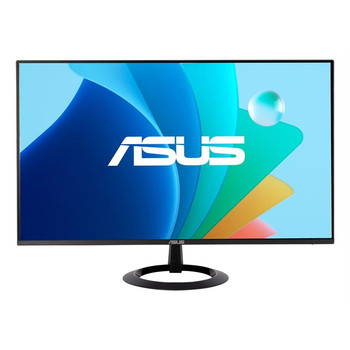
ASUS VA24ECPSN 60.5 cm 23.8 1920 x 1080 pixels Full HD LCD Black" VA24ECPSN
(No reviews yet)
Write a Review

- UPC:
- 4711081844396
- MPN:
- VA24ECPSN
- Condition:
- New
- Availability:
- Available with FREE Delivery (usually delivered within 5-7 working days)

Description
Enhance Your Productivity
ASUS VA24ECPSN is a 23.8 inch Full HD (1920 x 1080) monitor that features a frameless IPS panel for wide angle viewing to deliver incredibly sharp imagery and stunning video playback. Stable Internet connection and one-cable docking to your laptop with RJ45 and USB-C connection. Up to 75Hz refresh rate with Adaptive-Sync technology to eliminate tracing and ensure crisp and smooth viewing experience. Its highly ergonomic design with tilt, swivel, pivot and height adjustments along with TÜV Rheinland-certified Flicker-free and Low Blue Light provides a comfortable viewing experience.
Lifelike views with 178° wide view angle
Frameless IPS panel provides 178° viewing angles, both horizontally and vertically, so you can enjoy its beautiful visuals from almost any direction.
The USB-C That Does It All
An included USB-C® port enables superfast data transfers, DisplayPort connectivity and 65W power delivery to charge devices via just one USB-C cable. The monitor also serves as a USB hub: any device connected to the USB Type-A ports gains access to other peripherals hooked up to the other USB ports.
Expansive Connectivity
Along with a USB-C port, ASUS VA24ECPSN offers an HDMI, DisplayPort, three USB-A downstream ports and RJ45 ? so its compatible with a wide variety of devices. VA24ECPSN even includes an RJ45 Ethernet port to provide connected devices with a stable Internet connection for more space saving and convenience. It also has pass-through port for the headphone jack input.
Built-in stereo speakers for multimedia
With two integrated speakers, VA24ECPSN enhances your audiovisual experiences, for limitless entertainment and multimedia enjoyment.
Ergonomic Design
Flexible tilt, swivel, pivot and height adjustments make it easy to find the most comfortable viewing position. The screen can also be rotated a full 90° into a portrait orientation, which is ideal for working with long documents, writing code or browsing websites.
Protect your eyes with ASUS Eye Care technology
ASUS blue light filter
For viewing comfort and for protection from potentially harmful blue light, it offers intuitive and flexible with seamless adjustment that are easily accessed through the onscreen display menu.
ASUS Flicker-free technology
It's time to say goodbye to those tired, strained eyes. Flicker-Free technology helps reduce onscreen flicker, giving you a more comfortable, movie-marathon-ready environment. It is designed to minimize eyestrain, headaches and eye fatigue when you spend long, countless hours in front of the display.
Smart Cable Management
Cable management design helps you organize and hide various cables to keep your desk area tidy.
Caring for the environment
Committed to creating a sustainable future, ASUS ensures its products are compliant to environmental requirements at all stages of their product life cycles. ASUS Monitor with mercury-free LED backlit panel is energy-efficient to help reduce costs in the long run and meets the latest environmental standards such as Energy Star® , TCO Certified, and EPEAT™(*) .
Specs
Display
Display diagonal
Size of the display for this product, measured diagonally, usually in inches.
60.5 cm (23.8")
Display resolution
The number of distinct pixels in each dimension that can be displayed. It is usually quoted as width × height, with the units in pixels: for example, "1024 × 768" means the width is 1024 pixels and the height is 768 pixels. The higher the number of pixels, the sharper the image.
20 x 1080 pixels
HD type
Type of supported High Definition (e.g. Full HD, 4K Ultra HD).
Full HD
Native aspect ratio
The aspect ratio is the ratio of the width of an image to its height. The native aspect ratio is the one which the projector/display is particularly designed for. Images shown in native aspect ratio will utilize the entire resolution of the display and achieve maximum brightness. Images shown in other than native aspect ratio will always have less resolution and less brightness than images shown in native aspect ratio.
:9
Display technology
The technology used in the display e.g. plasma, LED.
LCD
Panel type
IPS
Backlight type
LED
Touchscreen
A screen of a laptop, smartphone, etc., that responds to touch so you can control the interface using your fingers.
Display brightness (typical)
Display brightness, measured by its Luminance, presented as a figure in nits. Typical brightness ratings for monitors range from 250 to 350 nits with a target value of between 80 to 120 nits being suitable for most displays in a normal viewing environment.
300 cd/m²
Response time
The response time is the time difference between the moment that a source (for example a video card) sends a signal and that equipment (for example a monitor) receives or display the signal. (Used abbreviations: R/F = Rise and Fall.)
5 ms
Anti-glare screen
Always gives an optimal view, even in direct sunlight.
Screen shape
Flat
Aspect ratio
The aspect ratio is the ratio of the width of a shape to its height. For example, 4:3 is common for standard displays and 16:9 is the ratio for Widescreen TV.
:9
Contrast ratio (typical)
The difference in light intensity between the brightest white and the darkest black.
00:1
Contrast ratio (dynamic)
A property of a display system, defined as the ratio of the luminance of the brightest color (white) to that of the darkest color (black) that the system is capable of producing.
0000000:1
Dynamic contrast ratio marketing name
ASUS Smart Contrast Ratio (ASCR)
Maximum refresh rate
75 Hz
Viewing angle, horizontal
Maximum horizontal angle at which a display can be viewed with acceptable visual performance.
8°
Viewing angle, vertical
Maximum vertical angle at which a display can be viewed with acceptable visual performance.
8°
Display number of colours
.7 million colours
Pixel pitch
This is the parameter of a picture tube, which specifies the shortest distance between two dots of the same colour. The principle is: the smaller the dot pitch, the better sharpness of image.
0.2745 x 0.2745 mm
Viewable size, horizontal
The viewable size is often somewhat smaller than the actual size of a monitor, because there is a border around the image.
52.7 cm
Viewable size, vertical
29.6 cm
Digital horizontal frequency
30 - 84 kHz
Digital vertical frequency
48 - 75 Hz
Performance
NVIDIA G-SYNC
AMD FreeSync
The product includes AMD Freesync Technology for the dynamic synchronization of the graphic card and the monitor in order to avoid screen tearing.
VESA Adaptive Sync support
Flicker-free technology
Low Blue Light technology
Game mode
Multimedia
Number of speakers
The quantity of speakers included in/with the product.
2
RMS rated power
RMS (Root mean square) is a measure of the continuous power required by a device, in particular audio amplifiers and loudspeakers.
4 W
Built-in speaker(s)
The device contains speaker(s) to produce sound.
Built-in camera
The product has an integrated camera.
Design
Market positioning
Under which category can the device be positioned in the market, e.g. camera phone.
Home
Product colour
The colour e.g. red, blue, green, black, white.
Black
Detachable stand
Feet colour
The colour of the feet, which are the projecting part on which a device/piece of furniture, or each of its legs, stands.
Black
Ports & interfaces
Built-in USB hub
Whether or not the device features a USB hub to connect more than one other device via USB.
USB hub version
3.2 Gen 1 (3.1 Gen 1)
USB Type-A downstream ports quantity
3
USB Power Delivery (USB PD)
USB Power Delivery up to
65 W
HDMI
HDMI (High-Definition Multimedia Interface) is a compact audio/video interface for transferring uncompressed video data and compressed/uncompressed digital audio data from a HDMI-compliant device ("the source device") to a compatible computer monitor, video projector, digital television, or digital audio device. HDMI is a digital replacement for existing analog video standards.
HDMI ports quantity
The number of sockets (ports) for HDMI connections. HDMI (High-Definition Multimedia Interface) is a compact audio/video interface for transferring uncompressed video data and compressed/uncompressed digital audio data from a HDMI-compliant device ("the source device") to a compatible computer monitor, video projector, digital television, or digital audio device. HDMI is a digital replacement for existing analog video standards.
1
HDMI version
1.4
DisplayPorts quantity
Number of DisplayPorts. A DisplayPort is a digital display interface developed by the Video Electronics Standards Association (VESA). The interface is primarily used to connect a video source to a display device such as a computer monitor, though it can also be used to carry audio, USB, and other forms of data.
1
Ports & interfaces
DisplayPort version
1.2
Headphone out
The socket for connecting headphones to the device.
Headphone outputs
Number of sockets /ports where headphones are connected.
1
Headphone connectivity
How headphones connect to a device e.g. wirelessly or via a cable and connector.
3.5 mm
HDCP
High-bandwidth Digital Content Protection (HDCP) is a form of digital copy protection to prevent copying of digital audio and video content as it travels across connections.
HDCP version
1.4
AC (power) in
Network
Ethernet LAN
An Ethernet LAN (Local Area Network) interface is present, for a wired conection via a cable.
Ergonomics
VESA mounting
Panel mounting interface
The product can be used wih VESA mounting interfaces.
0 x 100 mm
Cable lock slot
Holes on the edge of devices through which a cable lock can be passed, so the device can be locked to a desk etc.
Cable lock slot type
Kensington
Height adjustment
The part of the device that can be adjusted to change the height.
Adjustable height (max)
cm
Pivot
Pivot angle
-90 - 90°
Swivelling
Swivel angle range
-180 - 180°
Tilt adjustment
The tilt, which means the angle at which the device is pointing (up or down), can be changed.
Tilt angle range
-5 - 35°
Power
Energy efficiency class (SDR)
E
Power consumption (typical)
Amount of power consumed by this model, often expressed in watts (W). Typical values that manufacturers give are power consumption when off, standby/suspended mode, typical use, maximum usage.
.5 W
Power consumption (off)
0.3 W
Power consumption (PowerSave)
0.5 W
AC input voltage
The voltage of the AC electricity that is inputted into the product.
0 - 240 V
AC input frequency
50 - 60 Hz
European Product Registry for Energy Labelling (EPREL) code
93743
Weight & dimensions
Width (with stand)
539.5 mm
Depth (with stand)
211.4 mm
Height (with stand)
450.4 mm
Weight (with stand)
5.35 kg
Width (without stand)
539.5 mm
Depth (without stand)
48.1 mm
Height (without stand)
323.1 mm
Weight (without stand)
3.4 kg
Packaging data
Package width
The distance from one side of the packaging to the other.
600 mm
Package depth
The distance from the front to the back of the packaging.
8 mm
Package height
The distance from the top to the bottom of the packaging.
412 mm
Package weight
Weight of the packaged product.
7.24 kg
Package type
The type of product package e.g. box.
Box
Packaging content
Stand included
Cables included
AC, HDMI, USB Type-C
Quick start guide
Instructions, either online, as a computer program or in paper form, to allow you to set up and start using the product quickly.
Other features
Brand specific technologies
Eye Care+, SPLENDID
Certification
Energy Star EPEAT Silver TCO Certified TÜV Flicker-free TÜV Low Blue Light
View AllClose
ASUS VA24ECPSN is a 23.8 inch Full HD (1920 x 1080) monitor that features a frameless IPS panel for wide angle viewing to deliver incredibly sharp imagery and stunning video playback. Stable Internet connection and one-cable docking to your laptop with RJ45 and USB-C connection. Up to 75Hz refresh rate with Adaptive-Sync technology to eliminate tracing and ensure crisp and smooth viewing experience. Its highly ergonomic design with tilt, swivel, pivot and height adjustments along with TÜV Rheinland-certified Flicker-free and Low Blue Light provides a comfortable viewing experience.
Lifelike views with 178° wide view angle
Frameless IPS panel provides 178° viewing angles, both horizontally and vertically, so you can enjoy its beautiful visuals from almost any direction.
The USB-C That Does It All
An included USB-C® port enables superfast data transfers, DisplayPort connectivity and 65W power delivery to charge devices via just one USB-C cable. The monitor also serves as a USB hub: any device connected to the USB Type-A ports gains access to other peripherals hooked up to the other USB ports.
Expansive Connectivity
Along with a USB-C port, ASUS VA24ECPSN offers an HDMI, DisplayPort, three USB-A downstream ports and RJ45 ? so its compatible with a wide variety of devices. VA24ECPSN even includes an RJ45 Ethernet port to provide connected devices with a stable Internet connection for more space saving and convenience. It also has pass-through port for the headphone jack input.
Built-in stereo speakers for multimedia
With two integrated speakers, VA24ECPSN enhances your audiovisual experiences, for limitless entertainment and multimedia enjoyment.
Ergonomic Design
Flexible tilt, swivel, pivot and height adjustments make it easy to find the most comfortable viewing position. The screen can also be rotated a full 90° into a portrait orientation, which is ideal for working with long documents, writing code or browsing websites.
Protect your eyes with ASUS Eye Care technology
ASUS blue light filter
For viewing comfort and for protection from potentially harmful blue light, it offers intuitive and flexible with seamless adjustment that are easily accessed through the onscreen display menu.
ASUS Flicker-free technology
It's time to say goodbye to those tired, strained eyes. Flicker-Free technology helps reduce onscreen flicker, giving you a more comfortable, movie-marathon-ready environment. It is designed to minimize eyestrain, headaches and eye fatigue when you spend long, countless hours in front of the display.
Smart Cable Management
Cable management design helps you organize and hide various cables to keep your desk area tidy.
Caring for the environment
Committed to creating a sustainable future, ASUS ensures its products are compliant to environmental requirements at all stages of their product life cycles. ASUS Monitor with mercury-free LED backlit panel is energy-efficient to help reduce costs in the long run and meets the latest environmental standards such as Energy Star® , TCO Certified, and EPEAT™(*) .
Specs
Display
Display diagonal
Size of the display for this product, measured diagonally, usually in inches.
60.5 cm (23.8")
Display resolution
The number of distinct pixels in each dimension that can be displayed. It is usually quoted as width × height, with the units in pixels: for example, "1024 × 768" means the width is 1024 pixels and the height is 768 pixels. The higher the number of pixels, the sharper the image.
20 x 1080 pixels
HD type
Type of supported High Definition (e.g. Full HD, 4K Ultra HD).
Full HD
Native aspect ratio
The aspect ratio is the ratio of the width of an image to its height. The native aspect ratio is the one which the projector/display is particularly designed for. Images shown in native aspect ratio will utilize the entire resolution of the display and achieve maximum brightness. Images shown in other than native aspect ratio will always have less resolution and less brightness than images shown in native aspect ratio.
:9
Display technology
The technology used in the display e.g. plasma, LED.
LCD
Panel type
IPS
Backlight type
LED
Touchscreen
A screen of a laptop, smartphone, etc., that responds to touch so you can control the interface using your fingers.
Display brightness (typical)
Display brightness, measured by its Luminance, presented as a figure in nits. Typical brightness ratings for monitors range from 250 to 350 nits with a target value of between 80 to 120 nits being suitable for most displays in a normal viewing environment.
300 cd/m²
Response time
The response time is the time difference between the moment that a source (for example a video card) sends a signal and that equipment (for example a monitor) receives or display the signal. (Used abbreviations: R/F = Rise and Fall.)
5 ms
Anti-glare screen
Always gives an optimal view, even in direct sunlight.
Screen shape
Flat
Aspect ratio
The aspect ratio is the ratio of the width of a shape to its height. For example, 4:3 is common for standard displays and 16:9 is the ratio for Widescreen TV.
:9
Contrast ratio (typical)
The difference in light intensity between the brightest white and the darkest black.
00:1
Contrast ratio (dynamic)
A property of a display system, defined as the ratio of the luminance of the brightest color (white) to that of the darkest color (black) that the system is capable of producing.
0000000:1
Dynamic contrast ratio marketing name
ASUS Smart Contrast Ratio (ASCR)
Maximum refresh rate
75 Hz
Viewing angle, horizontal
Maximum horizontal angle at which a display can be viewed with acceptable visual performance.
8°
Viewing angle, vertical
Maximum vertical angle at which a display can be viewed with acceptable visual performance.
8°
Display number of colours
.7 million colours
Pixel pitch
This is the parameter of a picture tube, which specifies the shortest distance between two dots of the same colour. The principle is: the smaller the dot pitch, the better sharpness of image.
0.2745 x 0.2745 mm
Viewable size, horizontal
The viewable size is often somewhat smaller than the actual size of a monitor, because there is a border around the image.
52.7 cm
Viewable size, vertical
29.6 cm
Digital horizontal frequency
30 - 84 kHz
Digital vertical frequency
48 - 75 Hz
Performance
NVIDIA G-SYNC
AMD FreeSync
The product includes AMD Freesync Technology for the dynamic synchronization of the graphic card and the monitor in order to avoid screen tearing.
VESA Adaptive Sync support
Flicker-free technology
Low Blue Light technology
Game mode
Multimedia
Number of speakers
The quantity of speakers included in/with the product.
2
RMS rated power
RMS (Root mean square) is a measure of the continuous power required by a device, in particular audio amplifiers and loudspeakers.
4 W
Built-in speaker(s)
The device contains speaker(s) to produce sound.
Built-in camera
The product has an integrated camera.
Design
Market positioning
Under which category can the device be positioned in the market, e.g. camera phone.
Home
Product colour
The colour e.g. red, blue, green, black, white.
Black
Detachable stand
Feet colour
The colour of the feet, which are the projecting part on which a device/piece of furniture, or each of its legs, stands.
Black
Ports & interfaces
Built-in USB hub
Whether or not the device features a USB hub to connect more than one other device via USB.
USB hub version
3.2 Gen 1 (3.1 Gen 1)
USB Type-A downstream ports quantity
3
USB Power Delivery (USB PD)
USB Power Delivery up to
65 W
HDMI
HDMI (High-Definition Multimedia Interface) is a compact audio/video interface for transferring uncompressed video data and compressed/uncompressed digital audio data from a HDMI-compliant device ("the source device") to a compatible computer monitor, video projector, digital television, or digital audio device. HDMI is a digital replacement for existing analog video standards.
HDMI ports quantity
The number of sockets (ports) for HDMI connections. HDMI (High-Definition Multimedia Interface) is a compact audio/video interface for transferring uncompressed video data and compressed/uncompressed digital audio data from a HDMI-compliant device ("the source device") to a compatible computer monitor, video projector, digital television, or digital audio device. HDMI is a digital replacement for existing analog video standards.
1
HDMI version
1.4
DisplayPorts quantity
Number of DisplayPorts. A DisplayPort is a digital display interface developed by the Video Electronics Standards Association (VESA). The interface is primarily used to connect a video source to a display device such as a computer monitor, though it can also be used to carry audio, USB, and other forms of data.
1
Ports & interfaces
DisplayPort version
1.2
Headphone out
The socket for connecting headphones to the device.
Headphone outputs
Number of sockets /ports where headphones are connected.
1
Headphone connectivity
How headphones connect to a device e.g. wirelessly or via a cable and connector.
3.5 mm
HDCP
High-bandwidth Digital Content Protection (HDCP) is a form of digital copy protection to prevent copying of digital audio and video content as it travels across connections.
HDCP version
1.4
AC (power) in
Network
Ethernet LAN
An Ethernet LAN (Local Area Network) interface is present, for a wired conection via a cable.
Ergonomics
VESA mounting
Panel mounting interface
The product can be used wih VESA mounting interfaces.
0 x 100 mm
Cable lock slot
Holes on the edge of devices through which a cable lock can be passed, so the device can be locked to a desk etc.
Cable lock slot type
Kensington
Height adjustment
The part of the device that can be adjusted to change the height.
Adjustable height (max)
cm
Pivot
Pivot angle
-90 - 90°
Swivelling
Swivel angle range
-180 - 180°
Tilt adjustment
The tilt, which means the angle at which the device is pointing (up or down), can be changed.
Tilt angle range
-5 - 35°
Power
Energy efficiency class (SDR)
E
Power consumption (typical)
Amount of power consumed by this model, often expressed in watts (W). Typical values that manufacturers give are power consumption when off, standby/suspended mode, typical use, maximum usage.
.5 W
Power consumption (off)
0.3 W
Power consumption (PowerSave)
0.5 W
AC input voltage
The voltage of the AC electricity that is inputted into the product.
0 - 240 V
AC input frequency
50 - 60 Hz
European Product Registry for Energy Labelling (EPREL) code
93743
Weight & dimensions
Width (with stand)
539.5 mm
Depth (with stand)
211.4 mm
Height (with stand)
450.4 mm
Weight (with stand)
5.35 kg
Width (without stand)
539.5 mm
Depth (without stand)
48.1 mm
Height (without stand)
323.1 mm
Weight (without stand)
3.4 kg
Packaging data
Package width
The distance from one side of the packaging to the other.
600 mm
Package depth
The distance from the front to the back of the packaging.
8 mm
Package height
The distance from the top to the bottom of the packaging.
412 mm
Package weight
Weight of the packaged product.
7.24 kg
Package type
The type of product package e.g. box.
Box
Packaging content
Stand included
Cables included
AC, HDMI, USB Type-C
Quick start guide
Instructions, either online, as a computer program or in paper form, to allow you to set up and start using the product quickly.
Other features
Brand specific technologies
Eye Care+, SPLENDID
Certification
Energy Star EPEAT Silver TCO Certified TÜV Flicker-free TÜV Low Blue Light
Additional Information
Shipping: |
Usually shipped within 3-5 working days |
Delivery: |
Usually delivered within 5-7 working days |
Related Products
Related Products


Asus VA24ECPSN 60.5 Cm 23.8" 1920 X 1080 VA24ECPSN
Asus
£163.07
Enhance Your Productivity
ASUS VA24ECPSN is a 23.8 inch Full HD (1920 x 1080) monitor that features a frameless IPS panel for wide angle viewing to deliver incredibly sharp imagery and stunning video...

ASUS BE24ECSNK 60.5 cm 23.8 1920 x 1080 pixels Full HD Black" BE24ECSNK
Asus
£326.77
ASUS BE24ECSNK Video Conferencing Monitor - 24 inch (23.8 inch viewable), Full HD, IPS, Frameless, Full HD Webcam, Mic Array, AI Noise-canceling, Zoom Certified, Face Auto Exposure, USB-C Docking,...
ASUS VZ249HG Computer Monitor 60.5 Cm 23.8 1920 X 1080 Pixels Full HD LCD Black" VZ249HG
Asus
£117.63
ASUS VZ249HG Eye Care Gaming Monitor SMOOTH YOUR WORK & PLAY ASUS VZ249HG Eye Care Gaming Monitor features 24-inch IPS panel with Full HD (1920 x 1080) resolution, providing ultra-slim profile...

ASUS VA249HG Computer Monitor 60.5 Cm 23.8 1920 X 1080 Pixels Full HD LCD Black" VA249HG
Asus
£104.76
ASUS VA249HG Eye Care Gaming Monitor – 24-inch (23.8-inch viewable), IPS, Full HD, 99% sRGB, Frameless, 120Hz, Adaptive-Sync, 1ms MPRT, HDMI, VGA, Low Blue Light, Flicker Free, Wall Mountable ASUS...