
Asus
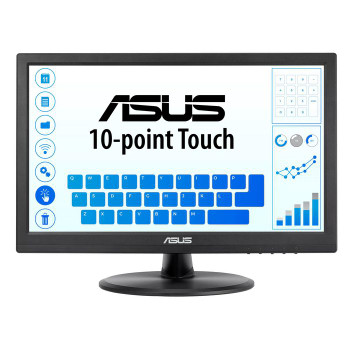
ASUS VT168HR 39.6 cm 15.6 1366 x 768 pixels WXGA LED Touchscreen Black" VT168HR
(No reviews yet)
Write a Review

- UPC:
- 4711081368403
- MPN:
- VT168HR
- Condition:
- New
- Availability:
- Available with FREE Delivery (usually delivered within 5-7 working days)

Description
10-Point Multi-touch – An Incredibly Intuitive Touch Experience
The ASUS VT168HR touchscreen monitor combines 10-point multi-touch capability with superb image quality, flexible connectivity and great ergonomics. The precise and accurate multi-touch display — allowing up to 10 simultaneous touches — is optimized for use with Windows 10 , allowing you to work smarter and more efficiently.
Windows 10 compatible
VT168HR has passed the tests and been confirmed that it has best compatibility and reliability with Windows10 operating system. Ensuring home and business users of Microsoft’s new operating system can benefit from ASUS Touch Monitor.
The Touchscreen Monitor That Gives You Much More
ASUS Splendid Video Intelligence Technology employs a color engine with eight preset modes. These allow you to adjust your display easily for the best color accuracy and image fidelity, depending on what kind of content is being displayed. You can access the presets via a designated hotkey.
Perfect Comfort and Flexibility for Home and Office
Designed With You in Mind
VT168HR has multiple video and peripheral connectors, including VGA and HDMI, making it suitable for use anywhere, either in the home or at the office.
VT168HR features an elegant circular base with an ergonomically-designed tilting stand that lets you choose the ideal viewing position. The monitor is also VESA mount-compatible, making it easy to mount on a wall or monitor arm. Advanced power-saving features ensure low energy costs and maximum reliability, and it meets stringent environmental standards including RoHS, ENERGY STAR and TCO.
Protect your eyes with ASUS Eye Care technology
VT168HR has undergone stringent performance tests and is awarded Flicker-free and Low Blue Light certifications by TÜV Rheinland laboratories, a global provider of technical, safety, and certification services, toshow display quality with clear image and prevent users suffering from eye strain and fatigue.
Ultra-low Blue Light Monitor
The TUV Rheinland-certified ASUS Blue Light Filter protects you from harmful blue light, and you can easily access its four different filter settings via a hotkey. VT168HR has undergone stringent performance tests and has been certified by TUV Rheinland laboratories, a global provider of technical, safety, and certification services, to be flicker-free and to emit low blue light levels
Flicker-free Technology
It's time to say goodbye to those tired, strained eyes. VT168HR features TUV Rheinland-certified ASUS Flicker-Free technology to reduce flicker for a comfortable viewing experience. This technology helps minimize instances of eyestrain and other damaging ailments, especially when you spend long, countless hours in front of a display watching favorite videos.
Specs
Display
Display diagonal
Size of the display for this product, measured diagonally, usually in inches.
39.6 cm (15.6")
Display resolution
The number of distinct pixels in each dimension that can be displayed. It is usually quoted as width × height, with the units in pixels: for example, "1024 × 768" means the width is 1024 pixels and the height is 768 pixels. The higher the number of pixels, the sharper the image.
66 x 768 pixels
HD type
Type of supported High Definition (e.g. Full HD, 4K Ultra HD).
WXGA
Native aspect ratio
The aspect ratio is the ratio of the width of an image to its height. The native aspect ratio is the one which the projector/display is particularly designed for. Images shown in native aspect ratio will utilize the entire resolution of the display and achieve maximum brightness. Images shown in other than native aspect ratio will always have less resolution and less brightness than images shown in native aspect ratio.
:9
Display technology
The technology used in the display e.g. plasma, LED.
LED
Panel type
TN
LED backlight
A backlight is a form of illumination used in liquid crystal displays (LCDs). One type of backlight is made by LEDs, which can be either white or RGB (red green blue). White LEDs are used most often in notebooks and desktop screens, and in virtually all mobile LCD screens. RGB LEDs for backlighting are found in high-end color proofing displays such as HP DreamColor LP2480zx monitor or selected HP EliteBook notebooks, as well as newer consumer grade displays such as Dell's Studio series laptops which have an optional RGB LED display.
Touchscreen
A screen of a laptop, smartphone, etc., that responds to touch so you can control the interface using your fingers.
Touchscreen technology
Projected capacitive system
Touch technology
Technology of touch sensetive screen e.g. dual-touch.
Multi-touch
Display brightness
Brightness is the amount of radiating light emitted from the screen. The brightness rating is measured in candellas per square meter, commonly known as 'nits'.
220 cd/m²
Response time
The response time is the time difference between the moment that a source (for example a video card) sends a signal and that equipment (for example a monitor) receives or display the signal. (Used abbreviations: R/F = Rise and Fall.)
5 ms
Anti-glare screen
Always gives an optimal view, even in direct sunlight.
Screen shape
Flat
Contrast ratio (typical)
The difference in light intensity between the brightest white and the darkest black.
400:1
Contrast ratio (dynamic)
A property of a display system, defined as the ratio of the luminance of the brightest color (white) to that of the darkest color (black) that the system is capable of producing.
0000000:1
Maximum refresh rate
60 Hz
Viewing angle, horizontal
Maximum horizontal angle at which a display can be viewed with acceptable visual performance.
90°
Viewing angle, vertical
Maximum vertical angle at which a display can be viewed with acceptable visual performance.
60°
Display number of colours
262144 colours
Pixel pitch
This is the parameter of a picture tube, which specifies the shortest distance between two dots of the same colour. The principle is: the smaller the dot pitch, the better sharpness of image.
0.252 x 0.252 mm
Performance
NVIDIA G-SYNC
AMD FreeSync
The product includes AMD Freesync Technology for the dynamic synchronization of the graphic card and the monitor in order to avoid screen tearing.
Multimedia
Built-in microphone
Microphone that is found inside the product.
Built-in camera
The product has an integrated camera.
Design
Product colour
The colour e.g. red, blue, green, black, white.
Black
Ports & interfaces
Built-in USB hub
Whether or not the device features a USB hub to connect more than one other device via USB.
VGA (D-Sub) ports quantity
Number of VGA (D-Sub) ports (connecting interfaces) in the device. The VGA (D-Sub) connector is a 15 pin connector between a computer and a monitor. It was first introduced in 1987 by IBM.
1
HDMI
HDMI (High-Definition Multimedia Interface) is a compact audio/video interface for transferring uncompressed video data and compressed/uncompressed digital audio data from a HDMI-compliant device ("the source device") to a compatible computer monitor, video projector, digital television, or digital audio device. HDMI is a digital replacement for existing analog video standards.
HDMI ports quantity
The number of sockets (ports) for HDMI connections. HDMI (High-Definition Multimedia Interface) is a compact audio/video interface for transferring uncompressed video data and compressed/uncompressed digital audio data from a HDMI-compliant device ("the source device") to a compatible computer monitor, video projector, digital television, or digital audio device. HDMI is a digital replacement for existing analog video standards.
1
HDMI version
1.4
HDCP
High-bandwidth Digital Content Protection (HDCP) is a form of digital copy protection to prevent copying of digital audio and video content as it travels across connections.
Ergonomics
VESA mounting
Ergonomics
Panel mounting interface
The product can be used wih VESA mounting interfaces.
75 x 75 mm
Wall mountable
The product can be mounted on (attached to ) a wall.
Cable lock slot
Holes on the edge of devices through which a cable lock can be passed, so the device can be locked to a desk etc.
Cable lock slot type
Kensington
Height adjustment
The part of the device that can be adjusted to change the height.
Tilt adjustment
The tilt, which means the angle at which the device is pointing (up or down), can be changed.
Tilt angle range
-5 - 30°
Power
Energy efficiency class (SDR)
B
Energy consumption (SDR) per 1000 hours
6 kWh
Power consumption (typical)
Amount of power consumed by this model, often expressed in watts (W). Typical values that manufacturers give are power consumption when off, standby/suspended mode, typical use, maximum usage.
8 W
Power consumption (standby)
The amount of electricity that is consumed when the product is on standby.
0.5 W
Power consumption (off)
0.5 W
AC input voltage
The voltage of the AC electricity that is inputted into the product.
0 - 240 V
AC input frequency
50 - 60 Hz
Energy efficiency scale
A to G
European Product Registry for Energy Labelling (EPREL) code
908289
Weight & dimensions
Width (with stand)
377.8 mm
Depth (with stand)
9.4 mm
Height (with stand)
280.7 mm
Weight (with stand)
1.51 kg
Width (without stand)
377.8 mm
Depth (without stand)
44 mm
Height (without stand)
235.9 mm
Packaging data
Package width
The distance from one side of the packaging to the other.
433.8 mm
Package depth
The distance from the front to the back of the packaging.
2 mm
Package height
The distance from the top to the bottom of the packaging.
349.7 mm
Package weight
Weight of the packaged product.
2.93 kg
Packaging content
Stand included
Cables included
AC, HDMI, USB Type-A to USB Type-B, VGA
Other features
Display viewable area (HxV)
344.23 x 193.54 mm
Logistics data
Harmonized System (HS) code
85285210
View AllClose
The ASUS VT168HR touchscreen monitor combines 10-point multi-touch capability with superb image quality, flexible connectivity and great ergonomics. The precise and accurate multi-touch display — allowing up to 10 simultaneous touches — is optimized for use with Windows 10 , allowing you to work smarter and more efficiently.
Windows 10 compatible
VT168HR has passed the tests and been confirmed that it has best compatibility and reliability with Windows10 operating system. Ensuring home and business users of Microsoft’s new operating system can benefit from ASUS Touch Monitor.
The Touchscreen Monitor That Gives You Much More
ASUS Splendid Video Intelligence Technology employs a color engine with eight preset modes. These allow you to adjust your display easily for the best color accuracy and image fidelity, depending on what kind of content is being displayed. You can access the presets via a designated hotkey.
Perfect Comfort and Flexibility for Home and Office
Designed With You in Mind
VT168HR has multiple video and peripheral connectors, including VGA and HDMI, making it suitable for use anywhere, either in the home or at the office.
VT168HR features an elegant circular base with an ergonomically-designed tilting stand that lets you choose the ideal viewing position. The monitor is also VESA mount-compatible, making it easy to mount on a wall or monitor arm. Advanced power-saving features ensure low energy costs and maximum reliability, and it meets stringent environmental standards including RoHS, ENERGY STAR and TCO.
Protect your eyes with ASUS Eye Care technology
VT168HR has undergone stringent performance tests and is awarded Flicker-free and Low Blue Light certifications by TÜV Rheinland laboratories, a global provider of technical, safety, and certification services, toshow display quality with clear image and prevent users suffering from eye strain and fatigue.
Ultra-low Blue Light Monitor
The TUV Rheinland-certified ASUS Blue Light Filter protects you from harmful blue light, and you can easily access its four different filter settings via a hotkey. VT168HR has undergone stringent performance tests and has been certified by TUV Rheinland laboratories, a global provider of technical, safety, and certification services, to be flicker-free and to emit low blue light levels
Flicker-free Technology
It's time to say goodbye to those tired, strained eyes. VT168HR features TUV Rheinland-certified ASUS Flicker-Free technology to reduce flicker for a comfortable viewing experience. This technology helps minimize instances of eyestrain and other damaging ailments, especially when you spend long, countless hours in front of a display watching favorite videos.
Specs
Display
Display diagonal
Size of the display for this product, measured diagonally, usually in inches.
39.6 cm (15.6")
Display resolution
The number of distinct pixels in each dimension that can be displayed. It is usually quoted as width × height, with the units in pixels: for example, "1024 × 768" means the width is 1024 pixels and the height is 768 pixels. The higher the number of pixels, the sharper the image.
66 x 768 pixels
HD type
Type of supported High Definition (e.g. Full HD, 4K Ultra HD).
WXGA
Native aspect ratio
The aspect ratio is the ratio of the width of an image to its height. The native aspect ratio is the one which the projector/display is particularly designed for. Images shown in native aspect ratio will utilize the entire resolution of the display and achieve maximum brightness. Images shown in other than native aspect ratio will always have less resolution and less brightness than images shown in native aspect ratio.
:9
Display technology
The technology used in the display e.g. plasma, LED.
LED
Panel type
TN
LED backlight
A backlight is a form of illumination used in liquid crystal displays (LCDs). One type of backlight is made by LEDs, which can be either white or RGB (red green blue). White LEDs are used most often in notebooks and desktop screens, and in virtually all mobile LCD screens. RGB LEDs for backlighting are found in high-end color proofing displays such as HP DreamColor LP2480zx monitor or selected HP EliteBook notebooks, as well as newer consumer grade displays such as Dell's Studio series laptops which have an optional RGB LED display.
Touchscreen
A screen of a laptop, smartphone, etc., that responds to touch so you can control the interface using your fingers.
Touchscreen technology
Projected capacitive system
Touch technology
Technology of touch sensetive screen e.g. dual-touch.
Multi-touch
Display brightness
Brightness is the amount of radiating light emitted from the screen. The brightness rating is measured in candellas per square meter, commonly known as 'nits'.
220 cd/m²
Response time
The response time is the time difference between the moment that a source (for example a video card) sends a signal and that equipment (for example a monitor) receives or display the signal. (Used abbreviations: R/F = Rise and Fall.)
5 ms
Anti-glare screen
Always gives an optimal view, even in direct sunlight.
Screen shape
Flat
Contrast ratio (typical)
The difference in light intensity between the brightest white and the darkest black.
400:1
Contrast ratio (dynamic)
A property of a display system, defined as the ratio of the luminance of the brightest color (white) to that of the darkest color (black) that the system is capable of producing.
0000000:1
Maximum refresh rate
60 Hz
Viewing angle, horizontal
Maximum horizontal angle at which a display can be viewed with acceptable visual performance.
90°
Viewing angle, vertical
Maximum vertical angle at which a display can be viewed with acceptable visual performance.
60°
Display number of colours
262144 colours
Pixel pitch
This is the parameter of a picture tube, which specifies the shortest distance between two dots of the same colour. The principle is: the smaller the dot pitch, the better sharpness of image.
0.252 x 0.252 mm
Performance
NVIDIA G-SYNC
AMD FreeSync
The product includes AMD Freesync Technology for the dynamic synchronization of the graphic card and the monitor in order to avoid screen tearing.
Multimedia
Built-in microphone
Microphone that is found inside the product.
Built-in camera
The product has an integrated camera.
Design
Product colour
The colour e.g. red, blue, green, black, white.
Black
Ports & interfaces
Built-in USB hub
Whether or not the device features a USB hub to connect more than one other device via USB.
VGA (D-Sub) ports quantity
Number of VGA (D-Sub) ports (connecting interfaces) in the device. The VGA (D-Sub) connector is a 15 pin connector between a computer and a monitor. It was first introduced in 1987 by IBM.
1
HDMI
HDMI (High-Definition Multimedia Interface) is a compact audio/video interface for transferring uncompressed video data and compressed/uncompressed digital audio data from a HDMI-compliant device ("the source device") to a compatible computer monitor, video projector, digital television, or digital audio device. HDMI is a digital replacement for existing analog video standards.
HDMI ports quantity
The number of sockets (ports) for HDMI connections. HDMI (High-Definition Multimedia Interface) is a compact audio/video interface for transferring uncompressed video data and compressed/uncompressed digital audio data from a HDMI-compliant device ("the source device") to a compatible computer monitor, video projector, digital television, or digital audio device. HDMI is a digital replacement for existing analog video standards.
1
HDMI version
1.4
HDCP
High-bandwidth Digital Content Protection (HDCP) is a form of digital copy protection to prevent copying of digital audio and video content as it travels across connections.
Ergonomics
VESA mounting
Ergonomics
Panel mounting interface
The product can be used wih VESA mounting interfaces.
75 x 75 mm
Wall mountable
The product can be mounted on (attached to ) a wall.
Cable lock slot
Holes on the edge of devices through which a cable lock can be passed, so the device can be locked to a desk etc.
Cable lock slot type
Kensington
Height adjustment
The part of the device that can be adjusted to change the height.
Tilt adjustment
The tilt, which means the angle at which the device is pointing (up or down), can be changed.
Tilt angle range
-5 - 30°
Power
Energy efficiency class (SDR)
B
Energy consumption (SDR) per 1000 hours
6 kWh
Power consumption (typical)
Amount of power consumed by this model, often expressed in watts (W). Typical values that manufacturers give are power consumption when off, standby/suspended mode, typical use, maximum usage.
8 W
Power consumption (standby)
The amount of electricity that is consumed when the product is on standby.
0.5 W
Power consumption (off)
0.5 W
AC input voltage
The voltage of the AC electricity that is inputted into the product.
0 - 240 V
AC input frequency
50 - 60 Hz
Energy efficiency scale
A to G
European Product Registry for Energy Labelling (EPREL) code
908289
Weight & dimensions
Width (with stand)
377.8 mm
Depth (with stand)
9.4 mm
Height (with stand)
280.7 mm
Weight (with stand)
1.51 kg
Width (without stand)
377.8 mm
Depth (without stand)
44 mm
Height (without stand)
235.9 mm
Packaging data
Package width
The distance from one side of the packaging to the other.
433.8 mm
Package depth
The distance from the front to the back of the packaging.
2 mm
Package height
The distance from the top to the bottom of the packaging.
349.7 mm
Package weight
Weight of the packaged product.
2.93 kg
Packaging content
Stand included
Cables included
AC, HDMI, USB Type-A to USB Type-B, VGA
Other features
Display viewable area (HxV)
344.23 x 193.54 mm
Logistics data
Harmonized System (HS) code
85285210
Additional Information
Shipping: |
Usually shipped within 3-5 working days |
Delivery: |
Usually delivered within 5-7 working days |
Related Products
Related Products
Out of stock

Asus VT168HR 39.6 Cm 15.6" 1366 X 768 VT168HR
Asus
£213.48
10-Point Multi-touch � An Incredibly Intuitive Touch Experience
The ASUS VT168HR touchscreen monitor combines 10-point multi-touch capability with superb image quality, flexible connectivity and...

Hannspree HT161HNB touch screen monitor 39.6 cm 15.6 1366 x 768 pixels Multi-tou HT161HNB
Hannspree
£188.91
With 10 point-touch Projective Capacitive technology the HANNSpree HT161HNB delivers seamless and accurate touch response. Featuring LED-backlight LCD screen technology, it offers exceptional...
Out of stock
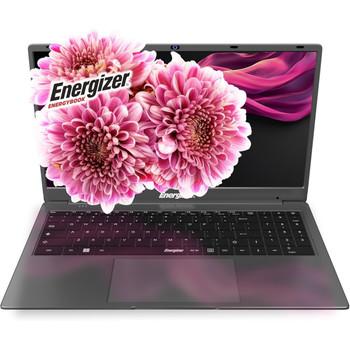
Energizer EnergyBook Intel Celeron N 1.1 GHz 39.6 cm 15.6" 1366 x 768 pixels 8 G L15-N40-82QW
Energizer
£234.93
Energizer EnergyBook. Product type: Laptop, Form factor: Clamshell. Processor family: Intel Celeron N, Processor model: N4020, Processor frequency: 1.1 GHz. Display diagonal: 39.6 cm (15.6"), HD...
Out of stock

ASUS ZenScreen MB16AHP 39.6 cm 15.6" 1920 x 1080 pixels Full HD LED 5 ms Black MB16AHP
Asus
£343.05
Extend your vision. Free your world.
ZenScreen Go MB16AHP with a large 7800 mAh built-in battery is designed to keep you productive, wherever you are. It weighs only 0.86 kilograms and is 9...