
Asus
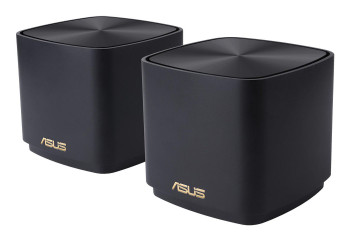
ASUS ZenWiFi XD4 Plus B-2-PK Dual-band 2.4 GHz / 5 GHz Wi-Fi 6 802.11ax Black In 90IG07M0-MO3C30
(No reviews yet)
Write a Review

- UPC:
- 4711081760221
- MPN:
- 90IG07M0-MO3C30
- Condition:
- New
- Availability:
- Available with FREE Delivery (usually delivered within 5-7 working days)

Description
WiFi Coverage Everywhere. Always Secure.
Whole-home Coverage
People enjoy family time together with good WiFi performance provided by ZenWiFi
The ZenWiFi XD4 Plus system consists of three ASUS AX1800 WiFi 6 routers, featuring unique technologies that give you superfast, reliable and secure WiFi connections - inside or outside your home!
WiFi 6
True 8K Streaming
ZenWiFi XD4 Plus puts your WiFi into top gear! With a total bandwidth of up to of 1800 Mbps, it's up to 1.4X faster* than WiFi 5 routers **.
* Compatible WiFi 6 device required.
** The data compares speed of 2X2 11ax on 5GHz 80 MHz bandwidth with 1024QAM modulation to speed of 2x2 11ac on 5GHz 80MHz with 256QAM modulation.
Space-saving and Great Design
Comes with mounting holes and a screw pack. Hang it on the wall or place it anywhere, the choice is yours!
More Stable WiFi with Wired Connections between ZenWiFi Hubs
If you have Ethernet ports in your walls, you can set ZenWiFi XD4 Plus to use Ethernet backhaul, reserving all WiFi bands for your wireless devices for even more stable and reliable networking.
Easier-than-ever Setup
3-step setup with the ASUS Router app
What makes ZenWiFi XD4 Plus setup so easy?
One-time setup, with auto synchronization for all the hubs in each package
Just power XD4 Plus on and follow the instructions in the App, the setup is easily done!
Make the Internet a Safer Place for Everyone
AiProtection Classic with Parental Controls is free for life. It gives you total peace of mind, and you can keep an eye on everything that's happening on your network via the mobile app.
One-Tap Safe Browsing
The internet can contain inappropriate content, intrusive ads or other dangers and safety risks. ASUS Safe Browsing helps block undesirable content in one tap -- no extra apps required. Its lightweight DNS-based filtering* won-t affect router performance. It can even filter explicit content from search engine results to protect your kids online.
*By using Safe Browsing, you acknowledge and agree that the standard for blocked and filtered content is established by a third-party DNS provider.
Instant Guard Makes Public WiFi Secure
ASUS Instant Guard uses the power of your ZenWiFi AX Hybrid to add rock-solid VPN security to any public WiFi connections you use. It helps protect your private information such as credit card details, business data, emails and more.
Smart Looks for Smart Homes
ZenWiFi XD4 Plus works perfectly with smart-home services - including Alexa skills and IFTTT - and is available in charcoal or white to suit your d-cor.
AiMesh Technology
Easy setup. Flexible management.
Even non-experts can quickly set up AiMesh technology, while more experienced users will appreciate the comprehensive advanced networking features.
Specs
Design
Product type
The sub-category of the product.
Mesh router
Product colour
The colour e.g. red, blue, green, black, white.
Black
LED indicators
Power
Antenna type
Type of antenna, also known an aerial, e.g. external, internal.
Internal
Antennas quantity
2
Maximum coverage
306.58 m?
Reset button
Wireless LAN features
Wi-Fi band
The frequency bands the product features.
Dual-band (2.4 GHz / 5 GHz)
Top Wi-Fi standard
Connection of this device is done via Wi-Fi in a high standard.
Wi-Fi 6 (802.11ax)
Wi-Fi standards
The type of wireless local area network (LAN). It can be ad-hoc, where units in a network communicate peer-to-peer, or Infrastructure, where units communicate with each other via an access point A LAN interconnects computers in a small area e.g. home, school or office.
802.11a, 802.11b, 802.11g, Wi-Fi 4 (802.11n), Wi-Fi 5 (802.11ac), Wi-Fi 6 (802.11ax)
WLAN data transfer rate (first band)
574 Mbit/s
WLAN data transfer rate (second band)
01 Mbit/s
Networking standards
The way in which the network is working, e.g. IEEE 802.11a, IEEE 802.11b, IEEE 802.11g.
IEEE 802.11a, IEEE 802.11b, IEEE 802.11g, IEEE 802.11n
Security algorithms
Security algorithms are used to provide authentication, cipher key generation, integrity and radio link privacy to users on mobile networks. The security algorithms supported are the ones that can be used with this product.
WPA, WPA2, WPA3
Point-to-point protocol over Ethernet (PPPoE)
The Point-to-Point Protocol over Ethernet (PPPoE) is a network protocol for encapsulating PPP frames inside Ethernet frames. It appeared in 1999, in the context of the boom of DSL as the solution for tunneling packets over the DSL connection to the ISP's IP network, and from there to the rest of the Internet. A 2005 networking book noted that "Most DSL providers use PPPoE, which provides authentication, encryption, and compression." Typical use of PPPoE involves leveraging the PPP facilities for authenticating the user with a username and password, predominately via the PAP protocol and less often via CHAP.
Static IP
IGMP snooping
Dynamic DNS (DDNS)
Guest access
VPN support
VPN Client L2TP VPN Client OVPN VPN Client PPTP VPN Server IPSec VPN Server OVPN VPN Server PPTP
Features
Internal memory
The amount of memory, usually measured in bytes (e.g. MB, GB), which is installed in the system's hardware.
256 MB
Flash memory
8 MB
Features
Quality of Service (QoS) support
Port forwarding
DHCP server
A server is a system which that responds to requests across a computer network to provide, or help to provide, a network service. DCHP servers uses the DCHP (Dynamic Host Configuration Protocol), which is a standardized networking protocol used by servers on an IP network to allocate IP addresses to computers. The purpose of DHCP is to automate the IP address configuration of a computer without a network administrator. IP addresses are typically selected from a range of assigned IP addresses stored in a database on the server and issued to a computer which requests a new IP address. An IP address is assigned to a computer for a set interval, after which, the computer must renew the IP address or acquire a new one.
Parental control
Parental control features
Time controls
Works with Amazon Alexa
SSID Broadcast
MIMO
Ports & interfaces
Ethernet LAN (RJ-45) ports
Number of Ethernet LAN (RJ-45) ports (connecting interfaces) in the device. Ethernet LAN (RJ-45) ports allow a computer to connect to the ethernet.
2
Ethernet WAN
DC-in jack
The socket/plug where the DC electricity supply connects to the device.
Power
AC input voltage
The voltage of the AC electricity that is inputted into the product.
0 - 240 V
AC input frequency
50 - 60 Hz
AC adapter output voltage
V
AC adapter output current
1.5 A
Packaging content
Number of products included
The number of products that are included in the package.
2 pc(s)
AC adapter included
Number of units included
2 pc(s)
Ethernet cable
View AllClose
Whole-home Coverage
People enjoy family time together with good WiFi performance provided by ZenWiFi
The ZenWiFi XD4 Plus system consists of three ASUS AX1800 WiFi 6 routers, featuring unique technologies that give you superfast, reliable and secure WiFi connections - inside or outside your home!
WiFi 6
True 8K Streaming
ZenWiFi XD4 Plus puts your WiFi into top gear! With a total bandwidth of up to of 1800 Mbps, it's up to 1.4X faster* than WiFi 5 routers **.
* Compatible WiFi 6 device required.
** The data compares speed of 2X2 11ax on 5GHz 80 MHz bandwidth with 1024QAM modulation to speed of 2x2 11ac on 5GHz 80MHz with 256QAM modulation.
Space-saving and Great Design
Comes with mounting holes and a screw pack. Hang it on the wall or place it anywhere, the choice is yours!
More Stable WiFi with Wired Connections between ZenWiFi Hubs
If you have Ethernet ports in your walls, you can set ZenWiFi XD4 Plus to use Ethernet backhaul, reserving all WiFi bands for your wireless devices for even more stable and reliable networking.
Easier-than-ever Setup
3-step setup with the ASUS Router app
What makes ZenWiFi XD4 Plus setup so easy?
One-time setup, with auto synchronization for all the hubs in each package
Just power XD4 Plus on and follow the instructions in the App, the setup is easily done!
Make the Internet a Safer Place for Everyone
AiProtection Classic with Parental Controls is free for life. It gives you total peace of mind, and you can keep an eye on everything that's happening on your network via the mobile app.
One-Tap Safe Browsing
The internet can contain inappropriate content, intrusive ads or other dangers and safety risks. ASUS Safe Browsing helps block undesirable content in one tap -- no extra apps required. Its lightweight DNS-based filtering* won-t affect router performance. It can even filter explicit content from search engine results to protect your kids online.
*By using Safe Browsing, you acknowledge and agree that the standard for blocked and filtered content is established by a third-party DNS provider.
Instant Guard Makes Public WiFi Secure
ASUS Instant Guard uses the power of your ZenWiFi AX Hybrid to add rock-solid VPN security to any public WiFi connections you use. It helps protect your private information such as credit card details, business data, emails and more.
Smart Looks for Smart Homes
ZenWiFi XD4 Plus works perfectly with smart-home services - including Alexa skills and IFTTT - and is available in charcoal or white to suit your d-cor.
AiMesh Technology
Easy setup. Flexible management.
Even non-experts can quickly set up AiMesh technology, while more experienced users will appreciate the comprehensive advanced networking features.
Specs
Design
Product type
The sub-category of the product.
Mesh router
Product colour
The colour e.g. red, blue, green, black, white.
Black
LED indicators
Power
Antenna type
Type of antenna, also known an aerial, e.g. external, internal.
Internal
Antennas quantity
2
Maximum coverage
306.58 m?
Reset button
Wireless LAN features
Wi-Fi band
The frequency bands the product features.
Dual-band (2.4 GHz / 5 GHz)
Top Wi-Fi standard
Connection of this device is done via Wi-Fi in a high standard.
Wi-Fi 6 (802.11ax)
Wi-Fi standards
The type of wireless local area network (LAN). It can be ad-hoc, where units in a network communicate peer-to-peer, or Infrastructure, where units communicate with each other via an access point A LAN interconnects computers in a small area e.g. home, school or office.
802.11a, 802.11b, 802.11g, Wi-Fi 4 (802.11n), Wi-Fi 5 (802.11ac), Wi-Fi 6 (802.11ax)
WLAN data transfer rate (first band)
574 Mbit/s
WLAN data transfer rate (second band)
01 Mbit/s
Networking standards
The way in which the network is working, e.g. IEEE 802.11a, IEEE 802.11b, IEEE 802.11g.
IEEE 802.11a, IEEE 802.11b, IEEE 802.11g, IEEE 802.11n
Security algorithms
Security algorithms are used to provide authentication, cipher key generation, integrity and radio link privacy to users on mobile networks. The security algorithms supported are the ones that can be used with this product.
WPA, WPA2, WPA3
Point-to-point protocol over Ethernet (PPPoE)
The Point-to-Point Protocol over Ethernet (PPPoE) is a network protocol for encapsulating PPP frames inside Ethernet frames. It appeared in 1999, in the context of the boom of DSL as the solution for tunneling packets over the DSL connection to the ISP's IP network, and from there to the rest of the Internet. A 2005 networking book noted that "Most DSL providers use PPPoE, which provides authentication, encryption, and compression." Typical use of PPPoE involves leveraging the PPP facilities for authenticating the user with a username and password, predominately via the PAP protocol and less often via CHAP.
Static IP
IGMP snooping
Dynamic DNS (DDNS)
Guest access
VPN support
VPN Client L2TP VPN Client OVPN VPN Client PPTP VPN Server IPSec VPN Server OVPN VPN Server PPTP
Features
Internal memory
The amount of memory, usually measured in bytes (e.g. MB, GB), which is installed in the system's hardware.
256 MB
Flash memory
8 MB
Features
Quality of Service (QoS) support
Port forwarding
DHCP server
A server is a system which that responds to requests across a computer network to provide, or help to provide, a network service. DCHP servers uses the DCHP (Dynamic Host Configuration Protocol), which is a standardized networking protocol used by servers on an IP network to allocate IP addresses to computers. The purpose of DHCP is to automate the IP address configuration of a computer without a network administrator. IP addresses are typically selected from a range of assigned IP addresses stored in a database on the server and issued to a computer which requests a new IP address. An IP address is assigned to a computer for a set interval, after which, the computer must renew the IP address or acquire a new one.
Parental control
Parental control features
Time controls
Works with Amazon Alexa
SSID Broadcast
MIMO
Ports & interfaces
Ethernet LAN (RJ-45) ports
Number of Ethernet LAN (RJ-45) ports (connecting interfaces) in the device. Ethernet LAN (RJ-45) ports allow a computer to connect to the ethernet.
2
Ethernet WAN
DC-in jack
The socket/plug where the DC electricity supply connects to the device.
Power
AC input voltage
The voltage of the AC electricity that is inputted into the product.
0 - 240 V
AC input frequency
50 - 60 Hz
AC adapter output voltage
V
AC adapter output current
1.5 A
Packaging content
Number of products included
The number of products that are included in the package.
2 pc(s)
AC adapter included
Number of units included
2 pc(s)
Ethernet cable
Additional Information
Shipping: |
Usually shipped within 3-5 working days |
Delivery: |
Usually delivered within 5-7 working days |
Related Products
Related Products

ASUS ZenWiFi XD4 Plus B-1-PK Dual-band 2.4 GHz / 5 GHz Wi-Fi 6 802.11ax Black 2 90IG07M0-MO3C10
Asus
£83.02
WiFi Coverage Everywhere. Always Secure. Whole-home Coverage People enjoy family time together with good WiFi performance provided by ZenWiFi The ZenWiFi XD4 Plus system consists of three ASUS...
Asus 90IG07M0-MO3C30 Zenwifi Xd4 Plus B-2-Pk 90IG07M0-MO3C30
Asus
£179.74
WiFi Coverage Everywhere. Always Secure.
Whole-home Coverage
People enjoy family time together with good WiFi performance provided by ZenWiFi
The ZenWiFi XD4 Plus system consists of three ASUS...

ASUS ZenWiFi XD5 W-1-PK Dual-band 2.4 GHz / 5 GHz Wi-Fi 6 802.11ax White 2 Inter 90IG0750-MO3B60
Asus
£110.71
WiFi Coverage Everywhere. Always Secure. Whole-home Coverage People enjoy family time together with good WiFi performance provided by ZenWiFi The ZenWiFi XD5 system consists of three ASUS AX3000...

ASUS ZenWiFi XD5 W-3-PK Dual-band 2.4 GHz / 5 GHz Wi-Fi 6 802.11ax White 2 Inter 90IG0750-MO3B20
Asus
£263.59
WiFi Coverage Everywhere. Always Secure. Whole-home Coverage People enjoy family time together with good WiFi performance provided by ZenWiFi The ZenWiFi XD5 system consists of three ASUS AX3000...