
Belkin
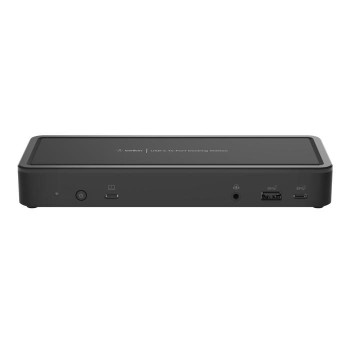
Belkin USB-C Triple Display MST Dock INC003VFBK
(No reviews yet)
Write a Review

- UPC:
- 0000000000000
- MPN:
- INC003VFBK
- Condition:
- New
- Availability:
- Available with FREE Delivery (usually delivered within 5-7 working days)

Description
Multiple Monitors, Multiple Ports
Create your workspace with a docking station that expands your connections for the office, home office, or classroom. Our USB-C docking station allows you to connect up to two extended monitors through HDMI or DisplayPort to your Chromebook. This 14-port docking station offers up to 65W of pass-through power and 10 Gbps data transfer speeds, giving you the ability to connect and work while charging your laptop. You can connect an external hard drive, mouse, keyboard, headphones, and other peripherals to the USB-C dock while reducing desktop clutter with a single cable connection to your USB-C laptop. It-s Works With Chromebook Certified, with the ability to install firmware updates directly through Chrome OS for an enhanced connectivity experience. Plus, it-s TAA compliant for use in a wide range of government applications.
Up to 4K Resolution
View everything in high definition and work on multiple applications across your screens. This USB-C dock allows your laptop to connect to up to three monitors* simultaneously on select host devices with MST capabilities so you can enjoy sharper-looking, more detailed images, and visualize content across extended displays. Monitor resolutions up to 4K are supported.
65W of USB-C Power Delivery 3.0
Power Delivery 3.0 delivers an efficient, simultaneous pass-through charge up to 65W to your laptop and multiple accessories while working, streaming, or gaming. Plus, USB-C PD 3.0 technology keeps you connected to devices even when your power source becomes disconnected.
Works With Chromebook Certified**
This USB-C dock is part of our portfolio of Chrome-certified products. All our Works With Chromebook products have gone through extensive testing and are proven to meet Chromebook compatibility standards. You can be assured it-s a docking station that-ll work seamlessly with your Chromebook, with the ability to install any needed firmware updates directly. Not recommended for Mac users.
Specs
Ports & interfaces
Connectivity technology
The technology that enables connectivity of the device, e.g. wired or wireless.
Docking
Host interface
Interface that enables a host controller to communicate with a driver.
USB 3.2 Gen 2 (3.1 Gen 2) Type-C
USB 2.0 ports quantity
Number of USB 2.0 ports (connecting interfaces) in the device. USB 2.0 was released in April 2000 (now called "Hi-Speed"), adding higher maximum signaling rate of 480 Mbit/s (effective throughput up to 35 MB/s or 280 Mbit/s), USB 2.0 ports are usually black.
2
USB 3.2 Gen 2 (3.1 Gen 2) Type-A ports quantity
3
USB 3.2 Gen 2 (3.1 Gen 2) Type-C ports quantity
Number of USB 3.1 (3.1 Gen 2) ports with Type-C connector. USB 3.1 (3.1 Gen 2) is USB interface version which supports transfer rate up to 10 Gbit/s (SuperSpeed+). USB Type-C connector has symmetrical design architecture and compatible with Thunderbolt 3 interface.
3
USB Power Delivery (USB PD)
USB Power Delivery revision
3.0
USB Power Delivery up to
65 W
HDMI ports quantity
The number of sockets (ports) for HDMI connections. HDMI (High-Definition Multimedia Interface) is a compact audio/video interface for transferring uncompressed video data and compressed/uncompressed digital audio data from a HDMI-compliant device ("the source device") to a compatible computer monitor, video projector, digital television, or digital audio device. HDMI is a digital replacement for existing analog video standards.
2
HDMI version
2.0
DisplayPorts quantity
Number of DisplayPorts. A DisplayPort is a digital display interface developed by the Video Electronics Standards Association (VESA). The interface is primarily used to connect a video source to a display device such as a computer monitor, though it can also be used to carry audio, USB, and other forms of data.
2
DisplayPort version
1.4
Microphone in
The socket where a microphone is connected to the device.
Combo headphone/mic port
Headphone connectivity
How headphones connect to a device e.g. wirelessly or via a cable and connector.
3.5 mm
DC-in jack
The socket/plug where the DC electricity supply connects to the device.
USB Type-C DisplayPort Alternate Mode
Network
Ethernet LAN
An Ethernet LAN (Local Area Network) interface is present, for a wired conection via a cable.
Ethernet LAN (RJ-45) ports
Number of Ethernet LAN (RJ-45) ports (connecting interfaces) in the device. Ethernet LAN (RJ-45) ports allow a computer to connect to the ethernet.
1
Ethernet LAN data rates
The different speed levels of the Ethernet LAN connection.
, 100, 1000 Mbit/s
Performance
Card reader integrated
A card reader is a device that enables reading and, in some cases, writing data to and from a memory card.
HD type
Type of supported High Definition (e.g. Full HD, 4K Ultra HD).
4K Ultra HD
Number of displays supported
The number of displays that can be used with this product.
3
Maximum refresh rate
60 Hz
Cable lock slot
Holes on the edge of devices through which a cable lock can be passed, so the device can be locked to a desk etc.
Product colour
The colour e.g. red, blue, green, black, white.
Black
On/off switch
The button which is pressed to switch the device on or off.
Charging function
Power
Power source type
What the power source is.
DC, USB
Power supply
The way in which the product is powered e.g. rechargeable battery, mains electricity connected via a plug and cable.
5 W
Output voltage
V
USB cable length
1 m
Weight & dimensions
Width
The measurement or extent of something from side to side.
210 mm
Depth
The distance from the front to the back of something.
80 mm
Height
The measurement of the product from head to foot or from base to top.
29 mm
Packaging data
Quantity per pack
1 pc(s)
Packaging content
Cables included
USB Type-C to USB Type-C
Logistics data
Harmonized System (HS) code
84713000
View AllClose
Create your workspace with a docking station that expands your connections for the office, home office, or classroom. Our USB-C docking station allows you to connect up to two extended monitors through HDMI or DisplayPort to your Chromebook. This 14-port docking station offers up to 65W of pass-through power and 10 Gbps data transfer speeds, giving you the ability to connect and work while charging your laptop. You can connect an external hard drive, mouse, keyboard, headphones, and other peripherals to the USB-C dock while reducing desktop clutter with a single cable connection to your USB-C laptop. It-s Works With Chromebook Certified, with the ability to install firmware updates directly through Chrome OS for an enhanced connectivity experience. Plus, it-s TAA compliant for use in a wide range of government applications.
Up to 4K Resolution
View everything in high definition and work on multiple applications across your screens. This USB-C dock allows your laptop to connect to up to three monitors* simultaneously on select host devices with MST capabilities so you can enjoy sharper-looking, more detailed images, and visualize content across extended displays. Monitor resolutions up to 4K are supported.
65W of USB-C Power Delivery 3.0
Power Delivery 3.0 delivers an efficient, simultaneous pass-through charge up to 65W to your laptop and multiple accessories while working, streaming, or gaming. Plus, USB-C PD 3.0 technology keeps you connected to devices even when your power source becomes disconnected.
Works With Chromebook Certified**
This USB-C dock is part of our portfolio of Chrome-certified products. All our Works With Chromebook products have gone through extensive testing and are proven to meet Chromebook compatibility standards. You can be assured it-s a docking station that-ll work seamlessly with your Chromebook, with the ability to install any needed firmware updates directly. Not recommended for Mac users.
Specs
Ports & interfaces
Connectivity technology
The technology that enables connectivity of the device, e.g. wired or wireless.
Docking
Host interface
Interface that enables a host controller to communicate with a driver.
USB 3.2 Gen 2 (3.1 Gen 2) Type-C
USB 2.0 ports quantity
Number of USB 2.0 ports (connecting interfaces) in the device. USB 2.0 was released in April 2000 (now called "Hi-Speed"), adding higher maximum signaling rate of 480 Mbit/s (effective throughput up to 35 MB/s or 280 Mbit/s), USB 2.0 ports are usually black.
2
USB 3.2 Gen 2 (3.1 Gen 2) Type-A ports quantity
3
USB 3.2 Gen 2 (3.1 Gen 2) Type-C ports quantity
Number of USB 3.1 (3.1 Gen 2) ports with Type-C connector. USB 3.1 (3.1 Gen 2) is USB interface version which supports transfer rate up to 10 Gbit/s (SuperSpeed+). USB Type-C connector has symmetrical design architecture and compatible with Thunderbolt 3 interface.
3
USB Power Delivery (USB PD)
USB Power Delivery revision
3.0
USB Power Delivery up to
65 W
HDMI ports quantity
The number of sockets (ports) for HDMI connections. HDMI (High-Definition Multimedia Interface) is a compact audio/video interface for transferring uncompressed video data and compressed/uncompressed digital audio data from a HDMI-compliant device ("the source device") to a compatible computer monitor, video projector, digital television, or digital audio device. HDMI is a digital replacement for existing analog video standards.
2
HDMI version
2.0
DisplayPorts quantity
Number of DisplayPorts. A DisplayPort is a digital display interface developed by the Video Electronics Standards Association (VESA). The interface is primarily used to connect a video source to a display device such as a computer monitor, though it can also be used to carry audio, USB, and other forms of data.
2
DisplayPort version
1.4
Microphone in
The socket where a microphone is connected to the device.
Combo headphone/mic port
Headphone connectivity
How headphones connect to a device e.g. wirelessly or via a cable and connector.
3.5 mm
DC-in jack
The socket/plug where the DC electricity supply connects to the device.
USB Type-C DisplayPort Alternate Mode
Network
Ethernet LAN
An Ethernet LAN (Local Area Network) interface is present, for a wired conection via a cable.
Ethernet LAN (RJ-45) ports
Number of Ethernet LAN (RJ-45) ports (connecting interfaces) in the device. Ethernet LAN (RJ-45) ports allow a computer to connect to the ethernet.
1
Ethernet LAN data rates
The different speed levels of the Ethernet LAN connection.
, 100, 1000 Mbit/s
Performance
Card reader integrated
A card reader is a device that enables reading and, in some cases, writing data to and from a memory card.
HD type
Type of supported High Definition (e.g. Full HD, 4K Ultra HD).
4K Ultra HD
Number of displays supported
The number of displays that can be used with this product.
3
Maximum refresh rate
60 Hz
Cable lock slot
Holes on the edge of devices through which a cable lock can be passed, so the device can be locked to a desk etc.
Product colour
The colour e.g. red, blue, green, black, white.
Black
On/off switch
The button which is pressed to switch the device on or off.
Charging function
Power
Power source type
What the power source is.
DC, USB
Power supply
The way in which the product is powered e.g. rechargeable battery, mains electricity connected via a plug and cable.
5 W
Output voltage
V
USB cable length
1 m
Weight & dimensions
Width
The measurement or extent of something from side to side.
210 mm
Depth
The distance from the front to the back of something.
80 mm
Height
The measurement of the product from head to foot or from base to top.
29 mm
Packaging data
Quantity per pack
1 pc(s)
Packaging content
Cables included
USB Type-C to USB Type-C
Logistics data
Harmonized System (HS) code
84713000
Additional Information
Shipping: |
Usually shipped within 3-5 working days |
Delivery: |
Usually delivered within 5-7 working days |
Related Products
Related Products
Belkin INC003VFBK Notebook Dock/Port Replicator INC003VFBK
Belkin
£210.36
Multiple Monitors, Multiple Ports
Create your workspace with a docking station that expands your connections for the office, home office, or classroom. Our USB-C docking station allows you to connect...


Belkin INC002VFBK Usb-C Dual Display Docking INC002VFBK
Belkin
£203.34
Easy, Expandable Docking Station for Any Laptop
Expand your workspace with a docking station that offers wide compatibility with laptops for any business, school, or home office. Our USB-C� Dual...