
JLab
JLab JBUDS ERGONOMIC Mouse Home Right-Hand RF Wireless + Bluetooth 2400 DPI IEUMJBERGORBLK82
(No reviews yet)
Write a Review

- UPC:
- 0810119070845
- MPN:
- IEUMJBERGORBLK82
- Condition:
- New
- Availability:
- Available with FREE Delivery (usually delivered within 5-7 working days)

Description
Multi-device vertical wireless mouse reduces strain
PRODUCTIVITY MEETS COMFORT
The JBuds Ergonomic Mouse offers blissful comfort with a personalized set-up for your favorite functions and tasks. With seven buttons, you have everything you need to reach WFH greatness, and everything you want to play your game, your way. The vertical design provides a natural angle for your wrist and hand, so switching between your favorite functions and your top devices is effortless.
NATURAL COMFORT
Designed to mimic the most natural handshake position, the JBuds Ergonomic Mouse rests at a cozy 52-degree angle. This angle helps reduce the risk of repetitive strain injuries, and if you're someone who deals with hand and wrist pain, this ergonomic mouse might just be your new best friend, offering some much-needed relief.
FLEXIBLE CONNECTIONS
The JBuds Wireless Mouse is compatible with three-count -em, three!-device connection options. You can pair with nearly any type of device using Bluetooth 5.2, or USB. We hate pairing confusion too, so we made it super easy for you to switch between saved devices.
CUSTOM USER PROFILES
Through our JLab Work App, you can program specific buttons to fit how you like to use your favorite applications. And why choose? Paste your most used Excel formulas or paste the same text with a simple click of a button. With up to three unique profiles, you can easily switch between them depending on what you-re doing. Check out some example set-ups.
SCROLL YOUR WAY
Adjustable tracking allows you to change the sensitivity of your mouse so you can move at your own speed. Whether you like to click around on turbo or leisurely make your way down a page, the JBuds Wireless Mouse will adjust to the right pace for you.
QUIET CLICKS
We-re very familiar with the looks you get from your newly appointed WFH colleagues, fellow caf--goers, and napping pets when clicking gets out of hand. That-s why we design all of our mice with silent buttons-so you can click away without raising any eyebrows (or ears).
Specs
Mouse
Purpose
What the product is used for.
Home
Device interface
The ports (sockets) where the device connects with other devices.
RF Wireless + Bluetooth
Movement resolution
2400 DPI
Buttons type
The type of the buttons.
Pressed buttons
Scroll type
Type of scroll in computer input device, e.g. wheel, touch.
Wheel
Buttons quantity
The number of buttons that there are in/on the product.
6
Frequency band
A small section of the spectrum of radio communication frequencies, in which channels are usually used or set aside for the same purpose e.g.for a channel on FM radio; for mobile networks to communicate with mobile phones.
2.4 GHz
Design
Form factor
The shape or design of the product.
Right-hand
Ergonomic design
Vertical design
Product colour
The colour e.g. red, blue, green, black, white.
Black
Surface coloration
Type of surface coloration e.g. monotone, image.
Monochromatic
Power
Power source
What is providing power for the product e.g. mains electricity.
Batteries/Cable
Rechargeable
The device can be connected to a power supply in order to restore electrical energy in the battery.
Battery type
Description of battery supplied with the product, such battery form factor (e.g. AA/AAA).
Built-in battery
USB Type-C charging port
USB Power Delivery (USB PD)
USB Type-C required charging power (min)
2.5 W
USB Type-C required charging power (max)
5 W
Packaging data
AC adapter included
Other features
Warranty period
2 year(s)
View AllClose
PRODUCTIVITY MEETS COMFORT
The JBuds Ergonomic Mouse offers blissful comfort with a personalized set-up for your favorite functions and tasks. With seven buttons, you have everything you need to reach WFH greatness, and everything you want to play your game, your way. The vertical design provides a natural angle for your wrist and hand, so switching between your favorite functions and your top devices is effortless.
NATURAL COMFORT
Designed to mimic the most natural handshake position, the JBuds Ergonomic Mouse rests at a cozy 52-degree angle. This angle helps reduce the risk of repetitive strain injuries, and if you're someone who deals with hand and wrist pain, this ergonomic mouse might just be your new best friend, offering some much-needed relief.
FLEXIBLE CONNECTIONS
The JBuds Wireless Mouse is compatible with three-count -em, three!-device connection options. You can pair with nearly any type of device using Bluetooth 5.2, or USB. We hate pairing confusion too, so we made it super easy for you to switch between saved devices.
CUSTOM USER PROFILES
Through our JLab Work App, you can program specific buttons to fit how you like to use your favorite applications. And why choose? Paste your most used Excel formulas or paste the same text with a simple click of a button. With up to three unique profiles, you can easily switch between them depending on what you-re doing. Check out some example set-ups.
SCROLL YOUR WAY
Adjustable tracking allows you to change the sensitivity of your mouse so you can move at your own speed. Whether you like to click around on turbo or leisurely make your way down a page, the JBuds Wireless Mouse will adjust to the right pace for you.
QUIET CLICKS
We-re very familiar with the looks you get from your newly appointed WFH colleagues, fellow caf--goers, and napping pets when clicking gets out of hand. That-s why we design all of our mice with silent buttons-so you can click away without raising any eyebrows (or ears).
Specs
Mouse
Purpose
What the product is used for.
Home
Device interface
The ports (sockets) where the device connects with other devices.
RF Wireless + Bluetooth
Movement resolution
2400 DPI
Buttons type
The type of the buttons.
Pressed buttons
Scroll type
Type of scroll in computer input device, e.g. wheel, touch.
Wheel
Buttons quantity
The number of buttons that there are in/on the product.
6
Frequency band
A small section of the spectrum of radio communication frequencies, in which channels are usually used or set aside for the same purpose e.g.for a channel on FM radio; for mobile networks to communicate with mobile phones.
2.4 GHz
Design
Form factor
The shape or design of the product.
Right-hand
Ergonomic design
Vertical design
Product colour
The colour e.g. red, blue, green, black, white.
Black
Surface coloration
Type of surface coloration e.g. monotone, image.
Monochromatic
Power
Power source
What is providing power for the product e.g. mains electricity.
Batteries/Cable
Rechargeable
The device can be connected to a power supply in order to restore electrical energy in the battery.
Battery type
Description of battery supplied with the product, such battery form factor (e.g. AA/AAA).
Built-in battery
USB Type-C charging port
USB Power Delivery (USB PD)
USB Type-C required charging power (min)
2.5 W
USB Type-C required charging power (max)
5 W
Packaging data
AC adapter included
Other features
Warranty period
2 year(s)
Additional Information
Shipping: |
Usually shipped within 3-5 working days |
Delivery: |
Usually delivered within 5-7 working days |
Related Products
Related Products
Out of stock

Jlab Jbuds 2400 Dpi Bluetooth Ergonomic Mouse IEUMJBERGORBLK82
JLab
£48.70
JLab JBuds 2400 DPI Bluetooth Ergonomic Mouse
Out of stock

JLab JBuds Right-hand Optical Bluetooth + USB Type-A 2400 DPI Black IEUMJBMOUSERBLK124
Jlab Audio
£38.17
Multi-device full-size wireless mouse for home or the office
PERFORMANCE IN HAND
The JBuds Wireless Bluetooth Mouse offers full-sized functionality with a personalized approach. With seven buttons...
Out of stock

Jlab Epic 2400 Dpi Wireless Bluetooth Mouse Black IEUMEPICMOUSERBLK124
JLab
£66.84
JLab Epic 2400 DPI Wireless Bluetooth Mouse Black Epic moves, all dayThe Epic Wireless Bluetooth Mouse gives you the ultimate pro-level performance whether you’re crunching the numbers, creating...
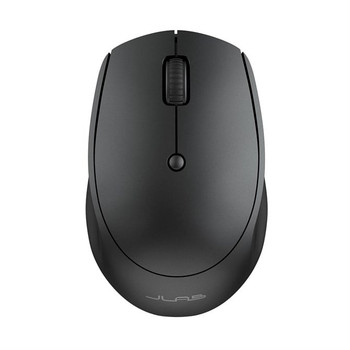
JLab GO Mouse Office Ambidextrous RF Wireless + Bluetooth 1600 DPI IEUMGOMOUSERBLK124
JLab
£24.23
CLICK CLICK GO The GO Wireless Bluetooth Mouse is small, comfortable in your hand, and dare we say-kind of cute? Your everything go-to, it goes with you from desk to caf- to coworking space and...