
Optoma
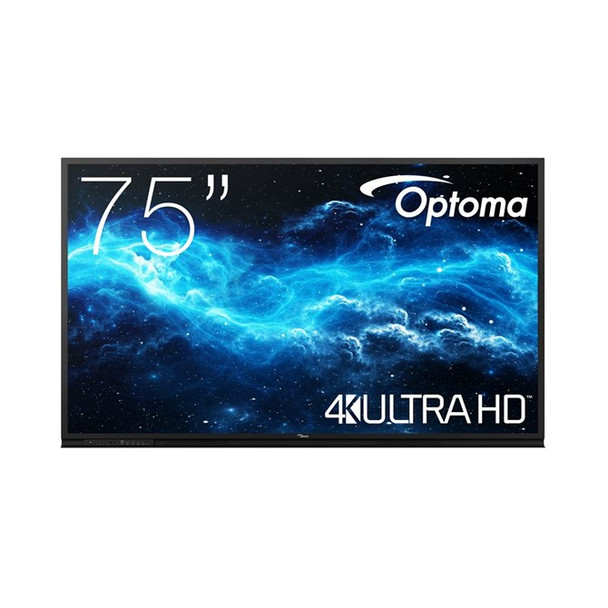
Optoma 3752RK Interactive flat panel 190.5 cm 75 LED Wi-Fi 400 cd/m? 4K Ultra HD H1F0H04BW101
(No reviews yet)
Write a Review
- UPC:
- 0000000000000
- MPN:
- H1F0H04BW101
- Condition:
- New
- Availability:
- Available with FREE Delivery (usually delivered within 5-7 working days)

Description
Creative Touch 3-Series 75" interactive flat panel display
Robust collaboration, extensive connectivity options and a value-focused design. Combining the latest technology and packed with everything a classroom or business requires, the Creative Touch 3-Series delivers all the functionalities and processing power needed to create, educate and collaborate.
Easily access the front-facing ports for HDMI and USB connectivity. For wireless connectivity, Optoma-s CreativeCast Pro allows up to four users to share content at the same time from their Windows, iOS, macOS, Chrome or Android device.
The easy-to-use interactive displays also make lessons more fun with built-in tools such as templates, type-to-text and handwriting recognition. As well as collaboration tools such as Cloud Whiteboard, Google Classroom and Vote where teachers are able to collect valuable feedback instantly.
Equipped with an OPS slot, and easy to download OTA updates, the touchscreen display is future-proofed should your requirements change in the ever-changing world of technology. (OPS sold separately).
Optoma Creative Board - Whiteboard and Annotation
Creative sharing is easy with built-in annotation tools to help facilitate collaboration in the classroom. Designed for hybrid working - Creative Board provides smart collaboration and connectivity features for any classroom.
Work simultaneously. Two teams or individuals can work together from two separate locations in real-time.
Our Floating Toolbar makes learning smoother Change tools at a touch.
Easily move and position the toolbar anywhere on the infinity canvas. Instantly select tools, such as an eraser, ruler and highlighter, change colours or import images to enhance any lesson.
Hybrid Learning - Teach beyond the classroom
Teach in real-time, no matter the location of the student.
Optoma-s Creative Touch interactive displays are perfectly suited to the ever-changing needs of educational environments. Designed to support distance learning, students can work together in real time from home, in the classroom or anywhere, maximizing engagement in remote and hybrid learning environments. With the ability to connect to webcams and other visualisers along with Optoma-s unique software, the Creative Touch interactive displays provide the ultimate collaboration solution for education.
Connect easily
Sync with your cloud accounts to plan your lessons from anywhere, at any time. As Creative Board is a cloud-based platform, you can access your lesson materials from any Optoma Creative Touch interactive display in your school.
Sync with Google Classroom
Use the tools you are already familiar with
Teachers can easily create and import lesson materials anywhere. Your Optoma display integrates seamlessly with Google Classroom bringing the benefits of paperless sharing and digital collaboration to the classroom. Teachers can now work on their lesson plans from home, and instantly bring them to any classroom.
Connect anytime, anywhere
Peace of mind
Teachers can have confidence in the ability of their IT managers to provide remote support with the Optoma Management Suite (OMS)- solution. IT managers can easily monitor and diagnose issues related to any Optoma AV display, ensuring teachers and support staff are not left without assistance. For an extra layer of readiness, schools can also set alerts and broadcast emergency announcements.
Never run out of space during a lesson
With the ability to draw anywhere, insert images and shapes, all of which can be saved, printed or shared with student devices, the infinity canvas will not limit your creativity and expands your workspace.
Enhance your lessons and keep ideas flowing
Easily drag and drop images and video content from the embedded browser directly into the Creative Board canvas.
CONNECT ACROSS PLATFORMS
Connect any device.
Wirelessly broadcast, share or stream your content to the big screen with CreativeCast Pro-. Screen mirror high-quality images, video, documents and audio from your smartphone, laptop or PC - all with a touch of a button. Bringing your own device has never been easier.
Reactiv SUITE
Elevate remote or in-person meetings. Transform your presentations into powerful storytelling moments with Vizetto Reactiv SUITE- software - included with your Optoma 5-Series interactive flat panel display.
Specs
Display
LED backlight
A backlight is a form of illumination used in liquid crystal displays (LCDs). One type of backlight is made by LEDs, which can be either white or RGB (red green blue). White LEDs are used most often in notebooks and desktop screens, and in virtually all mobile LCD screens. RGB LEDs for backlighting are found in high-end color proofing displays such as HP DreamColor LP2480zx monitor or selected HP EliteBook notebooks, as well as newer consumer grade displays such as Dell's Studio series laptops which have an optional RGB LED display.
LED backlighting type
Backlighting is the illumination of a screen e.g. LCD (liquid crystal display). There are several types of backlighting with LEDs, e.g. full array, edge lit.
Direct-LED
Display diagonal
Size of the display for this product, measured diagonally, usually in inches.
0.5 cm (75")
Display technology
The technology used in the display e.g. plasma, LED.
LED
Display resolution
The number of distinct pixels in each dimension that can be displayed. It is usually quoted as width - height, with the units in pixels: for example, "1024 - 768" means the width is 1024 pixels and the height is 768 pixels. The higher the number of pixels, the sharper the image.
3840 x 2160 pixels
Display brightness
Brightness is the amount of radiating light emitted from the screen. The brightness rating is measured in candellas per square meter, commonly known as 'nits'.
400 cd/m?
HD type
Type of supported High Definition (e.g. Full HD, 4K Ultra HD).
4K Ultra HD
Touchscreen
A screen of a laptop, smartphone, etc., that responds to touch so you can control the interface using your fingers.
Number of simultaneous touchpoints
40
Response time
The response time is the time difference between the moment that a source (for example a video card) sends a signal and that equipment (for example a monitor) receives or display the signal. (Used abbreviations: R/F = Rise and Fall.)
6 ms
Contrast ratio (dynamic)
A property of a display system, defined as the ratio of the luminance of the brightest color (white) to that of the darkest color (black) that the system is capable of producing.
5000:1
Viewing angle, horizontal
Maximum horizontal angle at which a display can be viewed with acceptable visual performance.
8?
Viewing angle, vertical
Maximum vertical angle at which a display can be viewed with acceptable visual performance.
8?
Display number of colours
1.07 billion colours
Rated lifetime
50000 h
Haze rate
8%
Surface hardness
7H
Ports & interfaces
HDMI ports quantity
The number of sockets (ports) for HDMI connections. HDMI (High-Definition Multimedia Interface) is a compact audio/video interface for transferring uncompressed video data and compressed/uncompressed digital audio data from a HDMI-compliant device ("the source device") to a compatible computer monitor, video projector, digital television, or digital audio device. HDMI is a digital replacement for existing analog video standards.
4
HDMI version
2.0
HDMI input ports quantity
3
HDMI output ports quantity
1
VGA (D-Sub) input ports
Sockets in the device for VGA (D-Sub) inputs, which are sockets with 15 holes. The 15-pin VGA connector is found on many video cards, computer monitors, and high definition television sets.
1
DisplayPorts quantity
Number of DisplayPorts. A DisplayPort is a digital display interface developed by the Video Electronics Standards Association (VESA). The interface is primarily used to connect a video source to a display device such as a computer monitor, though it can also be used to carry audio, USB, and other forms of data.
1
DisplayPorts in
1
USB port
The device features a socket into which a USB cable can be plugged.
USB ports quantity
8
USB version
Universal Serial Bus (USB) is an industry standard developed in the mid-1990s that defines the interface used for connection, communication and power supply between computers and electronic devices. Every new version - for example 1.1, 2.0, 3.0 - is much faster than the previous one.
2.0/3.2 Gen 1 (3.1 Gen 1)
USB 2.0 Type-B ports quantity
2
USB 3.2 Gen 1 (3.1 Gen 1) Type-A ports quantity
1
USB 3.2 Gen 1 (3.1 Gen 1) Type-C ports quantity
Number of USB 3.0 (3.1 Gen 1) ports with Type-C connector. USB 3.0 (3.1 Gen 1) is USB interface version which supports transfer rate up to 5 Gbit/s (SuperSpeed). USB Type-C connector has symmetrical design architecture and compatible with Thunderbolt 3 interface.
1
Ethernet LAN (RJ-45) ports
Number of Ethernet LAN (RJ-45) ports (connecting interfaces) in the device. Ethernet LAN (RJ-45) ports allow a computer to connect to the ethernet.
1
Audio (L/R) in
The two sockets (ports) for receiving left audio signal (white cable) and right audio signal (red cable).
1
Audio (L/R) out
The two sockets (ports) for transmitting left audio signal (white cable) and right audio signal (red cable).
1
Microphone in
The socket where a microphone is connected to the device.
RS-232 interface
Audio
Built-in speaker(s)
The device contains speaker(s) to produce sound.
Number of built-in speakers
2
RMS rated power
RMS (Root mean square) is a measure of the continuous power required by a device, in particular audio amplifiers and loudspeakers.
W
Design
Product design
The creation of a plan or convention for the construction of an object or a system.
Interactive flat panel
Placement supported
Where the product can be placed e.g. indoor/outdoor, horizontal/vertical.
Indoor
Orientation
Horizontal
Product colour
The colour e.g. red, blue, green, black, white.
Black
Screen shape
Flat
VESA mounting
Panel mounting interface
The product can be used wih VESA mounting interfaces.
800 x 400 mm
Bezel width (bottom)
5.4 cm
Design
Bezel width (side)
2.2 cm
Bezel width (top)
2.2 cm
Anti-glare screen
Always gives an optimal view, even in direct sunlight.
Fingerprint resistant
Mounting type
Type of mounting e.g. wall mounting.
Wall
Performance
Purpose
What the product is used for.
Universal
On Screen Display (OSD)
Number of OSD languages
On Screen Display (OSD) languages
Arabic, Simplified Chinese, Traditional Chinese, Czech, Danish, German, Dutch, English, Spanish, Finnish, French, Greek, Italian, Norwegian, Polish, Portuguese, Romanian, Russian, Swedish, Turkish
Pen type
The characteristics of the pen, specifically how the ink is transferred to a surface when writing, e.g. ball point.
Passive pen
Writing tools
Finger, Passive pen
Power
Power consumption (typical)
Amount of power consumed by this model, often expressed in watts (W). Typical values that manufacturers give are power consumption when off, standby/suspended mode, typical use, maximum usage.
3.1 W
Power consumption (standby)
The amount of electricity that is consumed when the product is on standby.
0.5 W
Power consumption (max)
The maximum amount of power used by the device.
400 W
AC input voltage
The voltage of the AC electricity that is inputted into the product.
0 - 240 V
AC input frequency
50 - 60 Hz
Computer system
Computer system
Built-in processor
Whether or not a processor is built into the device.
Processor manufacturer
The manufacturer that produced the processor.
ARM
Processor architecture
ARM Cortex-A55
Processor cores
The number of central processing units ('cores') in a processor. Some processors have 1 core, others have 2 (e.g. Intel Core Duo) or more (e.g. the Intel Xeon E7-2850 has 10 cores).
4
Internal memory
A computer's memory which is directly accessible to the CPU.
4 GB
Internal storage capacity
The amount e.g of data which can be stored inside the device.
32 GB
Operating system installed
Type of operating system on a device e.g. IOS on Apple devices, Android for mobile devices.
Android 11
Mac operating systems supported
Mac operating systems e.g. OS X can be used with the device.
Linux operating systems supported
8 RT. Linux (9.4, 9.5), Red Hat Enterprise Linux 5.0 (supported with a pre-built package); SUSE Linux (10.3, 11.0, 11, 11.1, 11.2), Fedora (9, 9.0, 10, 10.0, 11.0, 11, 12, 12.0), Ubuntu (8.04, 8.04.1, 8.04.2, 8.10, 9.04, 9.10, 10.04), Debian (5.0, 5.0.1, 5.0.2, 5.0.3)
Weight & dimensions
Display width
35 mm
Display depth
6 mm
Display height
47 mm
Display weight
65 kg
Packaging content
Remote control included
Component of an electronics device, most commonly a television set, DVD player and home theater systems originally used for operating the device wirelessly from a short line-of-sight distance.
Batteries included
Stylus pen
Cables included
HDMI, Power, USB Type-C
Operational conditions
Operating temperature (T-T)
The minimum and maximum temperatures at which the product can be safely operated.
-10 - 45 ?C
Operating relative humidity (H-H)
- 93%
Sensors
Ambient light sensor
Network
Ethernet LAN
An Ethernet LAN (Local Area Network) interface is present, for a wired conection via a cable.
Wi-Fi
Popular technology that allows an electronic device to exchange data or connect to the internet wirelessly using radio waves.
Features
Base colour
Black
Suitable for indoor use
Technical details
OPS slot
1
Other features
Quick start guide
Instructions, either online, as a computer program or in paper form, to allow you to set up and start using the product quickly.
View AllClose
Robust collaboration, extensive connectivity options and a value-focused design. Combining the latest technology and packed with everything a classroom or business requires, the Creative Touch 3-Series delivers all the functionalities and processing power needed to create, educate and collaborate.
Easily access the front-facing ports for HDMI and USB connectivity. For wireless connectivity, Optoma-s CreativeCast Pro allows up to four users to share content at the same time from their Windows, iOS, macOS, Chrome or Android device.
The easy-to-use interactive displays also make lessons more fun with built-in tools such as templates, type-to-text and handwriting recognition. As well as collaboration tools such as Cloud Whiteboard, Google Classroom and Vote where teachers are able to collect valuable feedback instantly.
Equipped with an OPS slot, and easy to download OTA updates, the touchscreen display is future-proofed should your requirements change in the ever-changing world of technology. (OPS sold separately).
Optoma Creative Board - Whiteboard and Annotation
Creative sharing is easy with built-in annotation tools to help facilitate collaboration in the classroom. Designed for hybrid working - Creative Board provides smart collaboration and connectivity features for any classroom.
Work simultaneously. Two teams or individuals can work together from two separate locations in real-time.
Our Floating Toolbar makes learning smoother Change tools at a touch.
Easily move and position the toolbar anywhere on the infinity canvas. Instantly select tools, such as an eraser, ruler and highlighter, change colours or import images to enhance any lesson.
Hybrid Learning - Teach beyond the classroom
Teach in real-time, no matter the location of the student.
Optoma-s Creative Touch interactive displays are perfectly suited to the ever-changing needs of educational environments. Designed to support distance learning, students can work together in real time from home, in the classroom or anywhere, maximizing engagement in remote and hybrid learning environments. With the ability to connect to webcams and other visualisers along with Optoma-s unique software, the Creative Touch interactive displays provide the ultimate collaboration solution for education.
Connect easily
Sync with your cloud accounts to plan your lessons from anywhere, at any time. As Creative Board is a cloud-based platform, you can access your lesson materials from any Optoma Creative Touch interactive display in your school.
Sync with Google Classroom
Use the tools you are already familiar with
Teachers can easily create and import lesson materials anywhere. Your Optoma display integrates seamlessly with Google Classroom bringing the benefits of paperless sharing and digital collaboration to the classroom. Teachers can now work on their lesson plans from home, and instantly bring them to any classroom.
Connect anytime, anywhere
Peace of mind
Teachers can have confidence in the ability of their IT managers to provide remote support with the Optoma Management Suite (OMS)- solution. IT managers can easily monitor and diagnose issues related to any Optoma AV display, ensuring teachers and support staff are not left without assistance. For an extra layer of readiness, schools can also set alerts and broadcast emergency announcements.
Never run out of space during a lesson
With the ability to draw anywhere, insert images and shapes, all of which can be saved, printed or shared with student devices, the infinity canvas will not limit your creativity and expands your workspace.
Enhance your lessons and keep ideas flowing
Easily drag and drop images and video content from the embedded browser directly into the Creative Board canvas.
CONNECT ACROSS PLATFORMS
Connect any device.
Wirelessly broadcast, share or stream your content to the big screen with CreativeCast Pro-. Screen mirror high-quality images, video, documents and audio from your smartphone, laptop or PC - all with a touch of a button. Bringing your own device has never been easier.
Reactiv SUITE
Elevate remote or in-person meetings. Transform your presentations into powerful storytelling moments with Vizetto Reactiv SUITE- software - included with your Optoma 5-Series interactive flat panel display.
Specs
Display
LED backlight
A backlight is a form of illumination used in liquid crystal displays (LCDs). One type of backlight is made by LEDs, which can be either white or RGB (red green blue). White LEDs are used most often in notebooks and desktop screens, and in virtually all mobile LCD screens. RGB LEDs for backlighting are found in high-end color proofing displays such as HP DreamColor LP2480zx monitor or selected HP EliteBook notebooks, as well as newer consumer grade displays such as Dell's Studio series laptops which have an optional RGB LED display.
LED backlighting type
Backlighting is the illumination of a screen e.g. LCD (liquid crystal display). There are several types of backlighting with LEDs, e.g. full array, edge lit.
Direct-LED
Display diagonal
Size of the display for this product, measured diagonally, usually in inches.
0.5 cm (75")
Display technology
The technology used in the display e.g. plasma, LED.
LED
Display resolution
The number of distinct pixels in each dimension that can be displayed. It is usually quoted as width - height, with the units in pixels: for example, "1024 - 768" means the width is 1024 pixels and the height is 768 pixels. The higher the number of pixels, the sharper the image.
3840 x 2160 pixels
Display brightness
Brightness is the amount of radiating light emitted from the screen. The brightness rating is measured in candellas per square meter, commonly known as 'nits'.
400 cd/m?
HD type
Type of supported High Definition (e.g. Full HD, 4K Ultra HD).
4K Ultra HD
Touchscreen
A screen of a laptop, smartphone, etc., that responds to touch so you can control the interface using your fingers.
Number of simultaneous touchpoints
40
Response time
The response time is the time difference between the moment that a source (for example a video card) sends a signal and that equipment (for example a monitor) receives or display the signal. (Used abbreviations: R/F = Rise and Fall.)
6 ms
Contrast ratio (dynamic)
A property of a display system, defined as the ratio of the luminance of the brightest color (white) to that of the darkest color (black) that the system is capable of producing.
5000:1
Viewing angle, horizontal
Maximum horizontal angle at which a display can be viewed with acceptable visual performance.
8?
Viewing angle, vertical
Maximum vertical angle at which a display can be viewed with acceptable visual performance.
8?
Display number of colours
1.07 billion colours
Rated lifetime
50000 h
Haze rate
8%
Surface hardness
7H
Ports & interfaces
HDMI ports quantity
The number of sockets (ports) for HDMI connections. HDMI (High-Definition Multimedia Interface) is a compact audio/video interface for transferring uncompressed video data and compressed/uncompressed digital audio data from a HDMI-compliant device ("the source device") to a compatible computer monitor, video projector, digital television, or digital audio device. HDMI is a digital replacement for existing analog video standards.
4
HDMI version
2.0
HDMI input ports quantity
3
HDMI output ports quantity
1
VGA (D-Sub) input ports
Sockets in the device for VGA (D-Sub) inputs, which are sockets with 15 holes. The 15-pin VGA connector is found on many video cards, computer monitors, and high definition television sets.
1
DisplayPorts quantity
Number of DisplayPorts. A DisplayPort is a digital display interface developed by the Video Electronics Standards Association (VESA). The interface is primarily used to connect a video source to a display device such as a computer monitor, though it can also be used to carry audio, USB, and other forms of data.
1
DisplayPorts in
1
USB port
The device features a socket into which a USB cable can be plugged.
USB ports quantity
8
USB version
Universal Serial Bus (USB) is an industry standard developed in the mid-1990s that defines the interface used for connection, communication and power supply between computers and electronic devices. Every new version - for example 1.1, 2.0, 3.0 - is much faster than the previous one.
2.0/3.2 Gen 1 (3.1 Gen 1)
USB 2.0 Type-B ports quantity
2
USB 3.2 Gen 1 (3.1 Gen 1) Type-A ports quantity
1
USB 3.2 Gen 1 (3.1 Gen 1) Type-C ports quantity
Number of USB 3.0 (3.1 Gen 1) ports with Type-C connector. USB 3.0 (3.1 Gen 1) is USB interface version which supports transfer rate up to 5 Gbit/s (SuperSpeed). USB Type-C connector has symmetrical design architecture and compatible with Thunderbolt 3 interface.
1
Ethernet LAN (RJ-45) ports
Number of Ethernet LAN (RJ-45) ports (connecting interfaces) in the device. Ethernet LAN (RJ-45) ports allow a computer to connect to the ethernet.
1
Audio (L/R) in
The two sockets (ports) for receiving left audio signal (white cable) and right audio signal (red cable).
1
Audio (L/R) out
The two sockets (ports) for transmitting left audio signal (white cable) and right audio signal (red cable).
1
Microphone in
The socket where a microphone is connected to the device.
RS-232 interface
Audio
Built-in speaker(s)
The device contains speaker(s) to produce sound.
Number of built-in speakers
2
RMS rated power
RMS (Root mean square) is a measure of the continuous power required by a device, in particular audio amplifiers and loudspeakers.
W
Design
Product design
The creation of a plan or convention for the construction of an object or a system.
Interactive flat panel
Placement supported
Where the product can be placed e.g. indoor/outdoor, horizontal/vertical.
Indoor
Orientation
Horizontal
Product colour
The colour e.g. red, blue, green, black, white.
Black
Screen shape
Flat
VESA mounting
Panel mounting interface
The product can be used wih VESA mounting interfaces.
800 x 400 mm
Bezel width (bottom)
5.4 cm
Design
Bezel width (side)
2.2 cm
Bezel width (top)
2.2 cm
Anti-glare screen
Always gives an optimal view, even in direct sunlight.
Fingerprint resistant
Mounting type
Type of mounting e.g. wall mounting.
Wall
Performance
Purpose
What the product is used for.
Universal
On Screen Display (OSD)
Number of OSD languages
On Screen Display (OSD) languages
Arabic, Simplified Chinese, Traditional Chinese, Czech, Danish, German, Dutch, English, Spanish, Finnish, French, Greek, Italian, Norwegian, Polish, Portuguese, Romanian, Russian, Swedish, Turkish
Pen type
The characteristics of the pen, specifically how the ink is transferred to a surface when writing, e.g. ball point.
Passive pen
Writing tools
Finger, Passive pen
Power
Power consumption (typical)
Amount of power consumed by this model, often expressed in watts (W). Typical values that manufacturers give are power consumption when off, standby/suspended mode, typical use, maximum usage.
3.1 W
Power consumption (standby)
The amount of electricity that is consumed when the product is on standby.
0.5 W
Power consumption (max)
The maximum amount of power used by the device.
400 W
AC input voltage
The voltage of the AC electricity that is inputted into the product.
0 - 240 V
AC input frequency
50 - 60 Hz
Computer system
Computer system
Built-in processor
Whether or not a processor is built into the device.
Processor manufacturer
The manufacturer that produced the processor.
ARM
Processor architecture
ARM Cortex-A55
Processor cores
The number of central processing units ('cores') in a processor. Some processors have 1 core, others have 2 (e.g. Intel Core Duo) or more (e.g. the Intel Xeon E7-2850 has 10 cores).
4
Internal memory
A computer's memory which is directly accessible to the CPU.
4 GB
Internal storage capacity
The amount e.g of data which can be stored inside the device.
32 GB
Operating system installed
Type of operating system on a device e.g. IOS on Apple devices, Android for mobile devices.
Android 11
Mac operating systems supported
Mac operating systems e.g. OS X can be used with the device.
Linux operating systems supported
8 RT. Linux (9.4, 9.5), Red Hat Enterprise Linux 5.0 (supported with a pre-built package); SUSE Linux (10.3, 11.0, 11, 11.1, 11.2), Fedora (9, 9.0, 10, 10.0, 11.0, 11, 12, 12.0), Ubuntu (8.04, 8.04.1, 8.04.2, 8.10, 9.04, 9.10, 10.04), Debian (5.0, 5.0.1, 5.0.2, 5.0.3)
Weight & dimensions
Display width
35 mm
Display depth
6 mm
Display height
47 mm
Display weight
65 kg
Packaging content
Remote control included
Component of an electronics device, most commonly a television set, DVD player and home theater systems originally used for operating the device wirelessly from a short line-of-sight distance.
Batteries included
Stylus pen
Cables included
HDMI, Power, USB Type-C
Operational conditions
Operating temperature (T-T)
The minimum and maximum temperatures at which the product can be safely operated.
-10 - 45 ?C
Operating relative humidity (H-H)
- 93%
Sensors
Ambient light sensor
Network
Ethernet LAN
An Ethernet LAN (Local Area Network) interface is present, for a wired conection via a cable.
Wi-Fi
Popular technology that allows an electronic device to exchange data or connect to the internet wirelessly using radio waves.
Features
Base colour
Black
Suitable for indoor use
Technical details
OPS slot
1
Other features
Quick start guide
Instructions, either online, as a computer program or in paper form, to allow you to set up and start using the product quickly.
Additional Information
Shipping: |
Usually shipped within 3-5 working days |
Delivery: |
Usually delivered within 5-7 working days |
Related Products
Related Products

Optoma 5752RK+ Interactive flat panel 190.5 cm 75 LED 400 cd/m? 4K Ultra HD Blac H1F0C0KBW101
Optoma
£2,619.68
Creative Touch 5-Series 75" premium interactive flat panel display Create. Connect. Inspire. Teacher led technology Optoma-s interactive displays are designed to fit the needs of teachers and...
Optoma N3861K Digital signage flat panel 2.18 m 86 LED Wi-Fi 450 cd/m? 4K Ultra H1F2C0HBW101
Optoma
£1,936.89
N-Series Professional Displays The N-Series Professional Displays are designed to enhance the current conferencing setups of corporate and education settings to accommodate hybrid work and...
Optoma N3651K Digital signage flat panel 165.1 cm 65 LED Wi-Fi 450 cd/m? 4K Ultr H1F2C0FBW101
Optoma
£1,132.61
N-Series Professional Displays The N-Series Professional Displays are designed to enhance the current conferencing setups of corporate and education settings to accommodate hybrid work and...