
Samsung
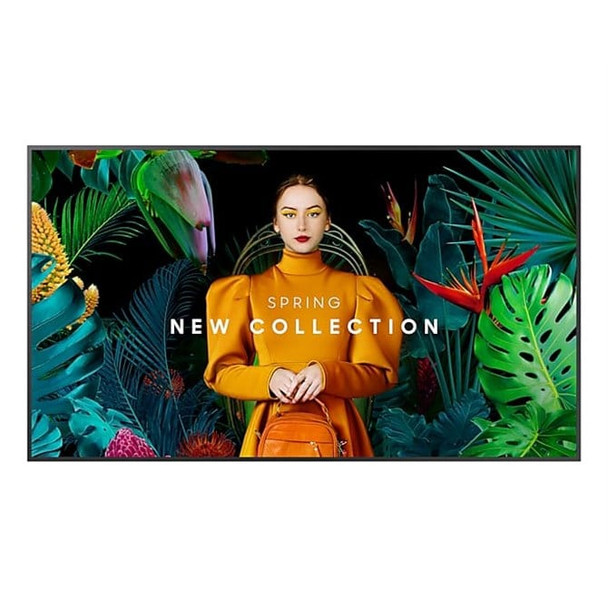
Samsung QMC Digital signage flat panel 127 cm 50 Wi-Fi 500 cd/m? 4K Ultra HD Bla LH50QMCEPGCXEN
(No reviews yet)
Write a Review
- UPC:
- 0000000000000
- MPN:
- LH50QMCEPGCXEN
- Condition:
- New
- Availability:
- Available with FREE Delivery (usually delivered within 5-7 working days)

Description
Maximum impact in minimum space
Ultra Slim Depth
The QMC's unparalleled ultra-slim thickness of 28.5mm makes it the thinnest option in Samsung-s UHD series. It comes with the Slim Fit Wall Mount, which allows you to install it neatly and easily in any environment. QMC optimizes space with its sleek design that blends seamlessly into your business.
Clean visuals in landscape or portrait mode
Even Bezel
The bezels are consistent and even on all four sides of the display, with the same thickness and dimensions. The new even bezel design prevents any visual issues from arising when the display is adjusted to portrait mode.
Secure and even mounting
Centered VESA Holes
The central positioning of the VESA holes on the back of the display evenly distribute its weight for secure mounting. With the VESA holes now shifted to the center, users can adjust the display to portrait mode without the display tilting unintentionally.
Lifelike colour, born in a pure state with fine crystal
Dynamic Crystal Colour
Every picture is more immersive with one billion shades of colour. Dynamic Crystal Colour delivers true-to-life variations, allowing customers to see every subtlety.
View lifelike shades of colour in powerful 4K
Quantum Processor Lite 4K
Samsung-s industry-leading video processing technology enhances every piece of content for clarity and consistency. Intelligent UHD upscaling technology, powered by Samsung-s Quantum Processor Lite 4K, elevates lower-resolution video to UHD, providing a professional picture quality.
Ensure critical information is always visible
Non-glare
QMC displays feature reliable, non-glare panels that provide better visibility from all angles, any time of day. The non-glare display enables businesses to deliver accurate information in critical locations, like airports and train stations.
Connect with convenience
Home UI
QMC boasts greater usability with an upgraded home screen UI. Popular categories like Favorites, Sources and Settings are displayed on the same screen for convenient availability. The Favorites folder grants users quick, easy access to frequently used features in a single click.
Collaborate between screens with wire-free speed
Smartview+
SmartView+ enables wireless screen sharing without cable connections, ensuring easy collaboration. Users can now enable the screen sharing function at the start of a meeting, allowing the meeting admin to quickly switch between screens with one click.
Simplified calibration between screens with mobile app
Smart Calibration
Guarantee complete brand consistency across every display in every location. Using the Samsung mobile app, Smart Calibration ensures every display is calibrated correctly, showcasing brand logos and other collateral in the exact colours required.
Enhance professional environments with expert tools
Professional Modes
Built-in professional modes enable more possibilities in specific verticals. Director Mode minimizes post-processing, aligning content to the director-s original intention. Medical teams can simulate medical images such as X-rays with DICOM Simulation Mode, meeting DICOM's full grayscale standards
Change the way to manage your display
Samsung VXT
Samsung VXT CMS is a cloud-based solution that brings together content management and remote device management capabilities, allowing users to remotely manage hardware settings and troubleshoot issues while effortlessly creating and deploying content with no previous training needed.
Everyday Sustainability
Energy Star / EPEAT* / T-V Rheinland Carbon Footprint*
Samsung is making diverse efforts to reduce our environmental impact in smart signage, and encouraging users to pursue a more sustainable life.
Specs
Display
Panel type
IPS
Display diagonal
Size of the display for this product, measured diagonally, usually in inches.
7 cm (50")
Display technology
The technology used in the display e.g. plasma, LED.
LCD
Display resolution
The number of distinct pixels in each dimension that can be displayed. It is usually quoted as width - height, with the units in pixels: for example, "1024 - 768" means the width is 1024 pixels and the height is 768 pixels. The higher the number of pixels, the sharper the image.
3840 x 2160 pixels
Display brightness
Brightness is the amount of radiating light emitted from the screen. The brightness rating is measured in candellas per square meter, commonly known as 'nits'.
500 cd/m-
HD type
Type of supported High Definition (e.g. Full HD, 4K Ultra HD).
4K Ultra HD
Touchscreen
A screen of a laptop, smartphone, etc., that responds to touch so you can control the interface using your fingers.
Response time
The response time is the time difference between the moment that a source (for example a video card) sends a signal and that equipment (for example a monitor) receives or display the signal. (Used abbreviations: R/F = Rise and Fall.)
8 ms
Contrast ratio (typical)
The difference in light intensity between the brightest white and the darkest black.
00:1
Dynamic contrast ratio marketing name
Mega Contrast
Viewing angle, horizontal
Maximum horizontal angle at which a display can be viewed with acceptable visual performance.
8-
Viewing angle, vertical
Maximum vertical angle at which a display can be viewed with acceptable visual performance.
8-
Pixel pitch
This is the parameter of a picture tube, which specifies the shortest distance between two dots of the same colour. The principle is: the smaller the dot pitch, the better sharpness of image.
0.285 x 0.285 mm
Display diagonal (metric)
This is the size of the display screen, measured diagonally.
5 cm
Horizontal scan range
30 - 81 kHz
Vertical scan range
48 - 75 Hz
Haze rate
25%
Pixel frequency (max)
594 MHz
RGB colour space
NTSC
Colour gamut
72%
Ports & interfaces
HDMI ports quantity
The number of sockets (ports) for HDMI connections. HDMI (High-Definition Multimedia Interface) is a compact audio/video interface for transferring uncompressed video data and compressed/uncompressed digital audio data from a HDMI-compliant device ("the source device") to a compatible computer monitor, video projector, digital television, or digital audio device. HDMI is a digital replacement for existing analog video standards.
3
HDMI version
2.0
HDMI input ports quantity
3
DVI port
Digital Visual Interface (DVI) is a video display interface to connect a video source to a display device, such as a computer monitor.
DisplayPorts quantity
Number of DisplayPorts. A DisplayPort is a digital display interface developed by the Video Electronics Standards Association (VESA). The interface is primarily used to connect a video source to a display device such as a computer monitor, though it can also be used to carry audio, USB, and other forms of data.
1
DisplayPorts in
1
DisplayPort version
1.2
USB port
The device features a socket into which a USB cable can be plugged.
USB ports quantity
2
Ethernet LAN (RJ-45) ports
Number of Ethernet LAN (RJ-45) ports (connecting interfaces) in the device. Ethernet LAN (RJ-45) ports allow a computer to connect to the ethernet.
1
RS-232 interface
Infrared data port
A data port that uses infra-red data association (irDA) as the standard for wireless communications between computer and mobile phone devices. For example, to update the phone list on your irDA-enabled PC, you would line up the infra-red ports on each device and then transfer the phone information to your PC. This is a wireless transfer, so you don't need a cable or extra software.
Remote (IR) input
1
Design
Product design
The creation of a plan or convention for the construction of an object or a system.
Digital signage flat panel
Placement supported
Where the product can be placed e.g. indoor/outdoor, horizontal/vertical.
Indoor
Product colour
The colour e.g. red, blue, green, black, white.
Black
Screen shape
Flat
VESA mounting
Panel mounting interface
The product can be used wih VESA mounting interfaces.
0 x 200 mm
Bezel width (bottom)
1.15 cm
Design
Bezel width (side)
1.15 cm
Bezel width (top)
1.15 cm
Bezel colour
Charcoal Black
Anti-glare screen
Always gives an optimal view, even in direct sunlight.
Performance
Purpose
What the product is used for.
Universal
Operating hours (hours/days)
24/7
HDCP
High-bandwidth Digital Content Protection (HDCP) is a form of digital copy protection to prevent copying of digital audio and video content as it travels across connections.
HDCP version
2.2
Power
Power consumption (typical)
Amount of power consumed by this model, often expressed in watts (W). Typical values that manufacturers give are power consumption when off, standby/suspended mode, typical use, maximum usage.
2 W
Power consumption (sleep)
0.5 W
Energy efficiency class (SDR)
G
Energy consumption (SDR) per 1000 hours
85 kWh
AC input voltage
The voltage of the AC electricity that is inputted into the product.
0 - 240 V
AC input frequency
50/60 Hz
Energy efficiency scale
A to G
Computer system
Computer system
Computer system type
System on Chip (SoC)
Built-in processor
Whether or not a processor is built into the device.
Operating system installed
Type of operating system on a device e.g. IOS on Apple devices, Android for mobile devices.
Tizen
Operating system version
The version of the operating system used e.g. 4.1, 4.2 for Android.
7.0
Weight & dimensions
Display width
24.1 mm
Display depth
28.5 mm
Display height
644.8 mm
Display weight
.8 kg
Packaging data
Package width
The distance from one side of the packaging to the other.
46 mm
Package depth
The distance from the front to the back of the packaging.
1 mm
Package height
The distance from the top to the bottom of the packaging.
761 mm
Package weight
Weight of the packaged product.
.9 kg
Operational conditions
Operating temperature (T-T)
The minimum and maximum temperatures at which the product can be safely operated.
0 - 40 -C
Operating relative humidity (H-H)
- 80%
Network
Ethernet LAN
An Ethernet LAN (Local Area Network) interface is present, for a wired conection via a cable.
Wi-Fi
Popular technology that allows an electronic device to exchange data or connect to the internet wirelessly using radio waves.
Technical details
Audio out (mini jack)
1
Other features
Bluetooth
Bluetooth is a low-power radio technology developed to replace the cables and wires currently used to link or connect electronic devices such as personal computers, printers, and a wide variety of handheld devices including mobile phones. Because it uses radio-wave connectivity, a Bluetooth-enabled device has a constant, established connection to whatever browser it uses. This saves the user the trouble of logging on to check for emails or news updates, for example.
Flash memory
000 MB
RS-232 input ports
1
RS-232 output ports
1
RJ-45 input ports
1
View AllClose
Ultra Slim Depth
The QMC's unparalleled ultra-slim thickness of 28.5mm makes it the thinnest option in Samsung-s UHD series. It comes with the Slim Fit Wall Mount, which allows you to install it neatly and easily in any environment. QMC optimizes space with its sleek design that blends seamlessly into your business.
Clean visuals in landscape or portrait mode
Even Bezel
The bezels are consistent and even on all four sides of the display, with the same thickness and dimensions. The new even bezel design prevents any visual issues from arising when the display is adjusted to portrait mode.
Secure and even mounting
Centered VESA Holes
The central positioning of the VESA holes on the back of the display evenly distribute its weight for secure mounting. With the VESA holes now shifted to the center, users can adjust the display to portrait mode without the display tilting unintentionally.
Lifelike colour, born in a pure state with fine crystal
Dynamic Crystal Colour
Every picture is more immersive with one billion shades of colour. Dynamic Crystal Colour delivers true-to-life variations, allowing customers to see every subtlety.
View lifelike shades of colour in powerful 4K
Quantum Processor Lite 4K
Samsung-s industry-leading video processing technology enhances every piece of content for clarity and consistency. Intelligent UHD upscaling technology, powered by Samsung-s Quantum Processor Lite 4K, elevates lower-resolution video to UHD, providing a professional picture quality.
Ensure critical information is always visible
Non-glare
QMC displays feature reliable, non-glare panels that provide better visibility from all angles, any time of day. The non-glare display enables businesses to deliver accurate information in critical locations, like airports and train stations.
Connect with convenience
Home UI
QMC boasts greater usability with an upgraded home screen UI. Popular categories like Favorites, Sources and Settings are displayed on the same screen for convenient availability. The Favorites folder grants users quick, easy access to frequently used features in a single click.
Collaborate between screens with wire-free speed
Smartview+
SmartView+ enables wireless screen sharing without cable connections, ensuring easy collaboration. Users can now enable the screen sharing function at the start of a meeting, allowing the meeting admin to quickly switch between screens with one click.
Simplified calibration between screens with mobile app
Smart Calibration
Guarantee complete brand consistency across every display in every location. Using the Samsung mobile app, Smart Calibration ensures every display is calibrated correctly, showcasing brand logos and other collateral in the exact colours required.
Enhance professional environments with expert tools
Professional Modes
Built-in professional modes enable more possibilities in specific verticals. Director Mode minimizes post-processing, aligning content to the director-s original intention. Medical teams can simulate medical images such as X-rays with DICOM Simulation Mode, meeting DICOM's full grayscale standards
Change the way to manage your display
Samsung VXT
Samsung VXT CMS is a cloud-based solution that brings together content management and remote device management capabilities, allowing users to remotely manage hardware settings and troubleshoot issues while effortlessly creating and deploying content with no previous training needed.
Everyday Sustainability
Energy Star / EPEAT* / T-V Rheinland Carbon Footprint*
Samsung is making diverse efforts to reduce our environmental impact in smart signage, and encouraging users to pursue a more sustainable life.
Specs
Display
Panel type
IPS
Display diagonal
Size of the display for this product, measured diagonally, usually in inches.
7 cm (50")
Display technology
The technology used in the display e.g. plasma, LED.
LCD
Display resolution
The number of distinct pixels in each dimension that can be displayed. It is usually quoted as width - height, with the units in pixels: for example, "1024 - 768" means the width is 1024 pixels and the height is 768 pixels. The higher the number of pixels, the sharper the image.
3840 x 2160 pixels
Display brightness
Brightness is the amount of radiating light emitted from the screen. The brightness rating is measured in candellas per square meter, commonly known as 'nits'.
500 cd/m-
HD type
Type of supported High Definition (e.g. Full HD, 4K Ultra HD).
4K Ultra HD
Touchscreen
A screen of a laptop, smartphone, etc., that responds to touch so you can control the interface using your fingers.
Response time
The response time is the time difference between the moment that a source (for example a video card) sends a signal and that equipment (for example a monitor) receives or display the signal. (Used abbreviations: R/F = Rise and Fall.)
8 ms
Contrast ratio (typical)
The difference in light intensity between the brightest white and the darkest black.
00:1
Dynamic contrast ratio marketing name
Mega Contrast
Viewing angle, horizontal
Maximum horizontal angle at which a display can be viewed with acceptable visual performance.
8-
Viewing angle, vertical
Maximum vertical angle at which a display can be viewed with acceptable visual performance.
8-
Pixel pitch
This is the parameter of a picture tube, which specifies the shortest distance between two dots of the same colour. The principle is: the smaller the dot pitch, the better sharpness of image.
0.285 x 0.285 mm
Display diagonal (metric)
This is the size of the display screen, measured diagonally.
5 cm
Horizontal scan range
30 - 81 kHz
Vertical scan range
48 - 75 Hz
Haze rate
25%
Pixel frequency (max)
594 MHz
RGB colour space
NTSC
Colour gamut
72%
Ports & interfaces
HDMI ports quantity
The number of sockets (ports) for HDMI connections. HDMI (High-Definition Multimedia Interface) is a compact audio/video interface for transferring uncompressed video data and compressed/uncompressed digital audio data from a HDMI-compliant device ("the source device") to a compatible computer monitor, video projector, digital television, or digital audio device. HDMI is a digital replacement for existing analog video standards.
3
HDMI version
2.0
HDMI input ports quantity
3
DVI port
Digital Visual Interface (DVI) is a video display interface to connect a video source to a display device, such as a computer monitor.
DisplayPorts quantity
Number of DisplayPorts. A DisplayPort is a digital display interface developed by the Video Electronics Standards Association (VESA). The interface is primarily used to connect a video source to a display device such as a computer monitor, though it can also be used to carry audio, USB, and other forms of data.
1
DisplayPorts in
1
DisplayPort version
1.2
USB port
The device features a socket into which a USB cable can be plugged.
USB ports quantity
2
Ethernet LAN (RJ-45) ports
Number of Ethernet LAN (RJ-45) ports (connecting interfaces) in the device. Ethernet LAN (RJ-45) ports allow a computer to connect to the ethernet.
1
RS-232 interface
Infrared data port
A data port that uses infra-red data association (irDA) as the standard for wireless communications between computer and mobile phone devices. For example, to update the phone list on your irDA-enabled PC, you would line up the infra-red ports on each device and then transfer the phone information to your PC. This is a wireless transfer, so you don't need a cable or extra software.
Remote (IR) input
1
Design
Product design
The creation of a plan or convention for the construction of an object or a system.
Digital signage flat panel
Placement supported
Where the product can be placed e.g. indoor/outdoor, horizontal/vertical.
Indoor
Product colour
The colour e.g. red, blue, green, black, white.
Black
Screen shape
Flat
VESA mounting
Panel mounting interface
The product can be used wih VESA mounting interfaces.
0 x 200 mm
Bezel width (bottom)
1.15 cm
Design
Bezel width (side)
1.15 cm
Bezel width (top)
1.15 cm
Bezel colour
Charcoal Black
Anti-glare screen
Always gives an optimal view, even in direct sunlight.
Performance
Purpose
What the product is used for.
Universal
Operating hours (hours/days)
24/7
HDCP
High-bandwidth Digital Content Protection (HDCP) is a form of digital copy protection to prevent copying of digital audio and video content as it travels across connections.
HDCP version
2.2
Power
Power consumption (typical)
Amount of power consumed by this model, often expressed in watts (W). Typical values that manufacturers give are power consumption when off, standby/suspended mode, typical use, maximum usage.
2 W
Power consumption (sleep)
0.5 W
Energy efficiency class (SDR)
G
Energy consumption (SDR) per 1000 hours
85 kWh
AC input voltage
The voltage of the AC electricity that is inputted into the product.
0 - 240 V
AC input frequency
50/60 Hz
Energy efficiency scale
A to G
Computer system
Computer system
Computer system type
System on Chip (SoC)
Built-in processor
Whether or not a processor is built into the device.
Operating system installed
Type of operating system on a device e.g. IOS on Apple devices, Android for mobile devices.
Tizen
Operating system version
The version of the operating system used e.g. 4.1, 4.2 for Android.
7.0
Weight & dimensions
Display width
24.1 mm
Display depth
28.5 mm
Display height
644.8 mm
Display weight
.8 kg
Packaging data
Package width
The distance from one side of the packaging to the other.
46 mm
Package depth
The distance from the front to the back of the packaging.
1 mm
Package height
The distance from the top to the bottom of the packaging.
761 mm
Package weight
Weight of the packaged product.
.9 kg
Operational conditions
Operating temperature (T-T)
The minimum and maximum temperatures at which the product can be safely operated.
0 - 40 -C
Operating relative humidity (H-H)
- 80%
Network
Ethernet LAN
An Ethernet LAN (Local Area Network) interface is present, for a wired conection via a cable.
Wi-Fi
Popular technology that allows an electronic device to exchange data or connect to the internet wirelessly using radio waves.
Technical details
Audio out (mini jack)
1
Other features
Bluetooth
Bluetooth is a low-power radio technology developed to replace the cables and wires currently used to link or connect electronic devices such as personal computers, printers, and a wide variety of handheld devices including mobile phones. Because it uses radio-wave connectivity, a Bluetooth-enabled device has a constant, established connection to whatever browser it uses. This saves the user the trouble of logging on to check for emails or news updates, for example.
Flash memory
000 MB
RS-232 input ports
1
RS-232 output ports
1
RJ-45 input ports
1
Additional Information
Shipping: |
Usually shipped within 3-5 working days |
Delivery: |
Usually delivered within 5-7 working days |
Related Products
Related Products

Samsung QMC Digital signage flat panel 109.2 cm 43 Wi-Fi 500 cd/m? 4K Ultra HD B LH43QMCEPGCXEN
Samsung
£715.60
Maximum impact in minimum space Ultra Slim Depth The QMC's unparalleled ultra-slim thickness of 28.5mm makes it the thinnest option in Samsung-s UHD series. It comes with the Slim Fit Wall Mount,...

Samsung QB13R-M Digital Signage Flat Panel 33 Cm 13 LCD Wi-Fi 500 Cd/m? Full HD LH13QBCEBGBXEN
Samsung
£353.78
Specs Display Panel type ADS Display diagonal Size of the display for this product, measured diagonally, usually in inches. 33 cm (13") Display technology The...
Out of stock

Optoma N3981K Digital signage flat panel 2.49 m 98 LED Wi-Fi 500 cd/m? 4K Ultra H1F2C0IBW101
Optoma
£4,006.13
N-Series Professional Displays The N-Series Professional Displays are designed to enhance the current conferencing setups of corporate and education settings to accommodate hybrid work and...
Samsung QE98C Digital Signage Flat Panel 2.49 M 98 LCD Wi-Fi 450 Cd/m? 4K Ultra LH98QECEDGCXEN
Samsung
£4,559.34
Specs Display Panel type VA LED backlight A backlight is a form of illumination used in liquid crystal displays (LCDs). One type of backlight is made by LEDs, which can be...