
Startech
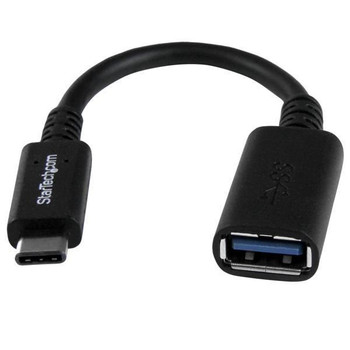
StarTech.com USB-C to USB-A Adapter Cable - M/F - 6in - USB 3.0 5Gbps - USB-IF C USB31CAADP
(No reviews yet)
Write a Review

- UPC:
- 0065030860789
- MPN:
- USB31CAADP
- Condition:
- New
- Availability:
- Available with FREE Delivery (usually delivered within 5-7 working days)

Description
Connect your USB Type-C laptop to a USB legacy peripheral device, with this durable adapter
Have you purchased a new device that only came equipped with a USB Type-C- or Thunderbolt- 3 port, such as a laptop or tablet? Do you need to connect to older USB 3.2 Gen 1 or 2.0 devices?
This USB-C- to USB-A adapter makes it easy to connect USB 3.2 Gen 1 and 2.0 devices to new USB-C devices. Simply plug the adapter into the USB Type-C port to turn it into a USB Type-A port, and you-re ready to connect your older devices. The adapter is compatible with USB 3.2 Gen 1 enabled computers, such as the Dell Latitude 11 5000 2-in-1, and more.
Provide superior connections with a USB-IF certified adapter
The adapter has undergone rigorous compliance testing and is certified by USB-IF (USB Implementers Forum) to meet all USB 3.2 Gen 1 specifications. This includes all environmental, electrical and mechanical standards, which ensures a reliable, high-quality connection for all of your USB-C devices.
The USB31CAADP is backed by StarTech.com-s 2-year warranty for guaranteed reliability.
Note : USB 3.2 Gen 1 is also known as USB 3.0 (5Gbps).
The StarTech.com Advantage
Specs
Features
USB version
Universal Serial Bus (USB) is an industry standard developed in the mid-1990s that defines the interface used for connection, communication and power supply between computers and electronic devices. Every new version - for example 1.1, 2.0, 3.0 - is much faster than the previous one.
USB 3.2 Gen 1 (3.1 Gen 1)
Connector 1
This is the first connector in the device.
USB C
Connector 2
This is the second connector in the device.
USB A
Connector gender
To distinguish parts on a cable interface, connectors are grouped under genders. Sockets or jacks are considered to be female whilst plugs are referred to as male.
Male/Female
Connector 1 gender
The gender of the first connector of the product. Each half of a pair of mating connectors is assigned the designation male or female, the part bearing one or which fits into another being called male.
Male
Connector 2 gender
The gender of the second connector of the product. Each half of a pair of mating connectors is assigned the designation male or female, the indented one or the one fitting around the other being called female.
Female
Connector 1 form factor
Straight
Connector 2 form factor
Straight
Connector contacts plating
What the connector contacts are covered with (layer on top).
Nickel
Cable jacket material
Polyvinyl chloride (PVC)
Cable shielding
The protective layer for the cable, typically made of plastic.
Aluminum mylar foil
Maximum data transfer rate
The maximum speed with which data can be transmitted from one device to another.
5000 Mbit/s
Maximum data transfer rate
5 Gbit/s
Product colour
The colour e.g. red, blue, green, black, white.
Black
Features
Plug and Play
Indicates whether this product supports is "plug and play". Plug and play is hardware or software that, after being installed ("plugged in"), can immediately be used ("played with"), as opposed to hardware or software which requires configuration.
Weight & dimensions
Cable length
How long the cable is.
0.15 m
Weight
Weight of the product without packaging (net weight). If possible, the net weight is given including standard accessories and supplies. Please note that sometimes the manufacturer leaves out the weight of accessories and/or supplies.
g
Packaging data
Package width
The distance from one side of the packaging to the other.
225 mm
Package depth
The distance from the front to the back of the packaging.
5 mm
Package height
The distance from the top to the bottom of the packaging.
mm
Package weight
Weight of the packaged product.
g
Packaging content
Quantity per pack
1 pc(s)
Certificates
Compliance certificates
RoHS
Certification
USB-IF
Logistics data
Harmonized System (HS) code
84733080
View AllClose
Have you purchased a new device that only came equipped with a USB Type-C- or Thunderbolt- 3 port, such as a laptop or tablet? Do you need to connect to older USB 3.2 Gen 1 or 2.0 devices?
This USB-C- to USB-A adapter makes it easy to connect USB 3.2 Gen 1 and 2.0 devices to new USB-C devices. Simply plug the adapter into the USB Type-C port to turn it into a USB Type-A port, and you-re ready to connect your older devices. The adapter is compatible with USB 3.2 Gen 1 enabled computers, such as the Dell Latitude 11 5000 2-in-1, and more.
Provide superior connections with a USB-IF certified adapter
The adapter has undergone rigorous compliance testing and is certified by USB-IF (USB Implementers Forum) to meet all USB 3.2 Gen 1 specifications. This includes all environmental, electrical and mechanical standards, which ensures a reliable, high-quality connection for all of your USB-C devices.
The USB31CAADP is backed by StarTech.com-s 2-year warranty for guaranteed reliability.
Note : USB 3.2 Gen 1 is also known as USB 3.0 (5Gbps).
The StarTech.com Advantage
Specs
Features
USB version
Universal Serial Bus (USB) is an industry standard developed in the mid-1990s that defines the interface used for connection, communication and power supply between computers and electronic devices. Every new version - for example 1.1, 2.0, 3.0 - is much faster than the previous one.
USB 3.2 Gen 1 (3.1 Gen 1)
Connector 1
This is the first connector in the device.
USB C
Connector 2
This is the second connector in the device.
USB A
Connector gender
To distinguish parts on a cable interface, connectors are grouped under genders. Sockets or jacks are considered to be female whilst plugs are referred to as male.
Male/Female
Connector 1 gender
The gender of the first connector of the product. Each half of a pair of mating connectors is assigned the designation male or female, the part bearing one or which fits into another being called male.
Male
Connector 2 gender
The gender of the second connector of the product. Each half of a pair of mating connectors is assigned the designation male or female, the indented one or the one fitting around the other being called female.
Female
Connector 1 form factor
Straight
Connector 2 form factor
Straight
Connector contacts plating
What the connector contacts are covered with (layer on top).
Nickel
Cable jacket material
Polyvinyl chloride (PVC)
Cable shielding
The protective layer for the cable, typically made of plastic.
Aluminum mylar foil
Maximum data transfer rate
The maximum speed with which data can be transmitted from one device to another.
5000 Mbit/s
Maximum data transfer rate
5 Gbit/s
Product colour
The colour e.g. red, blue, green, black, white.
Black
Features
Plug and Play
Indicates whether this product supports is "plug and play". Plug and play is hardware or software that, after being installed ("plugged in"), can immediately be used ("played with"), as opposed to hardware or software which requires configuration.
Weight & dimensions
Cable length
How long the cable is.
0.15 m
Weight
Weight of the product without packaging (net weight). If possible, the net weight is given including standard accessories and supplies. Please note that sometimes the manufacturer leaves out the weight of accessories and/or supplies.
g
Packaging data
Package width
The distance from one side of the packaging to the other.
225 mm
Package depth
The distance from the front to the back of the packaging.
5 mm
Package height
The distance from the top to the bottom of the packaging.
mm
Package weight
Weight of the packaged product.
g
Packaging content
Quantity per pack
1 pc(s)
Certificates
Compliance certificates
RoHS
Certification
USB-IF
Logistics data
Harmonized System (HS) code
84733080
Additional Information
Shipping: |
Usually shipped within 3-5 working days |
Delivery: |
Usually delivered within 5-7 working days |
Related Products
Related Products
Out of stock

Startech USB-C to USB-A Adapter Cable - M/F - 6in - USB 3.0 - USB-IF Certified U USB31CAADP
Startech
£14.77
Connect your USB Type-C laptop to a USB legacy peripheral device, with this durable adapterHave you purchased a new device that only came equipped with a USB Type-C� or Thunderbolt� 3 port, such as a...
StarTech.com USB31CAADP USB 3.1 USB-C TO USB-A ADAPTER USB31CAADP
Startech.Com
£23.94
USB 3.1 USB-C TO USB-A ADAPTER USB-C to USB-A Adapter Cable
Out of stock

StarTech.com 1m USB C To USB C Cable - USB 3.0 5gbps - USB Type C USB315CC1M
Startech
£17.40
Connect your USB Type-C devices
This USB 3.0 USB-C to USB-C cable lets you connect a USB 3.0, USB Type-C device, such as a hard drive or mobile device, to the USB-C port on your computer, or charger...

StarTech.com USB-C to USB-C Cable - M/M - 1 m 3 ft. - USB 3.0 5Gbps USB315CC1M
Startech
£18.09
Connect your USB Type-C devices This USB 3.0 USB-C to USB-C cable lets you connect a USB 3.0, USB Type-C device, such as a hard drive or mobile device, to the USB-C port on your computer, or...
Out of stock


Startech.Com Usb 3.0 Usb C To A Adapter M To F USB31CAADG
Startech.Com
£15.45
StarTech.com USB 3.0 USB C to A Adapter M to F Connect your USB Type-A device to a USB Type-C laptop, tablet or other device.This USB-C™ to USB-A adapter lets you connect standard USB 3.0 and USB 2...