
Belkin
Belkin 4-Port Single Head DP/HDMI to DP/HDMI Video Secure Desktop KVM Switch PP4 F1DN104KVM-UN-4
(No reviews yet)
Write a Review

- UPC:
- 0000000000000
- MPN:
- F1DN104KVM-UN-4
- Condition:
- New
- Availability:
- Available with FREE Delivery (usually delivered within 5-7 working days)

Description
Belkin Universal 2nd Gen Secure KVM Switch Series
Designed to deliver a streamlined user experience when working across security enclaves, Belkin's Universal 2nd Gen Secure KVM switches meet the latest in Common Criteria and NIAP Protection Profile for Peripheral Switching Devices version 4.0 requirements. Compatible with the optional Belkin KVM Remote Control with Integrated Keyboard, the Universal 2nd Gen Secure KVMs elevate the user experience while vastly improving enclave awareness and minimizing operator errors. The keyboard combined with a variety of mounting options from Belkin helps declutter the desk without jeopardizing operator control. Optical data diodes and embedded peripheral emulation allow operators to safely share peripherals across multiple security enclaves without exposing potential vectors for attack. Innovative video combo connectors combined with auto-sensing and internal converters make the Universal 2nd Gen SKVM Series compatible with modern and legacy systems, eliminating the need for external converters and their inherent cost and compatibility problems. Always on, active anti-tamper and some of the most advanced protections against ultrasonic audio attacks round out the Universal 2nd Gen SKVMs. US-Manufactured and TAA-compliant, these secure KVM series are ideal for use in IT environments that demand rigorous cybersecurity provisions-including government, military, and healthcare applications.
The Belkin Difference
- Certified for NIAP Protection Profile 4.0 to meet the highest security standards
- Universal video compatibility accommodates modern and legacy systems and monitors
- Configurable color coding on front panel maps to backlit KVM Remote Control with Integrated Keyboard for optimal user awareness
- Mounting options and Belkin KVM Remote Control with Integrated Keyboard declutter the desk for enhanced user efficiency
- US-based free technical support
Specs
Ports & interfaces
Number of computers controlled
The amount of computers controlled by this device.
4
Keyboard port type
The type of socket in the device for connecting a keyboard e.g. USB.
USB
Mouse port type
USB
Video port type
The type of socket in the device for connecting a video e.g. SCART.
HDMI/DisplayPort
HDMI ports quantity
The number of sockets (ports) for HDMI connections. HDMI (High-Definition Multimedia Interface) is a compact audio/video interface for transferring uncompressed video data and compressed/uncompressed digital audio data from a HDMI-compliant device ("the source device") to a compatible computer monitor, video projector, digital television, or digital audio device. HDMI is a digital replacement for existing analog video standards.
5
DisplayPorts quantity
Number of DisplayPorts. A DisplayPort is a digital display interface developed by the Video Electronics Standards Association (VESA). The interface is primarily used to connect a video source to a display device such as a computer monitor, though it can also be used to carry audio, USB, and other forms of data.
5
Console ports
DisplayPort, HDMI, USB A
Console USB ports quantity
2
USB 2.0 Type-A hub ports quantity
2
USB connector type
The type of USB connector/port that this product has.
USB Type-A, USB Type-B
Audio connections
Cables used to connect audio inputs or audio outputs to another device e.g, audio amplifier.
DC-in jack
The socket/plug where the DC electricity supply connects to the device.
Performance
HD type
Type of supported High Definition (e.g. Full HD, 4K Ultra HD).
4K Ultra HD
Maximum resolution
The maximum number of pixels that can be displayed in the image. It is usually quoted as width - height,: for example, "1024 - 768" means the width is 1024 pixels and the height is 768 pixels.
3840 x 2160 pixels
Design
Rack mounting
The type of mounting that can position devices in a shelving system (rack).
Product colour
The colour e.g. red, blue, green, black, white.
Black
LED indicators
Display
Built-in display
A display which is part of the product, so you do not need to attach another display.
Power
Input voltage
The voltage (V) which is required to power the product.
0 - 240 V
AC input frequency
50 - 60 Hz
Logistics data
Harmonized System (HS) code
85176200
View AllClose
Designed to deliver a streamlined user experience when working across security enclaves, Belkin's Universal 2nd Gen Secure KVM switches meet the latest in Common Criteria and NIAP Protection Profile for Peripheral Switching Devices version 4.0 requirements. Compatible with the optional Belkin KVM Remote Control with Integrated Keyboard, the Universal 2nd Gen Secure KVMs elevate the user experience while vastly improving enclave awareness and minimizing operator errors. The keyboard combined with a variety of mounting options from Belkin helps declutter the desk without jeopardizing operator control. Optical data diodes and embedded peripheral emulation allow operators to safely share peripherals across multiple security enclaves without exposing potential vectors for attack. Innovative video combo connectors combined with auto-sensing and internal converters make the Universal 2nd Gen SKVM Series compatible with modern and legacy systems, eliminating the need for external converters and their inherent cost and compatibility problems. Always on, active anti-tamper and some of the most advanced protections against ultrasonic audio attacks round out the Universal 2nd Gen SKVMs. US-Manufactured and TAA-compliant, these secure KVM series are ideal for use in IT environments that demand rigorous cybersecurity provisions-including government, military, and healthcare applications.
The Belkin Difference
- Certified for NIAP Protection Profile 4.0 to meet the highest security standards
- Universal video compatibility accommodates modern and legacy systems and monitors
- Configurable color coding on front panel maps to backlit KVM Remote Control with Integrated Keyboard for optimal user awareness
- Mounting options and Belkin KVM Remote Control with Integrated Keyboard declutter the desk for enhanced user efficiency
- US-based free technical support
Specs
Ports & interfaces
Number of computers controlled
The amount of computers controlled by this device.
4
Keyboard port type
The type of socket in the device for connecting a keyboard e.g. USB.
USB
Mouse port type
USB
Video port type
The type of socket in the device for connecting a video e.g. SCART.
HDMI/DisplayPort
HDMI ports quantity
The number of sockets (ports) for HDMI connections. HDMI (High-Definition Multimedia Interface) is a compact audio/video interface for transferring uncompressed video data and compressed/uncompressed digital audio data from a HDMI-compliant device ("the source device") to a compatible computer monitor, video projector, digital television, or digital audio device. HDMI is a digital replacement for existing analog video standards.
5
DisplayPorts quantity
Number of DisplayPorts. A DisplayPort is a digital display interface developed by the Video Electronics Standards Association (VESA). The interface is primarily used to connect a video source to a display device such as a computer monitor, though it can also be used to carry audio, USB, and other forms of data.
5
Console ports
DisplayPort, HDMI, USB A
Console USB ports quantity
2
USB 2.0 Type-A hub ports quantity
2
USB connector type
The type of USB connector/port that this product has.
USB Type-A, USB Type-B
Audio connections
Cables used to connect audio inputs or audio outputs to another device e.g, audio amplifier.
DC-in jack
The socket/plug where the DC electricity supply connects to the device.
Performance
HD type
Type of supported High Definition (e.g. Full HD, 4K Ultra HD).
4K Ultra HD
Maximum resolution
The maximum number of pixels that can be displayed in the image. It is usually quoted as width - height,: for example, "1024 - 768" means the width is 1024 pixels and the height is 768 pixels.
3840 x 2160 pixels
Design
Rack mounting
The type of mounting that can position devices in a shelving system (rack).
Product colour
The colour e.g. red, blue, green, black, white.
Black
LED indicators
Display
Built-in display
A display which is part of the product, so you do not need to attach another display.
Power
Input voltage
The voltage (V) which is required to power the product.
0 - 240 V
AC input frequency
50 - 60 Hz
Logistics data
Harmonized System (HS) code
85176200
Additional Information
Shipping: |
Usually shipped within 3-5 working days |
Delivery: |
Usually delivered within 5-7 working days |
Related Products
Related Products
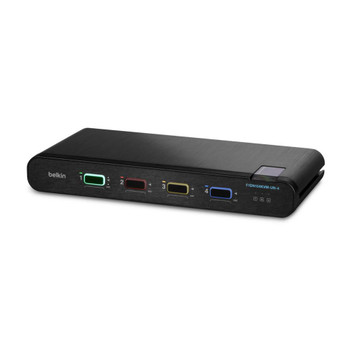

Belkin F1DN104KVM-UN-4 F1DN104KVM-UN-4 KVM switch F1DN104KVM-UN-4
Belkin
£1,393.71
Belkin Universal 2nd Gen Secure KVM Switch Series
Designed to deliver a streamlined user experience when working across security enclaves, Belkin's Universal 2nd Gen Secure KVM switches meet the...


StarTech.com SV431HDU3A2 HDMI KVM SWITCH - 4-PORT KVM SV431HDU3A2
Startech.Com
£527.33
This 4-Port USB 3.0 HDMI? KVM switch lets you control four HDMI computers with a single monitor, keyboard and mouse. The KVM also features 3.5 mm audio and a built-in 3-port USB 3.0 hub.
Convenient...
Out of stock
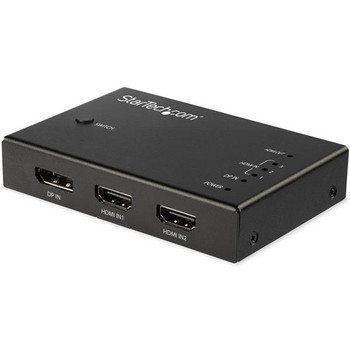
Startech.Com 4Pt Hdmi Video Switch 3X Hdmi And 1X Dp VS421HDDP
Startech.Com
£76.00
StarTech.com 4PT HDMI Video Switch 3x HDMI and 1x DP This 4-input HDMI video switch lets you share an HDMI 2.0 display or projector with three HDMI video sources and one DisplayPort video source...