
Startech
StarTech.com 2-Port Hybrid USB-C DisplayPort Cable KVM Switch 4K 60Hz Compact KV C2-D46-UAC-CBL-KVM
(No reviews yet)
Write a Review
- UPC:
- 0065030899338
- MPN:
- C2-D46-UAC-CBL-KVM
- Condition:
- New
- Availability:
- Available with FREE Delivery (usually delivered within 5-7 working days)

Description
Share a mouse, keyboard, and a 4K 60Hz DisplayPort display between a USB-A computer and a USB-C DP Alt-mode computer, using this KVM Switch with built-in cables
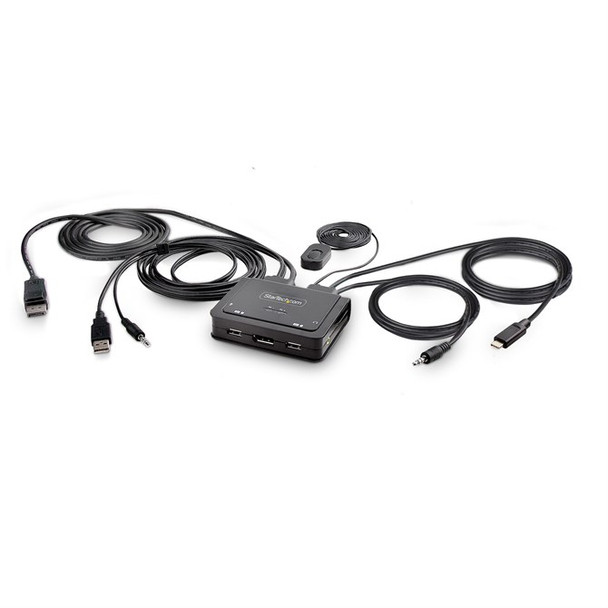
This Hybrid KVM Switch enables users to switch between a USB Type-A and DisplayPort-enabled desktop and a USB Type-C (DP Alt-Mode) enabled laptop, to share a keyboard, mouse, audio input/output devices, and a single 4K 60Hz DisplayPort monitor.
Hassle-Free Setup
The KVM switch is bus powered and features built-in DisplayPort, USB-A, USB-C, and 3.5mm Audio Input/Output cables. This ensures compatibility and performance between the KVM switch, monitors, and peripherals - without the need to select and purchase the cables required for those connections.
Compatibility
The 2-port KVM switch is compatible with all operating systems, including Windows, macOS, ChromeOS, and Linux. The KVM works with all hardware platforms including Intel, AMD, and Apple M1/M2. The USB-C host port works with USB-C, USB4, Thunderbolt 3, and Thunderbolt 4 laptops. If the desktop does not have a 4-position 3.5mm port the included 3.5mm Headset Adapter ensures compatibility out of the box.
Intuitive Control
The KVM switch offers two options to switch between hosts - a remote push button or hotkey commands, using the downloadable software. The remote push button includes a 1.5m cable for optimal placement in the setup. Independent audio switching can be achieved through the software, utilizing keyboard shortcuts (i.e., hotkeys), ensuring uninterrupted audio when switching between host devices.
Enhance Productivity and Device Management with the StarTech Connectivity Tools Application
Developed to improve performance and security, StarTech Connectivity Tools is the only software suite on the market that works with a wide range of IT connectivity accessories. The software suite includes:
- Advanced Windows Layout Utility: Setup and save custom windows layouts.
- MAC Address Pass-Through Utility: Improve network security.
- USB Event Monitoring Utility: Track and log connected USB devices.
- Wi-Fi Auto Switch Utility: Enable users to quickly access faster network speeds via wired LAN.
For more information and to download the StarTech Connectivity Tools application, please visit: startech /connectivity-tools
The StarTech Advantage
Specs
Ports & interfaces
Number of computers controlled
The amount of computers controlled by this device.
2
Keyboard port type
The type of socket in the device for connecting a keyboard e.g. USB.
USB
Mouse port type
USB
Video port type
The type of socket in the device for connecting a video e.g. SCART.
DisplayPort
DisplayPort version
1.2
Console ports
3.5mm headphone, 3.5mm mic, DisplayPort, USB A
Console USB ports quantity
2
Console DisplayPorts ports quantity
1
USB connector type
The type of USB connector/port that this product has.
USB Type-A, USB Type-C
Headphone outputs
Number of sockets /ports where headphones are connected.
1
Number of microphone inputs
1
Network
Ethernet LAN
An Ethernet LAN (Local Area Network) interface is present, for a wired conection via a cable.
Performance
Maximum resolution
The maximum number of pixels that can be displayed in the image. It is usually quoted as width - height,: for example, "1024 - 768" means the width is 1024 pixels and the height is 768 pixels.
5120 x 1440 pixels
Data transfer rate (max)
0.48 Gbit/s
Scan interval
, 20, 30, 40, 50, 60 s
Daisy chain
Chipset
Set of electronic components in an integrated circuit that manages the data flow between the processor, memory and peripherals. It is usually found in the motherboard of a computer. Chipsets are usually designed to work with a specific family of microprocessors. Because it controls communications between the processor and external devices, the chipset plays a crucial role in determining system performance.
SN8P2202SG
Audio channels
2.0
Number of displays supported
The number of displays that can be used with this product.
1
Design
Rack mounting
The type of mounting that can position devices in a shelving system (rack).
Product colour
The colour e.g. red, blue, green, black, white.
Black
Housing material
What the casing of the product is made of.
Acrylonitrile butadiene styrene (ABS)
Cable length
How long the cable is.
1.8 m
LED indicators
Push button
Hot keys
Mean time between failures (MTBF)
Statistical model used to indicate product/mechanism reliability; expressed in hours and percentage of duty cycle. This number (in hours) does not indicate the mean time before failure for a single unit/mechanism.
261196 h
Display
Built-in display
A display which is part of the product, so you do not need to attach another display.
Display
On Screen Display (OSD)
Power
Power source
What is providing power for the product e.g. mains electricity.
USB
Input voltage
The voltage (V) which is required to power the product.
5 V
System requirements
Windows operating systems supported
Windows vesions wich can be used with the device.
Windows 10, Windows 10 Education, Windows 10 Education x64, Windows 10 Enterprise, Windows 10 Enterprise x64, Windows 10 Home, Windows 10 Home x64, Windows 10 IOT Core, Windows 10 IoT Enterprise, Windows 10 Pro, Windows 10 Pro x64, Windows 10 x64, Windows 11, Windows 11 Enterprise, Windows 11 Enterprise x64, Windows 11 Home, Windows 11 Pro, Windows 11 x64, Windows 7, Windows 7 Enterprise, Windows 7 Enterprise x64, Windows 7 Home Basic, Windows 7 Home Basic x64, Windows 7 Home Premium, Windows 7 Home Premium x64, Windows 7 Professional, Windows 7 Professional x64, Windows 7 Starter, Windows 7 Starter x64, Windows 7 Ultimate, Windows 7 Ultimate x64, Windows 7 x64, Windows 8, Windows 8 Enterprise, Windows 8 Enterprise x64, Windows 8 Pro, Windows 8 Pro x64, Windows 8 x64, Windows 8.1, Windows 8.1 Enterprise, Windows 8.1 Enterprise x64, Windows 8.1 Pro, Windows 8.1 Pro x64, Windows 8.1 x64
Mac operating systems supported
Mac operating systems e.g. OS X can be used with the device.
Mac OS X 10.12 Sierra, Mac OS X 10.13 High Sierra, Mac OS X 10.14 Mojave, Mac OS X 10.15 Catalina, Mac OS X 10.15.3 Catalina, Mac OS X 11.0 Big Sur, Mac OS X 12.0 Monterey
Other operating systems supported
ChromeOS
Sustainability
Sustainability compliance
Compliance certificates
RoHS
Operational conditions
Operating temperature (T-T)
The minimum and maximum temperatures at which the product can be safely operated.
0 - 40 -C
Storage temperature (T-T)
The minimum and maximum temperatures at which the product can be safely stored.
-20 - 60 -C
Operating relative humidity (H-H)
0 - 90%
Weight & dimensions
Width
The measurement or extent of something from side to side.
80 mm
Depth
The distance from the front to the back of something.
95 mm
Height
The measurement of the product from head to foot or from base to top.
24 mm
Weight
Weight of the product without packaging (net weight). If possible, the net weight is given including standard accessories and supplies. Please note that sometimes the manufacturer leaves out the weight of accessories and/or supplies.
380 g
Packaging data
Package width
The distance from one side of the packaging to the other.
0 mm
Package depth
The distance from the front to the back of the packaging.
210 mm
Package height
The distance from the top to the bottom of the packaging.
60 mm
Package weight
Weight of the packaged product.
500 g
Packaging content
Quick installation guide
Other features
IP control
Logistics data
Master (outer) case width
345 mm
Master (outer) case length
440 mm
Master (outer) case height
345 mm
Products per master (outer) case
pc(s)
View AllClose
This Hybrid KVM Switch enables users to switch between a USB Type-A and DisplayPort-enabled desktop and a USB Type-C (DP Alt-Mode) enabled laptop, to share a keyboard, mouse, audio input/output devices, and a single 4K 60Hz DisplayPort monitor.
Hassle-Free Setup
The KVM switch is bus powered and features built-in DisplayPort, USB-A, USB-C, and 3.5mm Audio Input/Output cables. This ensures compatibility and performance between the KVM switch, monitors, and peripherals - without the need to select and purchase the cables required for those connections.
Compatibility
The 2-port KVM switch is compatible with all operating systems, including Windows, macOS, ChromeOS, and Linux. The KVM works with all hardware platforms including Intel, AMD, and Apple M1/M2. The USB-C host port works with USB-C, USB4, Thunderbolt 3, and Thunderbolt 4 laptops. If the desktop does not have a 4-position 3.5mm port the included 3.5mm Headset Adapter ensures compatibility out of the box.
Intuitive Control
The KVM switch offers two options to switch between hosts - a remote push button or hotkey commands, using the downloadable software. The remote push button includes a 1.5m cable for optimal placement in the setup. Independent audio switching can be achieved through the software, utilizing keyboard shortcuts (i.e., hotkeys), ensuring uninterrupted audio when switching between host devices.
Enhance Productivity and Device Management with the StarTech Connectivity Tools Application
Developed to improve performance and security, StarTech Connectivity Tools is the only software suite on the market that works with a wide range of IT connectivity accessories. The software suite includes:
- Advanced Windows Layout Utility: Setup and save custom windows layouts.
- MAC Address Pass-Through Utility: Improve network security.
- USB Event Monitoring Utility: Track and log connected USB devices.
- Wi-Fi Auto Switch Utility: Enable users to quickly access faster network speeds via wired LAN.
For more information and to download the StarTech Connectivity Tools application, please visit: startech /connectivity-tools
The StarTech Advantage
Specs
Ports & interfaces
Number of computers controlled
The amount of computers controlled by this device.
2
Keyboard port type
The type of socket in the device for connecting a keyboard e.g. USB.
USB
Mouse port type
USB
Video port type
The type of socket in the device for connecting a video e.g. SCART.
DisplayPort
DisplayPort version
1.2
Console ports
3.5mm headphone, 3.5mm mic, DisplayPort, USB A
Console USB ports quantity
2
Console DisplayPorts ports quantity
1
USB connector type
The type of USB connector/port that this product has.
USB Type-A, USB Type-C
Headphone outputs
Number of sockets /ports where headphones are connected.
1
Number of microphone inputs
1
Network
Ethernet LAN
An Ethernet LAN (Local Area Network) interface is present, for a wired conection via a cable.
Performance
Maximum resolution
The maximum number of pixels that can be displayed in the image. It is usually quoted as width - height,: for example, "1024 - 768" means the width is 1024 pixels and the height is 768 pixels.
5120 x 1440 pixels
Data transfer rate (max)
0.48 Gbit/s
Scan interval
, 20, 30, 40, 50, 60 s
Daisy chain
Chipset
Set of electronic components in an integrated circuit that manages the data flow between the processor, memory and peripherals. It is usually found in the motherboard of a computer. Chipsets are usually designed to work with a specific family of microprocessors. Because it controls communications between the processor and external devices, the chipset plays a crucial role in determining system performance.
SN8P2202SG
Audio channels
2.0
Number of displays supported
The number of displays that can be used with this product.
1
Design
Rack mounting
The type of mounting that can position devices in a shelving system (rack).
Product colour
The colour e.g. red, blue, green, black, white.
Black
Housing material
What the casing of the product is made of.
Acrylonitrile butadiene styrene (ABS)
Cable length
How long the cable is.
1.8 m
LED indicators
Push button
Hot keys
Mean time between failures (MTBF)
Statistical model used to indicate product/mechanism reliability; expressed in hours and percentage of duty cycle. This number (in hours) does not indicate the mean time before failure for a single unit/mechanism.
261196 h
Display
Built-in display
A display which is part of the product, so you do not need to attach another display.
Display
On Screen Display (OSD)
Power
Power source
What is providing power for the product e.g. mains electricity.
USB
Input voltage
The voltage (V) which is required to power the product.
5 V
System requirements
Windows operating systems supported
Windows vesions wich can be used with the device.
Windows 10, Windows 10 Education, Windows 10 Education x64, Windows 10 Enterprise, Windows 10 Enterprise x64, Windows 10 Home, Windows 10 Home x64, Windows 10 IOT Core, Windows 10 IoT Enterprise, Windows 10 Pro, Windows 10 Pro x64, Windows 10 x64, Windows 11, Windows 11 Enterprise, Windows 11 Enterprise x64, Windows 11 Home, Windows 11 Pro, Windows 11 x64, Windows 7, Windows 7 Enterprise, Windows 7 Enterprise x64, Windows 7 Home Basic, Windows 7 Home Basic x64, Windows 7 Home Premium, Windows 7 Home Premium x64, Windows 7 Professional, Windows 7 Professional x64, Windows 7 Starter, Windows 7 Starter x64, Windows 7 Ultimate, Windows 7 Ultimate x64, Windows 7 x64, Windows 8, Windows 8 Enterprise, Windows 8 Enterprise x64, Windows 8 Pro, Windows 8 Pro x64, Windows 8 x64, Windows 8.1, Windows 8.1 Enterprise, Windows 8.1 Enterprise x64, Windows 8.1 Pro, Windows 8.1 Pro x64, Windows 8.1 x64
Mac operating systems supported
Mac operating systems e.g. OS X can be used with the device.
Mac OS X 10.12 Sierra, Mac OS X 10.13 High Sierra, Mac OS X 10.14 Mojave, Mac OS X 10.15 Catalina, Mac OS X 10.15.3 Catalina, Mac OS X 11.0 Big Sur, Mac OS X 12.0 Monterey
Other operating systems supported
ChromeOS
Sustainability
Sustainability compliance
Compliance certificates
RoHS
Operational conditions
Operating temperature (T-T)
The minimum and maximum temperatures at which the product can be safely operated.
0 - 40 -C
Storage temperature (T-T)
The minimum and maximum temperatures at which the product can be safely stored.
-20 - 60 -C
Operating relative humidity (H-H)
0 - 90%
Weight & dimensions
Width
The measurement or extent of something from side to side.
80 mm
Depth
The distance from the front to the back of something.
95 mm
Height
The measurement of the product from head to foot or from base to top.
24 mm
Weight
Weight of the product without packaging (net weight). If possible, the net weight is given including standard accessories and supplies. Please note that sometimes the manufacturer leaves out the weight of accessories and/or supplies.
380 g
Packaging data
Package width
The distance from one side of the packaging to the other.
0 mm
Package depth
The distance from the front to the back of the packaging.
210 mm
Package height
The distance from the top to the bottom of the packaging.
60 mm
Package weight
Weight of the packaged product.
500 g
Packaging content
Quick installation guide
Other features
IP control
Logistics data
Master (outer) case width
345 mm
Master (outer) case length
440 mm
Master (outer) case height
345 mm
Products per master (outer) case
pc(s)
Additional Information
Shipping: |
Usually shipped within 3-5 working days |
Delivery: |
Usually delivered within 5-7 working days |
Related Products
Related Products
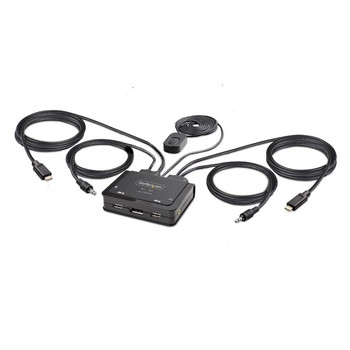
StarTech.com 2-Port USB-C Cable KVM Switch 4K 60Hz DisplayPort Output Compact KV C2-D46-UC2-CBL-KVM
Startech
£111.69
Share a mouse, keyboard, and 4K 60Hz DisplayPort display between two USB-C enabled laptops, using this KVM Switch with built-in cables This USB Type-C KVM Switch enables users to switch between...

StarTech.com C2-D46-UAC-CBL-KVM 2-Port Hybrid Usb-C C2-D46-UAC-CBL-KVM
Startech.Com
£82.34
Share a mouse, keyboard, and a 4K 60Hz DisplayPort display between a USB-A computer and a USB-C DP Alt-mode computer, using this KVM Switch with built-in cablesThis Hybrid KVM Switch enables users to...

StarTech.com 2-Port Hybrid USB-C HDMI Cable KVM Switch 4K 60Hz Compact KVM with C2-H46-UAC-CBL-KVM
Startech
£58.74
Share a mouse, keyboard, and a 4K 60Hz HDMI display between a USB-A computer and a USB-C DP Alt Mode computer using this KVM Switch with built-in cables This Hybrid KVM Switch enables users to...

StarTech.com C2-D46-UC2-CBL-KVM 2-Port Usb-C Cable Kvm C2-D46-UC2-CBL-KVM
Startech.Com
£156.15
Share a mouse, keyboard, and 4K 60Hz DisplayPort display between two USB-C enabled laptops, using this KVM Switch with built-in cablesThis USB Type-C KVM Switch enables users to switch between two...
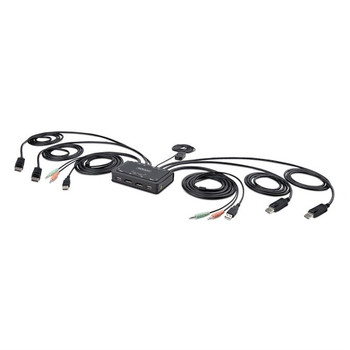
StarTech.com 2-Port Dual-Monitor DisplayPort Cable KVM Switch 4K 60Hz Compact KV C2-DD46-UA2-CBL-KVM
Startech
£193.49
Share a mouse, keyboard, and dual 4K 60Hz DisplayPort displays between two DisplayPort enabled computers, using this KVM Switch with built-in cables This Dual-Monitor KVM Switch enables users to...