
Tplink
TP-Link AX1500 Whole Home Mesh Wi-Fi 6 System DECOX101PK
(No reviews yet)
Write a Review

- UPC:
- 4895252503203
- MPN:
- DECOX101PK
- Condition:
- New
- Availability:
- Available with FREE Delivery (usually delivered within 5-7 working days)

Description
Superior Mesh WiFi,
Everywhere
AX1500 Whole Home Mesh Wi-Fi 6 System
Mesh Network Powered by Wi-Fi 6
Armed with WiFi 6 technology, Deco whole home mesh WiFi is designed to deliver a huge boost in coverage, speed, and total capacity. Get on the ultra-fast mesh WiFi to enjoy the future network that loads faster and connects more.
More Capacity for More Devices
Bi-directional MU-MIMO technology enables multiple devices to simultaneously receive data, so your WiFi network can handle more devices at once, reducing buffering and improving overall performance.
Make Latency A Thing of The Past
OFDMA technology allows for more efficient use of WiFi bandwidth, resulting in faster speeds, reduced latency, and improved network capacity.
Engineered for
More Devices
Deco products are aimed to dramatically improve capacity and efficiency in traffic-dense environments. No matter how many screens or devices are on at once, everyone is able to enjoy a more efficient network that loads faster without dragging down performance.
Cover Every Corner of Your Home
Deco X10 eliminates weak signal areas with clearer, stronger whole-home WiFi generated by BSS (Base Service Station) Coloring and Beamforming technologies as the WiFi dead zone killer. Thus, there will be no more searching around for a stable connection.
Want more coverage? Simply add another Deco. All TP-Link Deco can work together.
Intelligent Networking for a Smarter Home
Deco uses its custom algorithms to automate the connections on your network, ensuring the strongest possible signals at all times.
Seamless Roaming with One WiFi Name
TP-Link Mesh means Deco units work together to form one unified network. Your phone or tablet automatically connects to the fastest Deco as you move through your home, creating a truly seamless WiFi experience.
Whole Home Coverage
Eliminate weak signal areas throughout your house
Smart Roaming
Uninterrupted streaming when moving between rooms
One WiFi Name
No more switching WiFi network names
Unified Management
Control your home WiFi by managing the central node via the Deco App
Simple. Easy. Yet Powerful.
Setup and manage your network anytime and anywhere on the friendly TP-Link Deco app. In just three easy steps your entire home can be blanketed in strong and reliable WiFi.
Easy Management
Manage your WiFi at home or away on the Deco app. See every connected device, prioritize your own, and set up a guest network.
Voice Control
Use an Amazon Alexa or Google Assistant-enabled device to control Deco X10 with just your voice.
All Decos Work Together
Deco X10 is compatible with every other Deco model to form a Mesh network. Expand Mesh WiFi coverage anytime by adding more Decos.
Specs
Design
Product type
The sub-category of the product.
Mesh router
Product colour
The colour e.g. red, blue, green, black, white.
White
LED indicators
Yes
Antenna type
Type of antenna, also known an aerial, e.g. external, internal.
Internal
Maximum coverage
0 m²
Reset button
Wireless LAN features
Wi-Fi band
The frequency bands the product features.
Dual-band (2.4 GHz / 5 GHz)
Top Wi-Fi standard
Connection of this device is done via Wi-Fi in a high standard.
Wi-Fi 6 (802.11ax)
Wi-Fi standards
The type of wireless local area network (LAN). It can be ad-hoc, where units in a network communicate peer-to-peer, or Infrastructure, where units communicate with each other via an access point A LAN interconnects computers in a small area e.g. home, school or office.
802.11a, 802.11b, 802.11g, Wi-Fi 4 (802.11n), Wi-Fi 5 (802.11ac), Wi-Fi 6 (802.11ax)
WLAN data transfer rate (max)
00 Mbit/s
WLAN data transfer rate (first band)
300 Mbit/s
WLAN data transfer rate (second band)
01 Mbit/s
Networking standards
The way in which the network is working, e.g. IEEE 802.11a, IEEE 802.11b, IEEE 802.11g.
IEEE 802.11a, IEEE 802.11ac, IEEE 802.11ax, IEEE 802.11b, IEEE 802.11g, IEEE 802.11n
Security algorithms
Security algorithms are used to provide authentication, cipher key generation, integrity and radio link privacy to users on mobile networks. The security algorithms supported are the ones that can be used with this product.
WPA, WPA2, WPA3
Number of guest networks (5 GHz)
1
Number of guest networks (2.4 GHz)
1
Dynamic IP
Static IP
IGMP proxy
IGMP snooping
Tagged VLAN
Dynamic DNS (DDNS)
Guest access
Apps supported
TP-Link Deco
Features
Quality of Service (QoS) support
Port forwarding
BeamForming
DHCP client
Whether the product features a DHCP (Dynamic Host Configuration Protocol) to obtain IP addresses within a network.
DHCP server
A server is a system which that responds to requests across a computer network to provide, or help to provide, a network service. DCHP servers uses the DCHP (Dynamic Host Configuration Protocol), which is a standardized networking protocol used by servers on an IP network to allocate IP addresses to computers. The purpose of DHCP is to automate the IP address configuration of a computer without a network administrator. IP addresses are typically selected from a range of assigned IP addresses stored in a database on the server and issued to a computer which requests a new IP address. An IP address is assigned to a computer for a set interval, after which, the computer must renew the IP address or acquire a new one.
Universal Plug and Play (UPnP)
Parental control
Parental control features
Bedtime, Custom profiles, Family online time ranking, Family time, Off time, Pause the Internet, Professional content filter library, Time rewards
MU-MIMO technology
MIMO
Operating modes
Router Mode, Access Point Mode
Ports & interfaces
Ethernet LAN (RJ-45) ports
Number of Ethernet LAN (RJ-45) ports (connecting interfaces) in the device. Ethernet LAN (RJ-45) ports allow a computer to connect to the ethernet.
2
Operational conditions
Operating temperature (T-T)
The minimum and maximum temperatures at which the product can be safely operated.
0 - 40 °C
Storage temperature (T-T)
The minimum and maximum temperatures at which the product can be safely stored.
-40 - 60 °C
Operating relative humidity (H-H)
- 90%
Storage relative humidity (H-H)
5 - 90%
Weight & dimensions
Width
The measurement or extent of something from side to side.
0 mm
Depth
The distance from the front to the back of something.
0 mm
Height
The measurement of the product from head to foot or from base to top.
4 mm
Packaging content
AC adapter included
Number of units included
1 pc(s)
Ethernet cable
View AllClose
Everywhere
AX1500 Whole Home Mesh Wi-Fi 6 System
Mesh Network Powered by Wi-Fi 6
Armed with WiFi 6 technology, Deco whole home mesh WiFi is designed to deliver a huge boost in coverage, speed, and total capacity. Get on the ultra-fast mesh WiFi to enjoy the future network that loads faster and connects more.
More Capacity for More Devices
Bi-directional MU-MIMO technology enables multiple devices to simultaneously receive data, so your WiFi network can handle more devices at once, reducing buffering and improving overall performance.
Make Latency A Thing of The Past
OFDMA technology allows for more efficient use of WiFi bandwidth, resulting in faster speeds, reduced latency, and improved network capacity.
Engineered for
More Devices
Deco products are aimed to dramatically improve capacity and efficiency in traffic-dense environments. No matter how many screens or devices are on at once, everyone is able to enjoy a more efficient network that loads faster without dragging down performance.
Cover Every Corner of Your Home
Deco X10 eliminates weak signal areas with clearer, stronger whole-home WiFi generated by BSS (Base Service Station) Coloring and Beamforming technologies as the WiFi dead zone killer. Thus, there will be no more searching around for a stable connection.
Want more coverage? Simply add another Deco. All TP-Link Deco can work together.
Intelligent Networking for a Smarter Home
Deco uses its custom algorithms to automate the connections on your network, ensuring the strongest possible signals at all times.
Seamless Roaming with One WiFi Name
TP-Link Mesh means Deco units work together to form one unified network. Your phone or tablet automatically connects to the fastest Deco as you move through your home, creating a truly seamless WiFi experience.
Whole Home Coverage
Eliminate weak signal areas throughout your house
Smart Roaming
Uninterrupted streaming when moving between rooms
One WiFi Name
No more switching WiFi network names
Unified Management
Control your home WiFi by managing the central node via the Deco App
Simple. Easy. Yet Powerful.
Setup and manage your network anytime and anywhere on the friendly TP-Link Deco app. In just three easy steps your entire home can be blanketed in strong and reliable WiFi.
Easy Management
Manage your WiFi at home or away on the Deco app. See every connected device, prioritize your own, and set up a guest network.
Voice Control
Use an Amazon Alexa or Google Assistant-enabled device to control Deco X10 with just your voice.
All Decos Work Together
Deco X10 is compatible with every other Deco model to form a Mesh network. Expand Mesh WiFi coverage anytime by adding more Decos.
Specs
Design
Product type
The sub-category of the product.
Mesh router
Product colour
The colour e.g. red, blue, green, black, white.
White
LED indicators
Yes
Antenna type
Type of antenna, also known an aerial, e.g. external, internal.
Internal
Maximum coverage
0 m²
Reset button
Wireless LAN features
Wi-Fi band
The frequency bands the product features.
Dual-band (2.4 GHz / 5 GHz)
Top Wi-Fi standard
Connection of this device is done via Wi-Fi in a high standard.
Wi-Fi 6 (802.11ax)
Wi-Fi standards
The type of wireless local area network (LAN). It can be ad-hoc, where units in a network communicate peer-to-peer, or Infrastructure, where units communicate with each other via an access point A LAN interconnects computers in a small area e.g. home, school or office.
802.11a, 802.11b, 802.11g, Wi-Fi 4 (802.11n), Wi-Fi 5 (802.11ac), Wi-Fi 6 (802.11ax)
WLAN data transfer rate (max)
00 Mbit/s
WLAN data transfer rate (first band)
300 Mbit/s
WLAN data transfer rate (second band)
01 Mbit/s
Networking standards
The way in which the network is working, e.g. IEEE 802.11a, IEEE 802.11b, IEEE 802.11g.
IEEE 802.11a, IEEE 802.11ac, IEEE 802.11ax, IEEE 802.11b, IEEE 802.11g, IEEE 802.11n
Security algorithms
Security algorithms are used to provide authentication, cipher key generation, integrity and radio link privacy to users on mobile networks. The security algorithms supported are the ones that can be used with this product.
WPA, WPA2, WPA3
Number of guest networks (5 GHz)
1
Number of guest networks (2.4 GHz)
1
Dynamic IP
Static IP
IGMP proxy
IGMP snooping
Tagged VLAN
Dynamic DNS (DDNS)
Guest access
Apps supported
TP-Link Deco
Features
Quality of Service (QoS) support
Port forwarding
BeamForming
DHCP client
Whether the product features a DHCP (Dynamic Host Configuration Protocol) to obtain IP addresses within a network.
DHCP server
A server is a system which that responds to requests across a computer network to provide, or help to provide, a network service. DCHP servers uses the DCHP (Dynamic Host Configuration Protocol), which is a standardized networking protocol used by servers on an IP network to allocate IP addresses to computers. The purpose of DHCP is to automate the IP address configuration of a computer without a network administrator. IP addresses are typically selected from a range of assigned IP addresses stored in a database on the server and issued to a computer which requests a new IP address. An IP address is assigned to a computer for a set interval, after which, the computer must renew the IP address or acquire a new one.
Universal Plug and Play (UPnP)
Parental control
Parental control features
Bedtime, Custom profiles, Family online time ranking, Family time, Off time, Pause the Internet, Professional content filter library, Time rewards
MU-MIMO technology
MIMO
Operating modes
Router Mode, Access Point Mode
Ports & interfaces
Ethernet LAN (RJ-45) ports
Number of Ethernet LAN (RJ-45) ports (connecting interfaces) in the device. Ethernet LAN (RJ-45) ports allow a computer to connect to the ethernet.
2
Operational conditions
Operating temperature (T-T)
The minimum and maximum temperatures at which the product can be safely operated.
0 - 40 °C
Storage temperature (T-T)
The minimum and maximum temperatures at which the product can be safely stored.
-40 - 60 °C
Operating relative humidity (H-H)
- 90%
Storage relative humidity (H-H)
5 - 90%
Weight & dimensions
Width
The measurement or extent of something from side to side.
0 mm
Depth
The distance from the front to the back of something.
0 mm
Height
The measurement of the product from head to foot or from base to top.
4 mm
Packaging content
AC adapter included
Number of units included
1 pc(s)
Ethernet cable
Additional Information
Shipping: |
Usually shipped within 3-5 working days |
Delivery: |
Usually delivered within 5-7 working days |
Related Products
Related Products
Out of stock
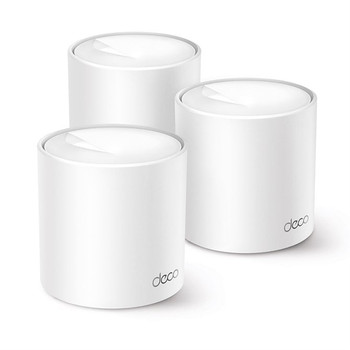
TP-Link AX1500 Whole Home Mesh Wi-Fi 6 System DECOX15003PK
Tplink
£153.51
Superior Mesh WiFi, Everywhere AX1500 Whole Home Mesh Wi-Fi 6 System Mesh Network Powered by Wi-Fi 6 Armed with WiFi 6 technology, Deco whole home mesh WiFi is designed to deliver a huge boost...
Out of stock

Tp-Link Ax1500 Whole Home Mesh Wi-Fi 6 System 3 Pack DECO X1500(3-PACK)
Tp-Link
£154.39
TP-Link AX1500 Whole Home Mesh Wi-Fi 6 System 3 Pack

TP-Link DECO X103-PACK Ax1500 Whole Home Mesh Wi-Fi DECO X10(3-PACK)
Tp-Link
£163.07
Ax1500 Whole Home Mesh Wi-Fi 6 System