
Tplink
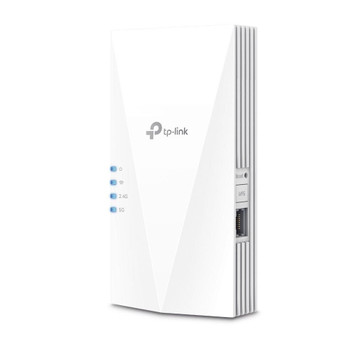
TP-Link AX1800 Gigabit Wi-Fi 6 Access Point TL-WA1801
(No reviews yet)
Write a Review

- UPC:
- 8885020620658
- MPN:
- TL-WA1801
- Condition:
- New
- Availability:
- Available with FREE Delivery (usually delivered within 5-7 working days)

Description
Advanced Wi-Fi for Better Performance
The Advanced Wi-Fi is Upon Us
Wi-Fi 6 (802.11ax) could turn out to be the most significant advancement in Wi-Fi development, delivering a huge boost in speed and total capacity. Mainstream adoption of Wi-Fi 6 is inching ever closer with more and more AX clients available. It's the right time to upgrade your router to the newest generation of Wi-Fi!
Lightning-Fast AX1800 Dual Band Wi-Fi
Upgrade your home or office network with the latest-generation of dual band 802.11ax access point, which offers combined speeds of up to 1800 Mbps and is perfectly suited to serve multiple devices at the same time. The 5GHz band is ideal for Ultra-HD streaming video and online gaming, while the 2.4GHz band is there for all of your everyday Internet needs, like sending email and browsing the Internet.
Boosted Wi-Fi Coverage
Four external antennas equipped with Beamforming technology concentrate Wi-Fi signals towards your devices to extend reliable Wi-Fi to every corner of your home or office—even over long distances.
WPA3—New Level of Cyber Security
The latest Wi-Fi security protocol, WPA3, brings new capabilities to improve cybersecurity in personal networks. More secure encryption in Wi-Fi password safety and enhanced protection against brute-force attacks combine to safeguard your home Wi-Fi.
Gigabit-Class Wired Performance
The gigabit Ethernet port makes full use of gigabit-class bandwidth provided by a local ISP to ensure reliable network connections. It also provides an ultra-fast connection for wired devices such as PCs, IPTVs, and game consoles, etc.
Deploy Anywhere with Just One Cable
Power over Ethernet (PoE) allows your Ethernet cable to carry electrical power and data simultaneously, making deployment effortless and flexible. An elegant appearance and simple mounting design make it easy to attach the Access Point to any wall or desktop, blending in perfectly with most interior decoration.
Captive Portal Marketing
Captive Portal provides a secure guest network and offers unique marketing opportunities, especially for small businesses like cafes or salons. Utilize a flexibly designed portal page—requiring customers to view an advertisement or accept a set of terms for internet access—to improve brand awareness or deliver marketing messages.
Multi-Mode 4 in 1
Multiple operation modes are supported to give you full flexibility to tailor the Access Point to fit your network's needs.
Access Point Mode (Default Mode)
Extends your existing wired network and makes it wireless, allowing you to connect all of your Wi-Fi devices.
Multi-SSID Mode
Simultaneously supports up to four separate SSIDs and VLANs on each band, making it ideal for offices where departments with different access policies share a wireless network.
Range Extender Mode
Extend your existing wireless coverage by repeating the wireless signal.
Client Mode
Acts as a “Wireless Adapter” to connect your wired devices to a wireless network.
Easy Setup and Management with the Tether APP
The free Tether app is available for both Android and iOS devices, making it easy to set up the TL-WA1801 and manage your network settings.
Specs
Features
2.4 GHz
5 GHz
6 GHz
Maximum data transfer rate
The maximum speed with which data can be transmitted from one device to another.
01 Mbit/s
Maximum data transfer rate (2.4 GHz)
574 Mbit/s
Maximum data transfer rate (5 GHz)
01 Mbit/s
Frequency band
A small section of the spectrum of radio communication frequencies, in which channels are usually used or set aside for the same purpose e.g.for a channel on FM radio; for mobile networks to communicate with mobile phones.
2.4 - 5 GHz
Networking standards
The way in which the network is working, e.g. IEEE 802.11a, IEEE 802.11b, IEEE 802.11g.
IEEE 802.11a, IEEE 802.11ac, IEEE 802.11ax, IEEE 802.11b, IEEE 802.11g, IEEE 802.11n
Wi-Fi Multimedia (WMM)/(WME)
Quality of Service (QoS) support
Security
Security algorithms
Security algorithms are used to provide authentication, cipher key generation, integrity and radio link privacy to users on mobile networks. The security algorithms supported are the ones that can be used with this product.
SNMP, WPA, WPA-Enterprise, WPA2, WPA2-Enterprise, WPA3
Service Set Identifier (SSID) features
Multiple SSIDs
Protocols
DHCP server
A server is a system which that responds to requests across a computer network to provide, or help to provide, a network service. DCHP servers uses the DCHP (Dynamic Host Configuration Protocol), which is a standardized networking protocol used by servers on an IP network to allocate IP addresses to computers. The purpose of DHCP is to automate the IP address configuration of a computer without a network administrator. IP addresses are typically selected from a range of assigned IP addresses stored in a database on the server and issued to a computer which requests a new IP address. An IP address is assigned to a computer for a set interval, after which, the computer must renew the IP address or acquire a new one.
DHCP client
Whether the product features a DHCP (Dynamic Host Configuration Protocol) to obtain IP addresses within a network.
Supported protocols
IPv4, IPv6
Ports & interfaces
Ethernet LAN (RJ-45) ports
Number of Ethernet LAN (RJ-45) ports (connecting interfaces) in the device. Ethernet LAN (RJ-45) ports allow a computer to connect to the ethernet.
1
DC-in jack
The socket/plug where the DC electricity supply connects to the device.
Power
Power over Ethernet (PoE)
The device supports Power over Ethernet (PoE), which is one of several standardized or ad-hoc systems which pass electrical power along with data on Ethernet cabling. This allows a single cable to provide both data connection and electrical power to devices such as wireless access points or IP cameras.
Power over Ethernet (PoE) type supported
Passive PoE
DC voltage range
48 V
Input current
0.375 A
Design
Placement
Where the product can be placed e.g. floor, wall.
Table
Product colour
The colour e.g. red, blue, green, black, white.
White
On/off switch
The button which is pressed to switch the device on or off.
Reset button
WPS push button
Antenna
Antenna type
Type of antenna, also known an aerial, e.g. external, internal.
External
Antennas quantity
4
Certificates
Compliance certificates
Federal Communications Commission (FCC), RoHS
Weight & dimensions
Width
The measurement or extent of something from side to side.
225 mm
Depth
The distance from the front to the back of something.
5.5 mm
Height
The measurement of the product from head to foot or from base to top.
37 mm
Packaging content
Quantity per pack
1 pc(s)
AC adapter included
PoE adapter included
Cables included
LAN (RJ-45)
Quick start guide
Instructions, either online, as a computer program or in paper form, to allow you to set up and start using the product quickly.
Operational conditions
Operating relative humidity (H-H)
- 90%
Operating temperature (T-T)
The minimum and maximum temperatures at which the product can be safely operated.
0 - 40 °C
Sustainability
Sustainability compliance
View AllClose
The Advanced Wi-Fi is Upon Us
Wi-Fi 6 (802.11ax) could turn out to be the most significant advancement in Wi-Fi development, delivering a huge boost in speed and total capacity. Mainstream adoption of Wi-Fi 6 is inching ever closer with more and more AX clients available. It's the right time to upgrade your router to the newest generation of Wi-Fi!
Lightning-Fast AX1800 Dual Band Wi-Fi
Upgrade your home or office network with the latest-generation of dual band 802.11ax access point, which offers combined speeds of up to 1800 Mbps and is perfectly suited to serve multiple devices at the same time. The 5GHz band is ideal for Ultra-HD streaming video and online gaming, while the 2.4GHz band is there for all of your everyday Internet needs, like sending email and browsing the Internet.
Boosted Wi-Fi Coverage
Four external antennas equipped with Beamforming technology concentrate Wi-Fi signals towards your devices to extend reliable Wi-Fi to every corner of your home or office—even over long distances.
WPA3—New Level of Cyber Security
The latest Wi-Fi security protocol, WPA3, brings new capabilities to improve cybersecurity in personal networks. More secure encryption in Wi-Fi password safety and enhanced protection against brute-force attacks combine to safeguard your home Wi-Fi.
Gigabit-Class Wired Performance
The gigabit Ethernet port makes full use of gigabit-class bandwidth provided by a local ISP to ensure reliable network connections. It also provides an ultra-fast connection for wired devices such as PCs, IPTVs, and game consoles, etc.
Deploy Anywhere with Just One Cable
Power over Ethernet (PoE) allows your Ethernet cable to carry electrical power and data simultaneously, making deployment effortless and flexible. An elegant appearance and simple mounting design make it easy to attach the Access Point to any wall or desktop, blending in perfectly with most interior decoration.
Captive Portal Marketing
Captive Portal provides a secure guest network and offers unique marketing opportunities, especially for small businesses like cafes or salons. Utilize a flexibly designed portal page—requiring customers to view an advertisement or accept a set of terms for internet access—to improve brand awareness or deliver marketing messages.
Multi-Mode 4 in 1
Multiple operation modes are supported to give you full flexibility to tailor the Access Point to fit your network's needs.
Access Point Mode (Default Mode)
Extends your existing wired network and makes it wireless, allowing you to connect all of your Wi-Fi devices.
Multi-SSID Mode
Simultaneously supports up to four separate SSIDs and VLANs on each band, making it ideal for offices where departments with different access policies share a wireless network.
Range Extender Mode
Extend your existing wireless coverage by repeating the wireless signal.
Client Mode
Acts as a “Wireless Adapter” to connect your wired devices to a wireless network.
Easy Setup and Management with the Tether APP
The free Tether app is available for both Android and iOS devices, making it easy to set up the TL-WA1801 and manage your network settings.
Specs
Features
2.4 GHz
5 GHz
6 GHz
Maximum data transfer rate
The maximum speed with which data can be transmitted from one device to another.
01 Mbit/s
Maximum data transfer rate (2.4 GHz)
574 Mbit/s
Maximum data transfer rate (5 GHz)
01 Mbit/s
Frequency band
A small section of the spectrum of radio communication frequencies, in which channels are usually used or set aside for the same purpose e.g.for a channel on FM radio; for mobile networks to communicate with mobile phones.
2.4 - 5 GHz
Networking standards
The way in which the network is working, e.g. IEEE 802.11a, IEEE 802.11b, IEEE 802.11g.
IEEE 802.11a, IEEE 802.11ac, IEEE 802.11ax, IEEE 802.11b, IEEE 802.11g, IEEE 802.11n
Wi-Fi Multimedia (WMM)/(WME)
Quality of Service (QoS) support
Security
Security algorithms
Security algorithms are used to provide authentication, cipher key generation, integrity and radio link privacy to users on mobile networks. The security algorithms supported are the ones that can be used with this product.
SNMP, WPA, WPA-Enterprise, WPA2, WPA2-Enterprise, WPA3
Service Set Identifier (SSID) features
Multiple SSIDs
Protocols
DHCP server
A server is a system which that responds to requests across a computer network to provide, or help to provide, a network service. DCHP servers uses the DCHP (Dynamic Host Configuration Protocol), which is a standardized networking protocol used by servers on an IP network to allocate IP addresses to computers. The purpose of DHCP is to automate the IP address configuration of a computer without a network administrator. IP addresses are typically selected from a range of assigned IP addresses stored in a database on the server and issued to a computer which requests a new IP address. An IP address is assigned to a computer for a set interval, after which, the computer must renew the IP address or acquire a new one.
DHCP client
Whether the product features a DHCP (Dynamic Host Configuration Protocol) to obtain IP addresses within a network.
Supported protocols
IPv4, IPv6
Ports & interfaces
Ethernet LAN (RJ-45) ports
Number of Ethernet LAN (RJ-45) ports (connecting interfaces) in the device. Ethernet LAN (RJ-45) ports allow a computer to connect to the ethernet.
1
DC-in jack
The socket/plug where the DC electricity supply connects to the device.
Power
Power over Ethernet (PoE)
The device supports Power over Ethernet (PoE), which is one of several standardized or ad-hoc systems which pass electrical power along with data on Ethernet cabling. This allows a single cable to provide both data connection and electrical power to devices such as wireless access points or IP cameras.
Power over Ethernet (PoE) type supported
Passive PoE
DC voltage range
48 V
Input current
0.375 A
Design
Placement
Where the product can be placed e.g. floor, wall.
Table
Product colour
The colour e.g. red, blue, green, black, white.
White
On/off switch
The button which is pressed to switch the device on or off.
Reset button
WPS push button
Antenna
Antenna type
Type of antenna, also known an aerial, e.g. external, internal.
External
Antennas quantity
4
Certificates
Compliance certificates
Federal Communications Commission (FCC), RoHS
Weight & dimensions
Width
The measurement or extent of something from side to side.
225 mm
Depth
The distance from the front to the back of something.
5.5 mm
Height
The measurement of the product from head to foot or from base to top.
37 mm
Packaging content
Quantity per pack
1 pc(s)
AC adapter included
PoE adapter included
Cables included
LAN (RJ-45)
Quick start guide
Instructions, either online, as a computer program or in paper form, to allow you to set up and start using the product quickly.
Operational conditions
Operating relative humidity (H-H)
- 90%
Operating temperature (T-T)
The minimum and maximum temperatures at which the product can be safely operated.
0 - 40 °C
Sustainability
Sustainability compliance
Additional Information
Shipping: |
Usually shipped within 3-5 working days |
Delivery: |
Usually delivered within 5-7 working days |
Related Products
Related Products

TP-Link RE600X Ax1800 Wi-Fi 6 Range Extender RE600X
Tp-Link
£108.76
Boosted WiFi Coverage for Ultimate Wireless Experience
AX1800 WiFi 6 Range Extender
Meet the next generation WiFi 6 with more capacity and data throughput
With WiFi 6, you will enjoy faster speeds,...